-
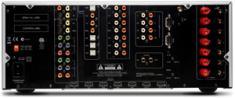 Arcam’s Stripped Down – More Affordable AVR500[teaser]Audiophiles will already be familiar with the Arcam AVR600’s impressive performance, but the $5,000 price tag may have been enough to drive people away. Arcam’s new AVR500 strips a few features and knocks $1,000 off the MSRP. [/teaser] Arcam assures that the build quality of the AVR is still very much the same as that of the AVR600, though a bit of its functionality has been taken out. Features often seen as extras, such as internet radio streaming and IP Control have been removed along with a network card. Compatibility with older hardware may also be diminished due to the lack of some legacy video and audio outputs. Of course, the Arcam AVR500 wasn’t lauded for amazing networking capabilities, and it didn’t get rave reviews for its ability to stream Pandora. It was known for one thing and one thing only – audio quality. Inside the shell of the Arcam AVR500 lies a seven channel amplifier rated to 100 Watts, able to decode all HD audio formats and including the popular Dolby Volume feature. Further details on the specs are yet to be revealed, but expectations are high. The AvR500 is expected to sell for 2,500 pounds in the UK. No ship date for the UK or US has yet been announced. Source: Home Cinema ChoicePosted Wed Sep 23, 2009 at 10:00 AM PDT by:
 -
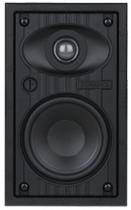 Sonance Introduces 30 New Visual Performance Loudspeakers[teaser]Looking to expand their market when it comes to in wall and in ceiling speakers, Sonance has announced plans to release thirty new models to their Visual Performance line. [/teaser] CEO of Sonance, Ari Supran, says the variety of products they offer may be the most important thing of all. “No other manufacturer offers as many options as we do for the architect, design community, custom installer or the consumer.” The new line of loudspeakers ranges from 4” to 8” models in a variety of prices, but common among them is a micro trim finish grille, featuring only a few millimeters of trim and attaching via magnets. In planning for the new speakers, Sonance turned to the people that deal with their speakers on a daily basis for inspiration. “We have spent the past 12 months listening to our custom integrators and partners within the design community,” said Jason Sloan, VP of sales at Sonance. “Feedback indicated the need to expand our Visual Performance Series with a wider variety of performance levels, shapes, and sizes to accommodate special applications. With these important introductions, our Visual Performance Series now contains over 70 unique SKUs, by far the broadest and deepest offering in the industry.” Source: Press ReleasePosted Wed Sep 23, 2009 at 07:00 AM PDT by:
 -
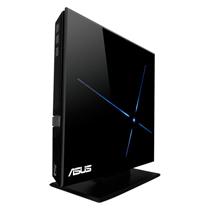 The ASUS USB Powered Blu-ray Player[teaser]A single wire connects the ASUS SBC-04D1S-U to the PC or laptop computer that powers it and displays its content, which has distinct advantages as well as disadvantages. [/teaser] Obviously, being able to connect a Blu-ray drive to a computer via a single USB cable without having to rely on an additional AC adapter is a boon. Anyone carrying around a laptop bag which already holds the laptop’s power brick and an external USB drive is aware what a difference a single power supply can make when it comes to packing that bag full safely. It does everything a BD drive should do. It reads CD, DVD, and Blu-ray formats, though it only writes CD and DVD. It reads Blu-ray discs at a maximum 4.8X speed and DVDs at 8X. The SBC-04D1S-U features a program which speeds up USB performance, and thankfully, an option to turn down the light on the front of the drive. The downside of course, is that while a USB connection is the only thing needed to run the drive, it’s the only connection offered at all. Having the option to run the drive from an adapter would have been a nice touch, especially for those using their laptops on battery power. The SBC-04D1S-U is expected to ship late this month with an MSRP of $199. Source: ASUSPosted Tue Sep 22, 2009 at 01:00 PM PDT by:
 -
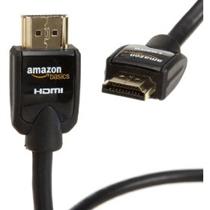 Amazon Jumps Into Cable Game With AmazonBasics[teaser]Looking to fill a much overlooked niche, Amazon is marketing its own line of inexpensive home theater cables. [/teaser] Priced to compete with online retail specialists like Monoprice, Amazon is hoping that the exposure their site grants and the Amazon brand name will bring in the sales. Prices are surprisingly good. For $8.35, you can get a 3 meter HDMI cable. Oddly enough, for an extra fifty nine cents, you can get their 2 meter HDMI cable. They offer high performance cables as well, which are priced like high performance cables, at around $40 for 3 meters. Everything from AmazonBasics qualifies for free shipping (for orders over $25) and ships in Amazon’s “Frustration-Free Packaging”. Forgoing slick looking but hate inducing clamshell packaging, Amazon simply pops the cable into a cardboard box and sends it on its way. AmazonBasics products will ship soon and are available for pre-order now for US based buyers. Source: Press ReleasePosted Tue Sep 22, 2009 at 07:00 AM PDT by:
 -
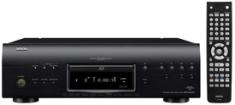 Denon Releases a New Universal Blu-ray Disc Player[teaser]Based on their flagship player, the Denon DBP-4010UDCI is a more affordable, but still impressive, Blu-ray player. [/teaser] Nearly half the price of the flagship DVD-A1UDCI, Denon’s DBP-4010UDCI is a very capable Blu-ray player. Denon’s player offers Bit Stream Bypass to HDMI for Dolby Digital+, TrueHD 7.1, dts-HR, and dts-Master Audio 7.1, making it fairly impressive in the audio department. From a video perspective, the 4010 features Anchor Bay VRS processing for HD signals and for upscaling to 1080p. The DENON LINK interface, and a new HDMI Clock Control help to eliminate jitters when using HDMI as the primary output for the system. In addition to AVCHD and DivxHD playback, the 4010 features an Ethernet port for BD-Live support among other things. The Internet connectivity can be made usable for 3rd party controllers as well as for firmware updates and web surfing, and an SD card slot ensures ease of use for additional content. The Denon DBP-4010UDCI will be available this October at an estimated retail price of $1,999. Source: Press ReleasePosted Mon Sep 21, 2009 at 10:00 AM PDT by:
 -
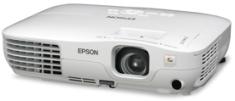 Epson Releases Low Budget HD Projector[teaser]Espon, fresh off of the release of several higher end projectors at CEDIA last week, has announced the release of their newest, most economically priceded, HD projector. [/teaser] With a price of only $749, consumers are going to be giving this Epson projector some serious thought over the holiday season. The Epson Home Cinema 705HD boasts 2,500 lumens of light output, meaning that a dedicated home theater room isn’t as necessary; this projector will function in a wide variety of lighting conditions. The 705 HD utilizes Epson’s three chip 3LCD technology and an energy efficient E-TORL lamp. Simple enough for the average consumer to set up, the Epson 705 HD does have one drawback: 720p resolution. While certainly better than standard definition, 720p stretched out over a large area is less than appealing to the discerning HD enthusiast. Epson’s Home Cinema 705HD will be available in October for an estimated price of $749. Source: Press ReleasePosted Mon Sep 21, 2009 at 06:00 AM PDT by:
 -
 Reminder: iNetVideo.com Special Giveaway![teaser]As a thank you to their High-Def Digest customers, iNet Video is awarding prizes - including $250 in gift certificates and 10 Blu-rays - to 15 winners![/teaser] This week we have an incredible giveaway sponsored by iNetVideo.com! Grand Prize- $100 gift certificate to iNetvideo.com 2nd & 3rd place $50 gift certificate to iNetvideo.com 4th & 5th place $25 gift certificate to iNetVideo.com 6th - 15th place Your choice of 1 of 3 Blu-Rays discs 3 Blu ray choices for free giveaway (10 prizes where winners get to choose 1 of 3 bluray titles) Get all the details and sign up here!Posted Fri Sep 18, 2009 at 01:00 PM PDT by:
 -
 28 HD Advisors LaterEditor's Note: Each Friday, High-Def Digest's own HD Advisor will answer a new round of questions from our readers. If you have home theater questions you need answered, send an email to [email protected]. If you've already sent a question and don't see it answered yet, please be patient as we work our way through them. To browse through previously answered questions, visit the main HD Advisor page. Answers by Joshua Zyber HD Audio Decoding Q: I use a PS3 for my Blu-ray needs. This player has what some believe to be a handicap in not being able to bitstream the HD audio codecs to a receiver. Is there a difference in decoding capabilities and/or quality in different components? Will my PS3 decode the DTS-HD Master Audio signal as well as my Onkyo 709 receiver? Would I get better sound from the same media with a standalone player that bitstreams to the receiver, and lets the receiver do the decoding? A: This is still an area of anxiety for many Blu-ray (and specifically PS3) owners, mainly because allowing the disc player to decode the audio internally prevents a Dolby TrueHD or DTS-HD MA logo from lighting up on their receiver's front panel. The Dolby and DTS compression codecs must go through three stages before sound comes out from the speakers. First, the codec must be decoded to PCM format. Then that PCM must be converted to analog. Finally, the analog signal is amplified out to the speakers. The second step (D-to-A conversion) will have by far the biggest impact on overall sound quality. The quality of DAC components is one of the biggest distinguishing features between entry-level and high-end hardware. When using a PS3 connected by HDMI, your D-to-A conversion still takes place in your receiver, not the player. So you're still relying on the receiver to the heavy lifting. All the PS3 does is the decoding. At least in theory, the decoding stage is a pretty straightforward process. If we think of the lossless Dolby TrueHD and DTS-HD Master Audio formats as being like ZIP compression files, then decoding the formats is like unzipping those files. If everything is working properly, you'll get a 100% perfect copy of the original source. If something isn't working properly, the file will be corrupted. Generally, this means that the movie soundtrack will be unplayable or horribly distorted, and you'll know it right away. As such, it really shouldn't really matter whether you do your format decoding in the disc player or in the receiver. Assuming that the hardware is working correctly, one component won't decode better than another. Either they work or they don't. However, the transmission process of sending the signal from the player to the receiver may be an area of concern. If you decode the format to PCM at the disc player, the transmission of PCM from one device to another could be susceptible to jitter. On the other hand, the undecoded compression formats have clocking mechanisms that make jitter much less likely when transmitted in bitstream form. There is much debate in audio circles about whether human ears can really hear the effects of jitter. Of course, members the audiophile crowd insist that their golden ears can discern even the most microscopic timing variations between the arrival of one bit and the next. Scientific double-blind testing usually reveals otherwise, unless the jitter is particularly egregious. But that's probably an argument for another day. The long and short of it is that, barring extraordinary circumstances, decoding the audio inside a disc player should be just as good as doing it in the receiver. But if seeing a Dolby or DTS logo on your receiver's front panel makes you feel reassured that everything is working properly, by all means seek out a player that can send the native bitstreams. I'll be honest, I set my standalone player to bitstream its audio, even though it has the necessary internal decoders. I like seeing those TrueHD and Master Audio indicators on my receiver's front panel. However, if my only Blu-ray player were a PS3, I doubt that I would go out of my way to purchase another player just for that feature. TV Calibration Q: My HDTV has about 6 or 7 different settings to fiddle with: contrast, color temp, etc. Can you give me a rundown on what numbers settings should be for the best picture? I have the Philips Ambilight 42". A: Unfortunately, it's not as simple as one person telling you what numbers to use. TV calibration settings will vary from set-to-set depending on the brand and model, manufacturing tolerances from one unit to another, and the conditions of your viewing environment. Even if you search online and find someone with your same model, any settings they recommend should really just be used as a starting point. Certain tips, such as which processing functions to turn on or off to make the picture better or worse, may be universal. But the specific numbers for where to set your Brightness, Contrast, Color, etc. will be specific to your TV and room. Ideally, you should hire a professional calibrator to fine-tune your set for its best performance using color analyzers and other professional equipment for precision measurement. If that's out of your budget, at the very least you should purchase a calibration disc like 'Digital Video Essentials' and follow its instructions for adjusting your TV's user-accessible controls. Service Menu Adjustments Q: I just purchased my final component to my home theater, a Panasonic TC-P46G10. I'm quite sure I'll be satisfied with it. According to all the reviews, it performs very well and has many great features, of which they all say that THX mode is the best. However, one review of the panel says that, "a calibration that accessed the service menu could increase light output in THX mode, but we don't perform such calibrations as part of our TV reviews." Is finding how to access the service menu and then changing the correct settings worth pursuing? Will it void any of my warranty? A: Your TV's service menu is intended to be accessed only by qualified professional calibrators and technicians. That's why it's hidden from public view, and can only be entered through a secret combination of buttons on the remote and/or front panel. Although there are many sources online that may provide the service menu access instructions for your set, entering this menu yourself will void your warranty. As a general rule, I don't recommend going into the service menu unless you know what you're doing. There are many settings in there that, if changed incorrectly, can seriously distort or even disable entirely your video image. Most of them will not be labeled with clear descriptions of what they are or how to adjust them. You don't want to accidentally change a setting without knowing how to change it back (or even what to change it back to). With that said, I know that there are many hobbyists who will do this anyway, some for curiosity and some who are genuinely knowledgeable enough to make service menu adjustments on their own. Frankly, I've done it myself on some TVs I've owned. For anyone brave (or foolish) enough to do this, I strongly recommend carefully reading the instructions for how to change the settings in your set's service menu. What happens when you press which keys on your remote? Is it the Volume key, the Channel key, or something else that advances a particular setting? Learn all this in advance so that you don't mistakenly hit a button without knowing what it will do. Also, when entering the service menu, the absolute first thing you must do is write down the TV's default settings for each and every option in the menu, no matter how many there are or how long it takes to do. If you change something (either intentionally or by accident) and it makes your picture worse, you will need to know what it should be reset back to. Really, it's probably best if you just stay out of there and leave those adjustments to professional technicians. Homework Assignment: You Be the Advisor Some questions that the HD Advisor receives are best answered with a consensus of opinions from our readers. If you can help to answer the following question, please post your response in our forum thread linked at the end of this article. Your advice and opinions matter too! Subwoofer Placement Q: My HT room is 4x6 meters. I'm currently using 2 subwoofers, both front firing -- a 10" sub at the front and a 12" sub at the back. Currently, the front sub is at the left side corner facing the room while the back sub is at the center of the back wall facing the left side wall. Is this the right placement? Check back soon for another round of answers. Keep those questions coming. Joshua Zyber's opinions are his own and do not necessarily reflect those of this site, its owners or employees.Posted Fri Sep 18, 2009 at 12:00 PM PDT by:
 -
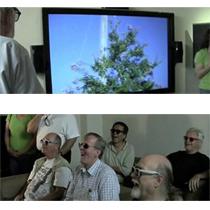 LASER TV!!! California Startup Creates 100” 3D HDTV Based On... LASERS![teaser]Though they’re a company you’ve probably never heard of, HDI out of Los Gatos, may quickly become a household name thanks to their 3D Laser TV. [/teaser] It sounds like something made up by a bragging kid, “Oh yeah, well, my TV is in 3D… and it’s got lasers!”, but HDI is putting kid like smiles on the faces of adults viewing their new technology. Using relatively inexpensive and cool lasers, HDI is able to bring a picture to the screen that’s apparently unlike anything seen before. Chief Technical Officer Edmund Sandburg attributes the picture’s smoothness to an ultra fast refresh rate, a reported 1080Hz to go along with the 1080p resolution. “This device is unique in the fact that it's extremely fast,” he says. “It will do over a thousand frames a second. That allows you to integrate all the color and everything into one device.” No plans to mass market the television have yet been announced, and pricing and availability could only be considered speculative at the moment. One thing that is certain is how much we’re looking forward to seeing this for ourselves. Lasers kinda make us giggle. Source: KGO-TV San FranciscoPosted Fri Sep 18, 2009 at 11:05 AM PDT by:
 -
 Sharp’s New LCD Technology Increases Quality, Lowers Energy Costs[teaser]Sharp has announced a new technology that will not only increase picture quality, but lower power consumption as well. [/teaser] The new technology, called UV2A, uses ultraviolet radiation to precisely control the movement of the LCD’s liquid crystal molecules. Measuring only a few nanometers in diameter, Sharp’s control over these molecules means a better picture for the consumer. This technology makes backlight blocking much more efficient, allowing incredibly deep blacks, and an estimated 5:000:1 native contrast ratio. UV2A also enables high aperture ratios which means less energy use and a more efficient display all around. Sharp also touts a fast response time which they call ideal for 3D TVs of the future as well. They see this as not only a perfect set up for 3D HDTVs, but 2K4K displays as well. Source: SharpPosted Fri Sep 18, 2009 at 06:00 AM PDT by: