-
 HD Advisor 61*Editor's Note: Each Friday, High-Def Digest's own HD Advisor will answer a new round of questions from our readers. If you have home theater questions you need answered, send an email to [email protected]. If you've already sent a question and don't see it answered yet, please be patient as we work our way through them. To browse through previously answered questions, visit the main HD Advisor page. Answers by Joshua Zyber 24 fps Playback Problems Q: When I watch films on Blu-ray through my Playstation 3 (connected to a Samsung LE40BDX) and set the output to 24p, I get a flicker/banding going up the screen, which is particularly noticeable in dark scenes or during the credits. It has become so annoying that I now watch films at 60 Hz. (I live in the UK.) The problem then disappears. Is there anything that I can do to eliminate this and be able to watch films as they were intended, or is it just a function of the low refresh rate? I know that my TV is 24p compatible and I cannot afford to replace it with a 120 Hz model (or any other one with a high refresh rate that is an even multiple of 24 Hz). My other friends have the same problem with their PS3s so I know that it isn't a faulty console. A: Although 24 fps sounds like a low refresh rate, very few (possibly no) digital HDTVs actually display content that slowly on screen. Models with a so-called "24p" mode will instead convert the 24 frames to a higher even multiple such as 48 Hz, 72 Hz, 96 Hz, etc. These days, 120 Hz and 240 Hz are very popular. However, those really high refresh rates are primarily designed to combat LCD motion lag. That's a different issue than the flicker you describe. You shouldn't need 120 Hz to avoid flicker. Realistically, any refresh rate 60 Hz or higher should be free of flicker. (48 Hz is perhaps on the low end of tolerance for some sensitive viewers.) I tried Googling the model number you provided, but couldn't find a lot of information on it. I think it's possible that the particular model designation may be retailer-specific. I did find references to similar Samsung models, however. This review of the Samsung LE 40B579 cites its "accurate 24p reproduction." Likewise, this review of the LD 40B650 claims that it, "handled 1080p/24 video signal from the Sony PS3 smoothly without any hint of telecine judder." That latter review also states that the set has several "100Hz Motion Plus" modes that apply frame interpolation. (That's a topic that I've discussed previously.) If your set has these options in its menus, you might try adjusting the settings or turning off the feature, if you can. The way that you describe the artifact as "banding going up the screen" makes me wonder if you're experiencing an electrical ground loop. A ground loop would cause an artifact known as "hum bars" that appear as vertical bands (of a different brightness than the rest of the picture) that scroll up the screen. If you have cable TV connected to your set, try disconnecting it and then watching a Blu-ray. If the banding goes away, what you need is a small doodad called a Ground Loop Isolator. Check your local electronics stores. This should not be very expensive. Why a ground loop would only manifest during 24 fps playback and not 60 Hz, I don't know. But stranger things have happened. It's worth a try. "Pure Direct" Audio Mode Q: My Denon 4310ci receiver has a Pure Direct mode. In a nutshell, what does this mode do and are there real world benefits to using it during Blu-ray playback (PS3, original), mp3/aac streaming (via iTunes & Apple's Air Tunes), and for playing records (Musichall MMF 2.2)? Also, I read that Pure Direct disables bass management and such. Can you explain this in greater detail? It mentions stuff like "double bass" and "LFE+MAIN" which is confusing. Is double bass good? Is it a benefit to have LFE+MAIN enabled? A: You actually have a couple of different questions mixed together here. We'll take them one at a time. "Pure Direct" is Denon's designation for an audio mode that disables all video output and extraneous digital processing. The idea is to provide the purest representation of the original audio signal with as little mucking around as possible. Theoretically, even something as simple as having video circuitry active could "pollute" the audio signal. (Realistically, the likelihood of this making an audible difference is next to nil; but it's something that makes audiophiles feel better about themselves.) Because Pure Direct turns off video output, you certainly wouldn't want to use it when watching a Blu-ray movie. You won't get a picture on screen. This is specifically a music-listening mode. You are correct that Pure Direct also disables bass management. If you have a typical home theater system with 5-7 limited range main speakers and a subwoofer, you're best off telling your receiver that you have "Small" speakers and setting an appropriate subwoofer crossover. Pure Direct bypasses that, and will send all bass to your main speakers, which may not be able to handle it or reproduce it accurately. I do not recommend using Pure Direct mode unless you have genuine full-range speakers. Long story short: Pure Direct is intended primarily for audiophile applications. If you spent less on your speakers than you did on your car, and haven't seriously contemplated building an anechoic chamber in your home just for music listening, it probably doesn't apply to you. As for the "LFE+Main" setting, that's a mode that will route bass in an audio signal to both your subwoofer and your main speakers simultaneously. This would be the "double bass" you mention. This is generally not recommended. First, your main speakers may not be able to reproduce the low bass frequencies, which could lead to distortion. Also, this may have the unintended consequence of causing the bass waves from two different directions to cancel each other out, resulting is less audible bass in your room. Again, you're better off telling the receiver that you have Small speakers and setting the crossover so that your subwoofer can do the heavy lifting when it comes to bass, which is what it's best at. Correction: A couple of readers have pointed out that my response to the "LFE+Main" issue is precisely backwards. Rather than determining which bass and how much is directed to the main speakers, that setting determines which bass is routed to the subwoofer. "LFE" will route only bass information specifically encoded in the soundtrack's .1 channel to the subwoofer. "LFE+Main" will filter bass meant for the main channels and direct it to the subwoofer instead. So, if you have "Small" main speakers, you should use the LFE+Main setting. The name for this and the instructions in the Denon user manual are both confusingly worded. After receiving these reader emails, I went into my own Denon receiver's setup menu and confirmed that I actually had it set for LFE+Main the whole time. Apparently, I knew the correct answer to this question at one point in the past, but had forgotten it over time. I set up my receiver when I installed it a couple years ago, but hadn't touched anything in the Setup menu or thought about it at all since. Thank you to Clarke and Elvis for bringing this to my attention. I apologize for any confusion this may have caused. Homework Assignment: You Be the Advisor The HD Advisor knows many things, but he doesn't know everything. Some questions are best answered with a consensus of opinions from our readers. If you can help to answer the following question, please post your response in our forum thread linked at the end of this article. Your advice and opinions matter too! Connecting a Digital Camera to an HDTV Q: I have a Canon digital camera #SD790IS and a Mitsubishi HDTV #WD73734. With the camera, I received a mini USB/composite A/V cable. The camera only has a mini USB connection. When viewing pictures and videos on the HDTV, the best resolution I can get is 480i. Can I get better resolution if I use a USB card reader or a mini USB/USB cable? Will I be able to view videos with sound with either of these? Is there a cable or converter that goes from mini USB to component or HDMI or is 480i the best I am going to get? Check back soon for another round of answers. Keep those questions coming. Joshua Zyber's opinions are his own and do not necessarily reflect those of this site, its owners or employees.Posted Fri Jun 4, 2010 at 11:00 AM PDT by:
 -
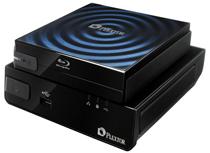 Plextor's Networked Media Player Lets You Enjoy Blu-ray With a Portable BD-ROM Drive[teaser]It's an external drive solution that handles Blu-ray playback, but functions as a drive for your computer too. [/teaser] Sure, there are plenty of valid reasons, but it just seems silly that a computer BD-ROM drive can't also function as a Blu-ray player. Plextor's can though, at least when it's combined with the PlexMedia. The PlexMedia seems like a fairy capable networked media player. On its own, it doesn't hold a lot of surprises. It streams video and audio from your computer and displays them on your TV. We've seen this before. And the PX-B120U external Blu-ray drive is pretty dull on its own too. It's a Blu-ray drive that connects to your computer via USB. Ho-hum. But together they make up a pretty slick solution that just might be worthy of replacing your HTPC. Price is still a mystery for the combo, but you can expect to hear something soon. Source: Benchmark ReviewsPosted Fri Jun 4, 2010 at 10:00 AM PDT by:
 -
 Toshiba's Debuts Two New Blu-ray Players[teaser]The BDX2500 and BDX2700 won't blow your mind, but they've got some nice features for entry level players. [/teaser] It used to be the case that high end electronics raised the bar for everyone else, but times have changed, and the low end seems to be driving the features. Toshiba's new players are among those entry level players with a very cool feature set. They can both handle 1080p/24, which seems to have become standard for all players. They do all the BD-Live and Bonus View content, in addition to DVD upscaling, and they can play back some basic digital formats. The BDX2500 and BDX2700 can both handle Dolby True HD and DTS-HD Master Audio, and you can send that audio out through HDMI or through 7.1 channel analog outputs. And of course, you can stream video from any of the usual sources, like Netflix and Blockbuster on Demand. With the $179 BDX2500 you'll have to plug in. The $249 BDX2700 lets you hook in with WiFi. Source eCousticsPosted Fri Jun 4, 2010 at 07:30 AM PDT by:
 -
 Panasonic Intros Its First Soundbars[teaser]They've got HDMI 1.4 outputs, can pass 3D right through, and the HTB500 even sports a wireless sub. [/teaser] The first ever soundbars from Panasonic, who prefer the term "surroundbar," are about what you'd expect. They're nice and slim and fit nicely in front of a TV. They're geared towards folks who aren't looking for a full surround system, and they're simple to set up. You'll get clear dialogue with the SC-HTB10 and SC-HTB500 thanks to a bamboo cone speaker design and a Clear-Mode Dialogue feature which acts as a virtual center channel. The HTB10 measures 31.5 inches wide and is designed for use with televisions measuring up to 42 inches. The HTB500 is built for bigger sets, and unlike the 10, it comes with a wireless subwoofer to fully flush out the sound. You'll be able to get the HTB10 this month for a retail price of $199, while the $349 SC-HTB500 won't be available until August. Source: eCousticsPosted Thu Jun 3, 2010 at 11:00 AM PDT by:
 -
 Sharp's New 3D Sets Allow 3D and 2D Viewers to Watch at the Same Time[teaser]But either way, you'll need to wear the glasses. [/teaser] Sharp is launching four new 3D capable televisions in Japan, and they're equipped with a feature that sounds really exciting, until you find out more about it anyway. There's no more need to argue about whether to watch a movie in 3D or not, the new AQUOS Quattron sets leave it up to the individual. If you want to watch in 3D, you're welcome to. If you want 2D, it's up to you. The downside is that either way, you'll need to wear the glasses. If your buddy is watching in 3D and you want to watch in 2D, you'll still have to pop on the glasses and toggle the switch that converts the 3D into 2D. Source: SharpPosted Thu Jun 3, 2010 at 09:00 AM PDT by:
 -
 Hulu Could Be Coming to the Xbox 360[teaser]A paid subscription may be involved for the streaming television service.[/teaser] For a lot of people, the game console is the center of the entertainment universe. And it's not difficult to see why. The PS3 and Xbox 360 both stream movies from Netflix, have their own 'on demand' services, and play optical discs of one sort or another. Television, especially current television, is something that's been missing from the lineup. And that's something Microsoft is aiming to fix by adding Hulu to the lineup. It's just a rumor, of course, but according to the folks as Gear Live, it comes from a reliable source. Cost is the big question; whether shows free on Hulu will be free on the Xbox. If the rumor is true, you can expect Hulu to show up as part of the Xbox Live fall update, right around the same time that Hulu is going to announce its own subscription plans. The other question of course, is licensing. According to 1UP, it's not a question of whether Hulu for Xbox exists, but whether or not Microsoft can iron out the content rights issues that accompany such a venture. "If does pop up in Microsoft's E3 press conference," writes Kris Pigna, "it'll only be because Microsoft was able to work out the licensing issues behind the scenes." Sources: Gear Live, 1UPPosted Thu Jun 3, 2010 at 07:00 AM PDT by:
 -
 Sony Creates an OLED That Can Be Wrapped Around a Pencil[teaser]Oh, and it's thinner than a strand of hair. Seriously. [/teaser] Now this is where OLEDs start to get exciting. The idea of having a nice TV set with great colors and dark blacks is cool, but plasma seems to have that handled pretty well these days. Sony's new OLED does something plasmas definitely can't – it wraps around a pencil. The new OLED is paper thin in the literal sense. It's got a depth of 80 micrometers, or .08 millimeters. The prototype that Sony is showing off measures 4.1 inches wide, has a 432 x 240 resolution and sports a 1,000:1 contrast ratio. It can be rolled around a pencil and even stretched while still returning to its original shape and displaying video. This is all in still in the developmental stage of course, but you can bet that Sony's going to be working hard on getting costs down and figuring out just how to market a flexible OLED. Source: Akihabara NewsPosted Wed Jun 2, 2010 at 10:00 AM PDT by:
 -
 Wii2HDMI Creates an HDMI Output for your Wii[teaser]But don't go getting all excited about high definition video, it's just an output. [/teaser] The Wii is an infinitely annoying system to have hooked up to a slick home theater. It's a current generation gaming console, but it doesn't sport HD video, and some of the games aren't even widescreen. The Wii2HDMI doesn't fix any of that, but it does allow for a simpler, cleaner way to hook up your Wii. No surprises here. The Wii2HDMI pops into the back of your Wii and allows you to attach an HDMI cable as an output. It probably won't help your picture, or even your sound, since the Wii can't handle 5.1 channel audio or 720p video. But it does clean up the back of your set or your receiver. There's something so much nicer about having an HDMI cable plugged in instead of a trio of composite cables or a quintet of component. You can pick up the Wii2HDMI for $39.95 Source: NeoyaPosted Wed Jun 2, 2010 at 07:00 AM PDT by:
 -
 Rumors Abound About the New Apple TV[teaser]According to sources, the new Apple TV will have a $99 price tag and an incredibly small footprint. [/teaser] The latest iteration of Apple TV, according to unnamed sources speaking with Engadget, is going to sell for a mere $99. That's right in the traditional range for streaming devices, but there's still a lot of excitement over it. It'll have the same hardware as the new iPhone, right down to the processor and 16GB of flash memory. And while that isn't a lot of space, Apple wants you grabbing video from the cloud. Rather than downloading your HD video from iTunes, you'll be streaming it. Details are scarce right now on just what else the device will be able to do. If iTunes is the only option for streaming, the new Apple TV won't be looking much better than the old one, especially with the Boxee Box and Google TV on the way. Source: EngadgetPosted Tue Jun 1, 2010 at 12:00 PM PDT by:
 -
 ABC May Start Online TV Subscription ServiceOn the plus side, it would be cheap, and it might be coming to game systems. On the downside, it would still have commercials. [/teaser] Surveys went out to ABC watchers earlier this week that questioned consumers about a possible ABC subscription service. And if ABC is following in the best traditions of Netflix, you can bet that means we'll see it sooner rather than later. So here's the proposed plan. If you're not paying the subscription, you'll be able to see the last two episodes of most current shows, but nothing from shows that are no longer on the air. You'll get about 35 percent of the commercials that you see on regular television, and HD video quality. And you'll have to wait until the morning after to watch. If you're paying – ABC has tossed out numbers between $1.99 and $4.99 a month – then you get the five latest episodes of current shows, and you get them immediately after they air in your time zone. You'll also get episodes from some older ABC shows, and a further decrease in ads. You'll only be seeing 15 percent of the commercials you'd normally see. The survey also says that you'll be able to watch ABC shows in HD on "any device or computer with internet connectivity." Does that mean devices like the Roku HD, Xbox 360 and PS3? Source: EngadgetPosted Tue Jun 1, 2010 at 11:00 AM PDT by: