-
 Marvel Licenses Comic Book Characters for Television Line[teaser]Marvel is the biggest name in comics, and one of the biggest names in licensing. They’ve got toys, clothes, costumes, and now HDTVs. So who got the Marvel contract for televisions? Sony? Samsung? Funai? None of the above. It’s RTC23. [/teaser] A company known as Roundtable Concepts, or RCT23, has officially released a series of LCD and LED backlit LCD televisions all bearing the marks of some of the most memorable comic book characters of all time. Are they cool? Somewhat. The sets with a black frame and subtle logos are alright, but others – like the Fantastic 4 television that’s designed to look like Thing – are downright hideous. Not to mention, when you start the television you’re greeted by a superhero splash screen. According to the product information, “when powered on the individual Marvel character will appear on the screen for approximately 8 seconds!” Quality is a big question. According to RTC23’s website, “these TVs are the finest LCD & LED televisions on the market.” The Marvel emblazoned TVs have a static contrast ratio of 5,000:1, four HDMI inputs, and a 120Hz refresh rate. They’re priced just a bit cheaper than Samsung’s new 7000 series and right about the same as the 6500 line. RTC’s televisions lack internet streaming support though. They’re a little cheesy and really impractical, especially since televisions that look a lot better on paper are available at the same price, but if you’re buying a smaller LCD for the kids, this might be a nice way to go. Source: RTC23Posted Wed Mar 3, 2010 at 10:00 AM PST by:
 -
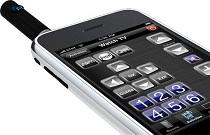 RedEye iPhone Infrared Remote Adapter is Now More Convenient[teaser]Using your iPhone as a universal remote is a cool idea, and with the new RedEye adapter, you don’t even have to give up your data port. [/teaser] The first RedEye device that came out from ThinkFlood was a great idea with a clunky execution. Using your iPhone as a remote meant giving up your dock connector. That meant no charging, and no connecting to anything else. In short, it was less than optimal. The newest iteration of RedEye, dubbed the RedEye Mini, solves that problem. Rather than plugging a bulky connector into the coveted iPhone port, you need only attach a small antenna like adapter to the headphone jack. It’s a small attachment, and it plugs into a port you don’t need active while watching TV or Blu-rays. Of course, the RedEye software is still free to download and incredibly customizable. You can set it up however you like, even utilizing multi-touch and accelerometer functions. Even better, you can add your own custom macro buttons. ThinkFlood’s new RedEye Mini will be available this spring for just under $50. Source: ThinkFloodPosted Wed Mar 3, 2010 at 07:00 AM PST by:
 -
 Marantz Launches a Roku HD Incentive Program[teaser]Looking for a high end player but worried about streaming options? Worry no more. [/teaser] The problem with more expensive high-end Blu-ray players is that they tend not to have all the features of the low end units. It seems strange, but it’s true. High-end electronics tend to serve a single purpose, and the focus is on doing that thing really well. That’s true of Marantz players for sure. The flagship UD9004 offers amazing video and audio processing capabilities. It’s built from top to bottom to deliver flawless quality during Blu-ray and DVD playback, but that’s all it does. $6,000 and no Netflix, no Amazon on Demand, and no YouTube. Of course, the folks at Marantz recognize the streaming market. It’s impossible to ignore. That’s why they’re offering a free Roku HD video player with the purchase of a Marantz BD player. The deal isn’t exclusive to the ultra high end players either. If you pick up a BD7004 or BD5004, you can still participate in the Roku program. Source: Marantz (PDF)Posted Tue Mar 2, 2010 at 02:30 PM PST by:
 -
 Pioneer Debuts Low Cost Receivers[teaser]The latest 5.1 channel receiver from Pioneer is surprising. Not only is it cheaper than you’d think, but it does a lot for the money too. [/teaser] There’s a new contender on the entry level receiver market, and it’s from Pioneer. The Pioneer VSX-520-K is a 5.1 channel receiver that can tackle all the latest in HD audio codecs, including Dolby Pro-Logic IIz. It’s 3D ready and it sports a trio of HDMI 1.4 inputs. It handles Deep Color, x.v. Color, and you can send signal out through component or HDMI. And it’s only $229. If you don’t mind stepping up a bit, you can grab the VSX-820-K. It’s only a bit more, at $299, but it adds support for iPhones and iPods as well as another HDMI input. It’s also got a nice on-screen display, which the 520 lacks. Both amps push 110 watts of power per channel and feature pre-outs for Dolby Pro-Logic IIz. You can also add on Bluetooth support for pulling audio files from your Blackberry or Android based phone, as well as other Blutooth devices like laptops. Source: AmazonPosted Tue Mar 2, 2010 at 11:00 AM PST by:
 -
 Sony’s 3D Ready Players Hit Shelves[teaser]If you’ve been itching to get your hands on one of Sony’s new 3D ready Blu-ray players, the time is now. [/teaser] It’s sometimes hard to make the argument that a standalone Blu-ray player is the way to go, especially if you’re getting a mid-range Sony. Their new players are no exception. Coming in at $200 and $250, there’s not a lot that they have going for them over the similarly priced PS3 (well, except reliability perhaps). The BDP-S470 is just a run-of-the-mill Blu-ray player. It’s got 1080p output, BD-Live capabilities, and access to online content like Netflix and YouTube. You’ll have to plug in a cord or get a wireless adapter since it’s not equipped with WiFi. Sony’s BDP-S570 kicks things up a tad by adding built-in WiFi and an extra digital output. Aside from that, it’s the same basic thing. It plays Blu-rays, streams video, and kicks out a 1080p signal. Not bad for a $250 player. Both players are marketed by Sony as 3D ready, which means they’ll play back 3D Blu-ray discs after a firmware upgrade. Of course, so will Sony’s game system, which runs only $50 more and includes a 120GB hard drive and plays videogames too. Source: Best BuyPosted Tue Mar 2, 2010 at 07:00 AM PST by:
 -
 Don’t Turn On Your Old PS3!! – Warns Sony[teaser]If you’ve got an older – non-slim – PlayStation 3, an internal clock error may kill your system. [/teaser] Let me get this out of the way. I absolutely love the PlayStation 3. I own one and use it as my primary Blu-ray player and my secondary game system. I’m addicted to PSN download titles like Flower and Mushroom Wars and I play more Burnout Paradise than I’d care to admit. Unfortunately, it’s been having a lot of problems recently. Reports of the recent firmware update bricking systems were spotty, relatively isolated incidents. There wasn’t much in the way of a response from Sony, and issues were worked out individually. This one’s different. Sony has put out word officially that older systems are having trouble dealing with March 1st. Apparently, due to an internal clock error, fat PS3s are freaking out. Clock times are being reset, data isn’t being saved, saved data isn’t being recovered, and trophies aren’t being given out. If you use your PS3 as a Blu-ray player and nothing else, you might be in the clear. Blu-rays still play and the loss of trophies won’t affect you. Regardless, Sony is urging owners of older PS3 systems to keep their consoles off until the issue is cleared up. A post on the official PlayStation blog says that the problem should be resolved within 24 hours. Source: PlayStation BlogPosted Mon Mar 1, 2010 at 03:10 PM PST by:
 -
 Entire Series of 'Nip/Tuck' Hitting iTunes, Xbox, Amazon on Demand and More[teaser]In celebration of the final episode of 'Nip/Tuck,' Warner Bros is releasing the entire series on practically every service there is. [/teaser] Fans of the series already know the importance of 'Nip/Tuck.' Debuting just a year after 'The Shield,' 'Nip/Tuck' helped lead the charge to turn around FX and make it a channel truly worth watching. It paved the way for more dramatic and comedic programming aimed at adults, and it earned an incredible number of Emmy awards. The series finally draws to a close after seven seasons, and Warner Brothers is giving fans the opportunity to relive the entire series in high definition. You’ll be able to download all episodes from seasons one through six directly from iTunes starting this week, while the seventh will be made available on March 4th. The series will also be available from Amazon’s Video on Demand service and on the Xbox 360, which likely means it will be included on the Zune video marketplace as well. Warner Bros says there are more services getting the downloads too, and assures that all Nip/Tuck downloads will be available in HD.Posted Mon Mar 1, 2010 at 12:30 PM PST by:
 -
 Could This Best Buy Leak be TiVo’s Big Announcement?[teaser]Tivo has built up their March 2nd announcement pretty heavily, but the leaked info on the TiVo Premiere from Best Buy isn’t too impressive. We’re guessing there’s more to the story. [/teaser] We’ll find out what the real deal is on Tuesday, but for now we’ve got some leaked info from Best Buy that details the TiVo Premiere and TiVo Premiere XL. When TiVo sent out invites to their event, they said that “Inventing the DVR was just a warmup,” but from the info we’ve got so far, it looks like TiVo’s invented a DVR with a bit more storage space. According to the screengrab from Best Buy, the TiVo Premiere XL is slated for a March 27th release and offers enough storage for up to 150 hours of HD recording. It lets users access on demand movies, TV and web videos. It’s also THX certified. THX certification is a bit of a rough subject right now, especially after the Oppo/Lexicon debacle, but it’s nice to see that TiVo put a lot of care into the video and audio quality of their new DVR. The TiVo Premiere is listed with similar features, but a much more limited 45 hour recording time for HD content. We’re guessing there’s more to the story than just this. TiVo could really use a win right now, and if larger hard drives are all they have to offer, they’re probably not going to get it.Posted Mon Mar 1, 2010 at 11:30 AM PST by:
 -
 Samsung Announces Skype and DTS Decoding For Upcoming TVs[teaser]The two latest additions to Samsung televisions have a broad appeal, aimed at the casual consumer. [/teaser] Samsung has officially announced that they’re adding Skype to the 7000 series of “Broadband HDTVs”, which we already knew, and the 8000 series, which we expected. The idea behind the addition is, of course, to add some value to their sets. Skype is a free to use (for the most part) internet phone service, so unlike video on demand and streaming services, Samsung 7000 owners can use it right out of the box without having to shell out any extra cash. The inclusion of Skype has not been announced for the LED 9000 series. If you’re not into the whole video phone thing, the inclusion of DTS decoding may be more up your alley. It won’t make any real difference if you’re just using the TV speakers, but those using the TV’s audio outs to send sound to a surround system will benefit. According to the folks at DTS, their decoding will be present in “virtually all Samsung digital televisions worldwide.” Source: TWICEPosted Mon Mar 1, 2010 at 10:30 AM PST by:
 -
 HD Advisor Twenty 4-7 Three Sixty FiveEditor's Note: Each Friday, High-Def Digest's own HD Advisor will answer a new round of questions from our readers. If you have home theater questions you need answered, send an email to [email protected]. If you've already sent a question and don't see it answered yet, please be patient as we work our way through them. To browse through previously answered questions, visit the main HD Advisor page. Answers by Joshua Zyber Film vs. Digital Q: I have a question to follow up on your column about Blu-ray vs. theatres. Is the time of shooting films with 35mm in its twilight? I've noticed that Blu-ray transfers from direct-digital sources like 'District 9' and 'Zodiac' are significantly more detailed/sharper than that of an internegative/interpositive transfer from regular film stock. Wouldn't it just be easier for directors to shoot digital, thus making the transfer much more efficient? A: There are a couple of different factors to take into consideration here. As far as ease or efficiency, shooting a movie digitally can sometimes be more of a hassle or expense than shooting on film. For better of worse, most of the production infrastructure in the movie industry is based around 35mm film. Especially for a modestly budgeted production, it may be less expensive or easier to find post-production facilities that will handle film than will handle digital video. Remember also that 35mm film is a universal standard, whereas there are many different digital video formats. When you shoot a movie digitally, you need a production chain that will support the specific format you're shooting on. As with anything digital, compatibility is a critical issue. The other consideration here is one of aesthetics. Film and video have different "looks." One may be more appropriate for a specific project than another, just as one type of film stock may be more appropriate than another. The razor sharp, super-detailed look common to HD video may make for nice home theater eye candy, but doesn't necessarily suit all movie subject matter. Many critics and viewers cried foul when Michael Mann chose to shoot 'Public Enemies' on digital video, because the resulting visual style didn't seem appropriate for the time period depicted. Mann used it anyway, because he liked that style, for reasons that some of us may not ever fully understand. Likewise, some directors prefer the look of film. Steven Spielberg is a big proponent of film over digital video. His frequent cinematographer Janusz Kaminski likes the texture of film grain, and often goes out of his way to emphasize it in movies like 'Saving Private Ryan' and 'Minority Report'. I expect that, eventually, digital video will supplant film for all but a few die-hard holdouts. Ironically, the more advanced that digital video becomes, the better it gets at emulating the traditional film-look, which viewers have grown to associate with movies. At some point, HD video will be so good that a director so inclined could use it to make another 'Saving Private Ryan' indistinguishable from the one shot on grainy film. But we're not quite there yet, and it might take a while before we are. Video Quality of Movie Trailers Q: Are the movie previews on a Blu-ray disc actually taken from the Blu-ray transfers of the movies themselves? If they are, then is it fair to judge a movie by the high-def preview on other discs? A: No, the video quality of a movie trailer is not a reliable indicator of how the movie itself will look on Blu-ray. Trailers are usually transferred separately from the movie, sometimes with incomplete color timing or even a different aspect ratio. If it's an older movie, the film elements for the trailer may suffer from damage or fading you won't see on the movie proper. Take anything you see in a trailer with a grain of salt. The movie may look better (or perhaps just different). LCD TVs and Burn-In Q: Are any of the current crop of flat-screen TVs friendly to the 4:3 format? I have had two flat-screen LCDs (both Westinghouse), one a 37", the other a 42", and had been assured that burn-in would not be a problem...and had burn-in problems with both. The Westinghouse was purchased less than six months ago. A lot of broadcast TV is still in 4:3, and of course classic films and television. Maybe a third of what I watch falls into that category. I was told LCD did not have burn-in problems, that only plasma did. But my LCDs do have problems. I also have a stuck pixel. A: What you were told initially is (mostly) correct. LCD displays do not suffer from burn-in as it's typically defined. Burn-in is a danger to phosphor-based displays such as CRT and plasma. LCDs don't have phosphors that can burn an image into the screen. However, LCDs can exhibit a similar condition sometimes called pixel persistence, image retention, or video memory. The general idea is the same: If you leave a static image on screen for too long, that image can get stuck on the screen. The difference is that once a plasma or CRT exhibits burn-in, the condition is usually permanent. With an LCD, it can often be corrected by either leaving the TV off or displaying a solid gray image (such as from a video calibration disc) for an extended period of time. Also, it takes much longer static exposure for an image to stick on an LCD than it does plasma or CRT. Burn-in and image retention are primarily factors of having improperly calibrated contrast on the TV. The "contrast" control is the screen's white level. If you have this set too high, the white is more likely to (for lack of a better word) "burn" an image into the screen. Calibrating this setting, either yourself with a calibration disc or by bringing in a professional, will greatly reduce the likelihood of this problem occurring. I would also recommend varying up the content that you watch. You say that 4:3 shows and movies make up approximately 1/3 of your viewing. Try to spread that out interspersed with content that fills the screen. You also mention that you have a stuck pixel. That's a completely separate problem caused by poor manufacture of the TV. Unfortunately, that can't be corrected. Update – A reader sent in this feedback: It is possible to correct a stuck pixel (not the same as a dead pixel). Using the tapping method, I was able to clear out a bright green stuck pixel that plagued my monitor for over a year before this solution was shared with me. Homework Assignment: You Be the Advisor The HD Advisor knows many things, but he doesn't know everything. Some questions are best answered with a consensus of opinions from our readers. If you can help to answer the following question, please post your response in our forum thread linked at the end of this article. Your advice and opinions matter too! LG BH200 Disc Error Problems Q: I own an LG BH200 which I've had for two years. As far as I'm aware, it's fully up to date with firmware upgrades. The problem I have is that 'Battle of Britain', 'Night at the Museum', 'RockNRolla', and 'Coming to America' have all ceased to play. They get the message "Disc Error" and then eject. This is weird because I've watched them numerous times before. All the latest titles load and play straight away. Can you shed any light? JZ: Although I own an LG BH200, it's currently relegated to the living room, and honestly gets very little use these days. Unfortunately, I don't have any of these specific titles to test. Have any other BH200 owners experienced issues like this? Check back soon for another round of answers. Keep those questions coming. Joshua Zyber's opinions are his own and do not necessarily reflect those of this site, its owners or employees.Posted Fri Feb 26, 2010 at 12:00 PM PST by: