-
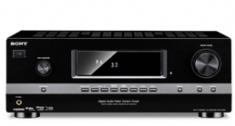 Sony Announces Three New Receivers[teaser]A trio of good ol’ 2D receivers is on the way from Sony in March. [/teaser] We got the scoop on Sony’s new 3D A/V receiver last week, but if 3D viewing isn’t in your immediate plans, you can get your hands on one of three other receivers coming from Sony. At the top of the lineup is the STR-DH810. It’s a 7.1 channel receiver that provides 110 watts of power per channel at eight ohms. Like the rest of Sony’s new receivers, it sits at one percent total harmonic distortion. Unlike the rest, it upscales analog signals to 1080p. The STR-DH810 sports four HDMI inputs and three component. You can pick it up in March for around $400. The STR-DH710 is just a step down from the 810. You’re losing five watts of power per channel, which isn’t too big a concern, and you lose two HDMI channels. The most notable omission though, is that the 710 doesn’t upscale to 1080p. Of course, you’re also saving money, since Sony’s estimated price for the DH710 is a cool $300. Sony’s STR-DH510 is the base model of the new line. It’s a 5.1 channel receiver, two less than its bigger brothers. The connections drop to three HDMI and two component, and upscaling is gone as well. The 510 debuts in March as well, for $230. Source: SonyPosted Tue Feb 23, 2010 at 11:00 AM PST by:
 -
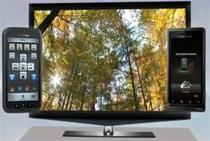 Verizon Offers Remote Control Apps for Droid and Imagio[teaser]Free apps from Verizon let you control your box from your phone, set favorite channels, and conduct photo slideshows. [/teaser] Today’s a day that Droid owners can feel pretty smug. At least, if they subscribe to Verizon’s FiOS television network. They get something iPhone owners haven’t yet. Verizon announced they’ve released an app that will let you control your television with your Droid or Imagio phone. It’s free to download, and it’s pretty simple to set up. Once installed, you’ll be able to change the channel, navigate menus and even shoot photos from your phone to your set-top box with ease. To get it going, you’ll need to download an app to your phone and a separate app to your FiOS box. It’s a little inconvenient to have to download two apps, but Verizon said they split the app into two to keep the file size small on the phone end. Source: VerizonPosted Tue Feb 23, 2010 at 09:30 AM PST by:
 -
 Vizio Ranks as Highest LCD Shipper, Most Growth for 2009[teaser]While companies like Sony faltered, Vizio and Toshiba experienced outstanding growth. [/teaser] It should come as no surprise that Vizio had a good 2009. They’ve sold a record number of LCD sets and surpassed every other company on the market. They’re the number one in sales, but also the number one in growth. Vizio’s sales grew a massive 92.1% over 2008. The six thousand units of televisions sold in 2009 were almost double the amount sold in 2008. In comparison, Samsung had a 22% growth, while LG grew 8.9% and Sony lost a full percent of the market. Analysts say that the growth is due to Vizio’s approach of pairing a low cost with competitive quality. But that shouldn’t shock anyone. Slightly more unexpected is the success of Toshiba. They ranked fourth in sales overall and boasted an 81.7% growth. Source: VizioPosted Tue Feb 23, 2010 at 07:00 AM PST by:
 -
 Walmart is Buying Vudu Video Streaming Service[teaser]The world’s largest retail chain enters the digital distribution race. [/teaser] Things are silent in terms of communication with the press, but both Walmart and Vudu have informed studios and distributors that a deal has been reached. Walmart will soon officially own the Vudu rental service. While Vudu isn’t the most popular streaming service, this deal with Walmart could mean big things for the company. Namely, the Vudu service will now have national exposure. The one thing Vudu has that others don’t is a huge selection of HD titles. There are a lot of great benefits for Walmart in this deal, but first and foremost this will almost certainly put them on the map as a legitimate distributor of digital movies. They’ve tried before with both MP3s and movies but never really had much luck. The second is in advertising. In an effort to one up the competition, television and BD player manufacturers added more and more streaming services to their new sets. Among those services is Vudu. Even if you don’t buy your TV from Walmart, you still might have a Walmart branded service on your set. Lastly of course, there’s the option to sell more than just movies. Walmart could incorporate not just digital music sales into the Vudu service, but merchandise sales as well. Giving customers the option to browse and purchase products without leaving the couch may be the perfect move for the massive company. Source: The New York TimesPosted Mon Feb 22, 2010 at 04:15 PM PST by:
 -
 Can CCFL Compete With LED? Sanken Says Yes[teaser]There’s a Japanese company called Sanken that has created a new type of CCFL they say will act as a better, cheaper alternative to LED. [/teaser] If you own an LCD set, you’ve probably got one with CCFL backlighting. If it’s not LED it’s cold cathode fluorescent lamp (CCFL) lighting. It’s a technology that’s being phased out, especially in higher end televisions, in favor of the new LED backlighting that creates a brighter picture. Of course, CCFL manufacturers aren’t going to take it lying down. One of them – Sanken – says that their new lamps are just as power efficient as LEDs but cost 60% less to produce. That’s a pretty big claim, especially since efficiency is one of the things LED is known for. CCFL lighting typically relies on the use of six lamps inside a television, but Sanken says with their lamps, you’ll only need two. Whether these new lamps will have any effect on picture quality has yet to be seen. What they will do though, is bring down the prices and energy use of non-LED televisions. Sanken will begin mass production of their new lights this summer.Posted Mon Feb 22, 2010 at 09:30 AM PST by:
 -
 HD Advisor Code 46Editor's Note: Each Friday, High-Def Digest's own HD Advisor will answer a new round of questions from our readers. If you have home theater questions you need answered, send an email to [email protected]. If you've already sent a question and don't see it answered yet, please be patient as we work our way through them. To browse through previously answered questions, visit the main HD Advisor page. Answers by Joshua Zyber Blu-ray vs. Theaters Q: It has been stated several times in this column and on many sites that 35mm film holds higher resolution that even Blu-ray and the best of HDTVs cannot capture. However, having seen most films in theaters, and then on Blu-ray again later, am I crazy in thinking that the Blu-ray looks better than it did in theaters? Now I understand that 35mm film has a higher resolution and more detail. So why does it seem to me that my Blu-rays sometimes look 10 times better than the movie did in theaters? When I watch a film on Blu, my eyes tend to wander and are taken aback by the sheer beauty and vast amount of detail on the screen. This is not the case in theaters. A: The first thing to keep in mind is that movie theater screens are much larger than your HDTV at home. Even if you have a big-screen TV or high-def projector, your home theater display benefits from having a smaller and brighter picture in comparison to that at a movie theater. If you were to project a movie from a Blu-ray source onto a 50-foot screen, it would suffer a lot of the same problems that you see in commercial theaters. Even small visual artifacts that are virtually invisible to you now would be glaringly obvious at that size. Depending on the projection equipment used, the picture would also likely appear dimmer and consequently softer. With that said, the increased resolution available on 35mm film is often a theoretical advantage when it comes to theatrical projection. All that detail really resides on the original camera negative. Of course, that's not what's being projected at your local theater. The dupe prints distributed to theaters are several generations removed from the negative. Because film prints are optically duplicated, each subsequent generation loses some quality. As a result, a lot of that detail in the original photography never makes it to your theater screen. However, Blu-rays are typically mastered from Internegative or Interpositive film elements much closer to the source, and thus retain much more of that original detail. This is the same reason why D-Cinema digital screenings usually appear more vibrant and detailed than 35mm screenings, even though the 2k projectors used in most digital theaters are barely higher in resolution than the 1080p used on Blu-ray. Another contributing factor to your disappointment with theatrical screenings is that many commercial theaters underpower the lamps in their projectors in the misguided belief that the lamps will last longer that way. Some theaters also keep old lamps in service long after they have dimmed beyond the point of acceptability. Update: One of our forum readers has added the following: As a former projectionist, I can tell you that the biggest contributing factors to theater pictures looking like crap are: 1. Projectionist error (focus is often slightly off, framing almost always is to some degree). 2. Wear and tear on the print (if projected from film, it gets pretty beat up, especially if the projector has some problems and scratches or wears it more on the way through). 3. Overall condition of the projector. As I said above, it can further damage the film, but the bigger problem I see is jitter. When the picture is slightly shaky, just enough to almost seem like its the focus problem, it is usually due to a projector not exactly lining up each frame, or the projector not being properly secured to where its own motor is vibrating it. Of course the reasons mentioned in the column play big parts too, but if we could conquer the 3 reasons I listed, you'd be seeing something MUCH better. "Source Direct" Video Mode Q: I recently borrowed a Sony BDP-S500 Blu-ray player. It has the Source Direct option when choosing the video format. In the case of playing a DVD, it outputs the disc at 480/60i. I was very surprised that the disc looked pretty good. What does Source Direct do for output of the video? And what are the benefits over upconversion? A: The "Source Direct" option bypasses any internal processing that your Blu-ray player may otherwise apply to a video signal. It outputs the video at the resolution and frame rate that was encoded onto the disc. For an NTSC DVD, this means that it will send a 480i signal at 60 Hz, without upconversion. When a Blu-ray disc is played, it will output at 1080p resolution and 24 fps. (Unless it's a 1080i disc, of course.) If you have a digital HDTV, your set will have one and only one native resolution. If it's a 1080p set, the native resolution is 1920x1080 pixels. Any video signal your TV receives will be displayed at that resolution. If the input signal is less than the native resolution, the set will upconvert it. It is not possible to watch a DVD on a digital HDTV without upconversion. The question is where that upconversion should be performed. It can occur either in the DVD/Blu-ray player or in the TV. If the Blu-ray player has better deinterlacing and scaling quality, you'll want to do the upconversion there. In that case, set the player to output DVDs at 1080p. On the other hand, if the TV has a better processing chip, you're better off setting the Blu-ray player for Source Direct mode and letting the TV do the hard work. I haven't used the Sony BDP-S500 personally. But I did used to own an S300, which is very similar. The S300 didn't have particularly good DVD upconversion. I'd expect the S500 to be the same. If you like the results you're getting with Source Direct, I'd recommend sticking with it. HDTV Preset Picture Calibration Modes Q: For years, TVs (and now HDTVs) have come equipped with pre-set picture modes such as Vivid, Standard, Cinema, etc. When we see those TVs at the store, they're set to Vivid mode because that's the best way to catch one's attention. But for a true home theater enthusiast, a professional calibration is needed, or at least some picture adjustments made by ourselves with the aid of a calibration disc. Why don't TV manufacturers include in their models a picture mode that is professionally calibrated with proper settings for color accuracy, black level, shadow detail, etc.? I know that some TVs include a "better" picture mode (THX, Pure, Cinema, etc.), but even these are usually not perfectly calibrated. A: TVs or HD displays with proper calibration presets built-in are not completely unheard of. Years ago, video calibration guru Joe Kane worked with a company called Princeton Graphics to design a 32" CRT HD set that met his demanding standards for picture accuracy. (Unfortunately, the set's mechanical workings were notoriously unreliable.) More recently, he's collaborated with Samsung to design the SP-A900B DLP projector. Unrelated to Kane, the Planar PD8150 DLP projector is also said to have nearly perfect calibration out-of-the-box. I'm sure other examples exist as well. But your point stands. Most TVs and HD displays on the market do not come with accurate picture calibration, no matter which of their preset modes you choose. You'd think this would be an important selling point. So why don't more manufacturers design their displays with a feature like this? Well, frankly, because it would cost them more to do so. Precise calibration requires measurement, testing, and adjustment of every single unit sold. The smallest of unit-to-unit manufacturing variances can throw video calibration way off. This generally isn't something that can be automated. Even on those displays with THX calibration presets, the THX mode is usually a "ballpark" setting. A professional calibration of your specific set might be able to do better. It's also worth pointing that the calibration settings for most TVs and projectors will drift over time as the light source ages. That's why it's recommended to recalibrate once a year or so. A unit that's properly calibrated when you first buy it may not remain quite so accurate over time. Beyond all that, the truth of the matter is that those ridiculously inaccurate preset modes like Vivid, Sports, and whatnot are designed to prey on the ignorance of consumers who don't know any better. As you noted, the brightest picture (typically the Vivid mode, with Brightness and Contrast cranked to the maximums) is the most eye-catching on a retailer floor. Sadly, it works. Modes like that sell a lot more TVs than those that are properly calibrated. When it comes down to it, most manufacturers will choose the cheapest option that results in the most sales. Homework Assignment: You Be the Advisor The HD Advisor knows many things, but he doesn't know everything. Some questions are best answered with a consensus of opinions from our readers. If you can help to answer the following question, please post your response in our forum thread linked at the end of this article. Your advice and opinions matter too! Bitstream Audio Problems Q: I have a Memorex MVBD2520 Blu-ray player that I've set to Bitstream. This connects via HDMI to my Yamaha HTR-6250 receiver. When I play a Dolby TrueHD track, I can see the logo on the display. But when I play a disc using the DTS-HD track, I either get PCM or the connection # on the display. My receiver supports both formats so I'm not sure what I'm doing wrong. Is my receiver decoding the DTS track correctly or is it downgrading the AQ? JZ: Are any of our readers familiar with these particular models? Please post your set-up tips in the forum. Check back soon for another round of answers. Keep those questions coming. Joshua Zyber's opinions are his own and do not necessarily reflect those of this site, its owners or employees.Posted Fri Feb 19, 2010 at 12:00 PM PST by:
 -
 Goodbye Analog – Hello DRM[teaser]Component makers will soon be discontinuing the use of component cables. It might not sound like a big deal, but what if your old Blu-rays won’t play through your existing setup? It may happen next January. [/teaser] Digital rights management (DRM) is a really touchy subject for consumers. DRM is the reason you can’t use Zune Pass with an iPod. It’s the reason you can’t reinstall Spore more than twice, and it’s the reason video download services are more limiting than you’d expect. But in the past, it hasn’t really been a problem for Blu-ray discs. Admittedly, Blu-rays have some pretty strong copy protection, but there’s nothing that stops you from watching a disc you own. Starting at the end of this year, no new hardware will be introduced that offers alternate HD outputs. If the signal going out is 720p or higher, it’ll be HDMI or bust. That doesn’t sound too bad initially. Some connections get phased out over time. It happens. The problem isn’t the new products though. It’s the old ones. Starting January 1st, companies will be able to put something called an Image Constraint Token into their Blu-ray players. Coding this into a Blu-ray disc means that HD video will only be able to be sent out using HDMI. Your component outputs will be rendered useless. Anyone with a component video setup currently may have to change accordingly. At the least, it will mean buying a new cable. At the most, it could mean a whole new wiring job for those with custom home theater installations, and even new components. Of course, a company would have to embed the token to make this happen. There’s still no word on which makers will be adopting this technology. Source: CE ProPosted Thu Feb 18, 2010 at 04:30 PM PST by:
 -
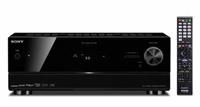 Sony Announces 3D Capable Receiver[teaser]If you’re in the market for a 3D A/V receiver you won’t have to wait too long. Sony’s dropping their first one this June. [/teaser] The STR-DN1010 is the first 3D receiver to come out of Sony, and on paper it looks pretty good. It’s got HDMI 1.4 pass through technology which sends the video signal through to a capable TV while the receiver hashes out the audio. It’s a 7.1 channel receiver that supplies 110 watts of power per channel at 6 ohms. It’s got plenty of hookups in the back including four HDMI inputs and three component. Sony boasts that their new receiver is not only powerful, but simple to use. “By streamlining connectivity and supporting 3D hardware and software,” says Sony’s Neal Manowitz, “the STR-DN1010 receiver will provide a simplified approach to 3D home theater control and performance, ensuring the best possible user experience.” The STR-DN1010 will be hitting shelves in June at a price that Sony says will be “about $500.” Source: SonyPosted Thu Feb 18, 2010 at 04:20 PM PST by:
 -
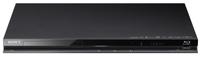 Sony Blu-ray Players to do 3D 1080p with HDMI 1.3[teaser]Surprisingly, Sony has announced that they’re going to be sending full 1080p 3D signals over existing cables. Of course, that’s not the whole story. [/teaser] Sony revealed recently that their new players are capable of a lot more than we thought. Mainly, they're able to process a 1080p 3D signal. There’s been a lot of confusion with the advent of 3D and HDMI 1.4, and the initial word was that HDMI 1.3 just couldn’t handle 3D in 1080p. As Sony pointed out though, that’s not really the case. Their new Blu-ray players can hack a 1080p signal using your existing HDMI cords. So what’s the deal? Well, there are two real factors here. First off, while Sony’s new player doesn’t bear the HDMI 1.4 branding, it sounds like it will still be HDMI 1.4 compatible. As a Sony rep said, “The players and theater systems support the HDMI 1.4 spec for 3D playback, but may not support all of the qualifications of spec.” So the players won’t support everything required to get HDMI 1.4 branding, but you’ll still be able to get the 3D benefits of HDMI 1.4 while using an HDMI 1.4 cord. The player doesn’t work with the other features of the new spec though, such as an audio return channel, which means it doesn’t get HDMI 1.4 branding. The second thing, and perhaps the most important, is that HDMI 1.3 will indeed carry a 3D signal at 1080p. It can’t handle 3D at sixty frames per second though, only thirty. Of course, while watching movies on most Blu-ray players, the output is set to 24fps, which HDMI 1.3 can handle just fine. Source: EngadgetPosted Thu Feb 18, 2010 at 04:00 PM PST by:
 -
 LG Debuts New “Skinny Frame” Plasmas Overseas[teaser]Korea gets first dibs on LG’s new Skinny Frame plasmas, but we’d love to get our hands on these incredibly slim and impressive sets. [/teaser] The new Skinny Frame plasmas are the newest from LG, and like most LG products, they’re hitting the Korean market first. The Skinny Frame plasmas come in both fifty inch and sixty inch models. LG’s new sets have the 600Hz refresh rate that’s typical of plasmas, and a 1080p resolution. They’ve got a trio of HDMI ports as well as a USB port for displaying photos and videos. LG’s plasmas also offer a feature that automatically detects the light and color in the room and adjusts the picture accordingly. Not only does this create a better picture, LG says that it creates a great energy savings as well. The 50 inch model will sell for the equivalent of $1,500, while the 60 inch model runs a much steeper $3,300. Source: LG (Via Babel Fish)Posted Thu Feb 18, 2010 at 02:20 PM PST by: