-
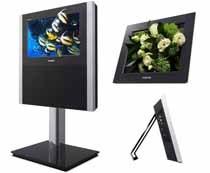 Samsung Says You Won't be Going Glasses-Free Anytime Soon[teaser]Toshiba is, as you might imagine, inclined to disagree. [/teaser] B.K. Yoon, the president of visual displays over at Samsung, said recently that he doesn't think we'll be seeing glasses-free 3D televisions in homes any time in the near future. In fact, he predicts that we'll be waiting five to ten years before the technology is good enough and cheap enough. Yoon says that's not true of handheld devices like cell phones and Nintendo's 3DS. The trouble, he explains, comes when trying to mass produce large displays – there are just too many problems with efficiency and cost. Toshiba is the only major company launching a glasses-free display this year, and the cost and size leave a lot to be desired. Still, it will be interesting to see whether Samsung is right about the market not being ready or if Toshiba's early launch will promote quicker adaptation. Source: Wall Street JournalPosted Mon Oct 18, 2010 at 09:00 AM PDT by:
 -
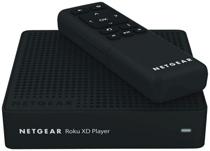 The Netgear Branded Roku XD Hits Retail[teaser]It's the same Roku XD we know and love, but with the advantage of being sold at retail. [/teaser] By this point, you're probably familiar with the whole Roku family, including the Roku XD. You know who makes it and how to get it, but if you swing into your local Best Buy you might be a little confused, since the box for the Roku XD clearly says Netgear. It's all a part of a distribution deal that Roku hooked up with Netgear. Essentially, Netgear gets to put their name on the player and Roku gets their gear into stores like Best Buy, Fry's and other big box retailers. There's probably some money involved too. Interestingly, it looks like the Netgear Roku XD – which is the exact same thing as the normally branded model – goes for $10 more at retail. Source: EngadgetPosted Mon Oct 18, 2010 at 07:00 AM PDT by:
 -
 The Concorde... HD Advisor '79Editor's Note: Each Friday, High-Def Digest's own HD Advisor will answer a new round of questions from our readers. If you have home theater questions you need answered, send an email to [email protected]. If you've already sent a question and don't see it answered yet, please be patient as we work our way through them. To browse through previously answered questions, visit the main HD Advisor page. Answers by Joshua Zyber Home Theater Connection Basics Q: I have an LCD TV (LG 32" LH70YR) and home-theater-in-a-box (LG HT353SD). For the time being, this is the only set up I can afford. I'm 15 years old, and I don't have the money yet to buy a real home theatre. What is the best (connection) for all this gears I have: cables, wires, or converters, etc. I really need your help. A: From what I've discovered through online searches, I'm going to assume that you live in the UK, because both of these products are UK models. I see that your HTiB has a DVD player built in. You haven't mentioned what or how many other video sources you will be connecting: Blu-ray, cable/satellite TV, video game consoles, etc. Without that, I can only make some general suggestions. Your TV appears to have both HDMI and Component Video inputs. HDMI is its best connection type for video, but Component Video (the set of red/green/blue RCA cables) is a close second. You will want to connect any video source to the TV by one of these. The DVD player in your HTiB doesn't have an HDMI output, but does have Component. So you should use that. If your HTiB didn't already come with any, you will need speaker wire to connect the main processor component to the speakers. Speaker wire is rated by gauge, which is a measure of its thickness. The lower the number, the thicker (and better) the wire. I would recommend at least 14 gauge wire for all speakers. If you had higher grade equipment, you might want to use 12 gauge wire for the front three speakers, where the most critical portions of the soundtrack are directed. However, with your particular system, I don't think this is necessary unless you have very long distances between the processor and the speakers. Unfortunately, your HTiB is a fully self-contained unit. It doesn't seem to have either any video inputs or audio inputs, just outputs. That means that you won't be able to connect any other video sources (like cable/satellite TV or game consoles) to it to benefit from surround sound. You will have to connect those directly to the TV – ideally by HDMI – and use the TV's own built-in speakers. HDMI will carry both video and audio together in one cable, so you won't need separate audio connections. You should note that Component Video cables are not necessarily the same as the yellow/red/white "A/V" packages of three RCA cables. Although those will work in a pinch, they may slightly compromise picture quality. Each of the cables in a Component Video connection should be rated for 75 ohm impedance. In the "A/V" sets, usually only the yellow "Video" cable meets that standard (if even). The red and white cables are typically only rated for 50 ohm. If it's more cost effective, you can substitute three of the yellow Video cables for one set of red/green/blue Component cables. However, I wouldn't recommend any cheap thin cables that may have come packaged in the box with some of your equipment. Component Video is an analog signal, and is more sensitive to interference or signal loss than digital transmission. Quality cables are more critical for this application. Home theater cables (especially HDMI) and speaker wire tend to be very overpriced at retail. You don't really need to spend a lot of money to get decent HDMI or Component cables. If you lived in the U.S., I would recommend buying from Monoprice.com. Perhaps some of our other readers can recommend similar value retailers in the UK? PS3 "Bitstream Direct" vs. "Bitstream Mix" Q: On my Playstation 3, I have the option of choosing "Bitstream Direct" or "Bitstream Mix" after a firmware update. I use an optical cable to get 5.1 surround sound. When I choose Mix, the audio sounds fuller and more clear. When I check the settings while the movie is playing, it displays DTS-HD MA or Dolby TrueHD, with a variable bit rate of 2.0 mbps and above, instead of DTS 1.5 mbps or Dolby Digital 640 kbps, like it did before. I was under the impression that you could not get lossless sound via optical, but it sure seems like I am when I choose Bitstream Mix. The official Sony page detailing the update only describes it as adding "sounds of button presses on the BD." So, am I actually getting lossless sound or is this a high bit rate lossy signal? A: Unfortunately, you were right the first time. It is not possible to transmit the Dolby TrueHD or DTS-HD Master Audio formats in full lossless quality over an S/PDIF cable (either Toslink optical or digital coaxial). This type of connection is limited to standard Dolby Digital 5.1, standard DTS (up to 6.1), or two channels of PCM. The difference between "Bitstream Direct" and "Bitstream Mix" determines whether the PS3 performs any internal audio decoding. The "Direct" setting will extract the data from the disc and send it to the A/V receiver without any audio processing. If you're using an optical cable, the console will only extract the DTS "core" (not the DTS lossless extension) or the backup Dolby Digital track embedded along with a TrueHD track (not the TrueHD signal itself). Because the console isn't doing any processing, it cannot perform live-mixing of any supplemental audio such as menu button noises or the audio content for Bonus View picture-in-picture features. You will only get the movie soundtrack itself. For the "Bitstream Mix" setting, the console will first decode the original Dolby or DTS soundtrack internally, live-mix in any of that supplemental audio, and then re-encode the results back to a Dolby or DTS form. Your A/V receiver will report receiving a Dolby or DTS bitstream signal, which it then has to decode again. But that bitstream is comprised of both the original soundtrack and new audio content mixed with it. As to why you seem to hear a difference in audio quality between these two settings, there are two possibilities. Allowing the PS3 to decode internally and then re-encode into Dolby or DTS may result in a volume difference if the PS3 were to strip away certain metadata such as Dialogue Normalization values. A difference in volume is not truly a difference in quality. A louder soundtrack is not actually better; it's just louder. If you make the effort to volume-match the soundtrack both ways with a sound level meter, the audible results should equalize. Perhaps even more likely is that this is simply placebo effect. Your brain expects to hear a difference between the two settings, and allows itself to be influenced by that expectation. Placebo effect is a very real and very powerful force in human perception. The best way to eliminate this factor is to perform a double-blind listening test where you must evaluate the options without knowing which is which. Reader Feedback Once again, I'm going to forego a Homework assignment this week in order to highlight this piece of Reader Feedback on an important issue. Misleading "HD" Advertising Q: This has more to do with the business side of HD than the hardware side. I just received a booklet letting me know about some "new" DirecTV features (I'd already been aware of them for a while). In a section bragging about the HD movie selection, it says that movies can be delivered in 1080p, "the same stunning quality as Blu-ray". Now I know this isn't true and that DirecTV doesn't approach Blu-ray's quality. 1080p is only the resolution and just one of many factors (like bit rate) that make up quality. I'm just wondering how they can even claim this. I had heard that Dish Network was made to pull ads claiming "same quality as Blu-ray" some time ago. I started to notice them saying "same resolution" instead, which is at least accurate. I work in the electronics section of a retail store and this is the type of thing that confuses people and makes them afraid of HD. I try to clarify because it all starts to sound too complex when you have to explain WHY Blu-ray is actually better. While I would love a world where everyone is simply well educated on the expensive things they buy, we depend on all types getting into Blu-ray to keep the movies coming. JZ: I fully agree that these sort of claims are misleading at best and borderline fraudulent. If our readers have seen similar advertisements for other sources that claim to be Blu-ray quality but clearly aren't, please discuss in the forum thread linked at the end of this article. Check back soon for another round of answers. Keep those questions coming. Joshua Zyber's opinions are his own and do not necessarily reflect those of this site, its owners or employees.Posted Fri Oct 15, 2010 at 11:00 AM PDT by:
 -
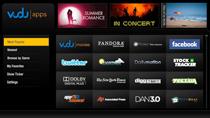 Vudu Significantly Upgrades Set-Top Boxes[teaser] The dedicated Vudu set-tops will now match the capabilities of Vudu on other devices. [/teaser] The Vudu set-top box was launched with much excitement, but was then seemingly forgotten by Vudu. Now that the service is available on Blu-ray players, televisions, and home theater systems, there hasn't been a lot of help for the early adopters. Thankfully, the latest update brings Vudu set-top boxes up to date with the capabilities of less dedicated hardware platforms. You'll now have access to social media sites like Twitter and Facebook as well as the ability to watch previews. The biggest addition is of course the ability to stream HDX movies instead of waiting for them to download. All you need is a 4.5mbps connection speed and you're ready to go. Source: VuduPosted Fri Oct 15, 2010 at 09:00 AM PDT by:
 -
 Artcoustic Intros Modular On-Wall Speakers[teaser]The new speakers are designed to fit your screen thanks to custom baffles. [/teaser] Your television is so large that it dwarfs your on-wall speakers, making them look out of place by comparison. It's the kind of problem you want to have. If you've got the new Arcoustic on-wall speakers, it's not a problem at all. The Modular One is the smallest speaker produced by Artcoustic, at just 9.8 inches by 3.1 inches by 2.1 inches. It may sound great, but it definitely doesn't look good on a wall. That's why Artcoustic offers custom baffles to make the speaker seem larger than it actually is. If you lean more towards concealing your home theater gear, there's an option for you too. Instead of a custom baffle in black, you can get a printed baffle that hides your speakers under a work of art. Pricing starts at $680 for the Modular One and goes up from there for the Modular L+C+R and Modular Cinema. Source: eCousticsPosted Fri Oct 15, 2010 at 07:00 AM PDT by:
 -
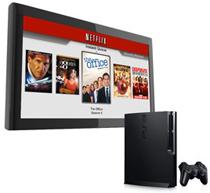 The PS3 Gets 1080i Netflix with 5.1 Sound – Disc Free[teaser]Other devices will see similar updates in the near future, but Sony gets it first. [/teaser] If you're a Netflix fan with even a basic home theater setup, you've probably been chomping at the bit for 5.1 surround. Lucky PlayStation 3 owners will be the first to get it, helping to make up for having to use discs to stream for all this time. On October 18 – that's Monday – if you've got a PS3, you'll be able to stream Netflix movies with 5.1 channel surround with Dolby Digital Plus. You'll also be able to watch videos in 1080i, an upgrade from the service which formerly capped out at 720p. What's more, you won't even have to use a disc to do it. The folks at Netflix say that other devices like the Xbox 360, Roku streamers, Blu-ray players and receivers will be getting the 5.1 channel treatment too, but a date hasn't been set. Netflix hasn't publicly stated whether or not we'll see 1080i streaming on other devices, but it's almost surely on the way. Update: It looks like the PlayStation Blog was wrong on this one. PS3 owners will actually be getting 1080p instead of 1080i. Thanks to the forum goers and emailers for pointing this out! Source: Official Playstation BlogPosted Thu Oct 14, 2010 at 12:40 PM PDT by:
 -
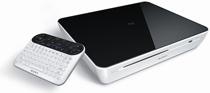 Sony Launches a Google TV Blu-ray Player[teaser]Sony's Blu-ray player comes in at just $100 more than Logitech's standalone box, making it an attractive choice for those who want Google TV. [/teaser] Imagine you're a person who wants Google TV – you've got some choices available to you. Sure, getting a new television is always cool, but if you've already got a great set, it's not really an option. You could go with the Logitech Revue as your source, but $299 for a set-top isn't exactly cheap. On the other hand, you could shell out just $100 more and get a Sony Blu-ray player with Google TV built in. The Blu-ray player has the same hardware and the same functionality as the Revue and the Sony Internet TVs and offers the bonus of playing back your physical media too. The Sony Internet TV Blu-ray player has a strange name, and a strange look to boot. It all but ditches that sleek glossy black that we've come to expect from the company, relegating it to the top of the device and surrounding the rest in white. You'll be able to pick up the Sony Internet TV Blu-ray player for $399 when it comes out later this month. Source: eCousticsPosted Thu Oct 14, 2010 at 11:00 AM PDT by:
 -
 TiVo Launches an Online Season Pass Manager[teaser]You'll be able to manage your recordings both through your computer or your web capable phone. [/teaser] The folks at TiVo say that the new Season Pass manager was built in direct response to requests by customers. Using the new tool, you'll be able to prioritize, delete and otherwise manage your season passes remotely. "The Season Pass manager is something that our subscribers have asked for and we are pleased to make it available to them today," says VP Jim Denney, "saving customers time and giving the unique ability to ensure they do not miss a single episode of their favorite shows when they upgrade to a new box." You can access the new tool by going to www.tivo.com/spm. You'll need to have a TiVo that's connected to broadband to do it of course, and a TiVo Premiere, Series 3 HD or Series 2 DVR. Source: TiVoPosted Thu Oct 14, 2010 at 09:00 AM PDT by:
 -
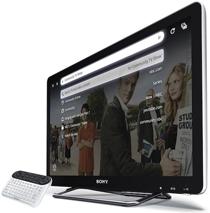 Sony Reveals their Google TV Lineup[teaser]It's finally here and it's cheaper than we expected. [/teaser] Google TV is finally here in television form thanks to Sony's Internet TV. The functionality is similar to that of the Logitech Revue that was announced last week, but with a few minor changes. For starters, the Google Internet TV won't need an Ethernet cord since it's got WiFi built right in. It also includes access to Qriocity, Sony's own digital delivery service. It's been hinted that Sony movies may hit Qriocity before they get to the competition, so this could be a big incentive to use the new service. You can get Sony's Internet TV in four different sizes, only one of which breaks the thousand dollar mark. The 46 inch NSX-46GT1 comes in at $1,399 and features LED edge lighting, as do the $999 40 inch model and the $799 32 inch model. The smallest in the series is a 24 inch set that uses CCFL backlighting yet still boasts a 1080p picture. You can pick up the NSX-24GT1 for $599. You'll be able to pick up your own Sony Internet TV on October 16th when they launch at Sony Style stores, or slightly later when they'll be coming to Best Buy. Source: eCousticsPosted Thu Oct 14, 2010 at 07:00 AM PDT by:
 -
 CEDIA and CEA Announce New Home Theater Guidelines[teaser]The new guide updates suggestions for current equipment and adds information on 3D TVs. [/teaser] While most amateurs simply set their systems up based on rule of thumb, the pros tend to do things a bit more by the book. That book is the new CEB-23 that was released by CEA and CEDIA today. "CEA projects more than 31 million HDTV sets and more than 2 million 3DTVs will be sold in 2010," says CEA's Brian Markwalter. "With increased consumer adoption of HD and 3DTV, accurate home theater design parameters are essential to provide consumers with a high-quality viewing experience." The CEB-23 details information such as optimal screen sizes, lighting conditions, and other issues that crop up when installing televisions and projectors. It's also designed as an assist for those prepping for certification exams. Source: CE ProPosted Wed Oct 13, 2010 at 11:00 AM PDT by: