-
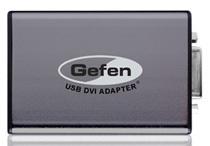 Connect up to Six HDTVs to your Computer with Gefen's USB Adapter[teaser]Gefen's new adapter supports a wide range of resolutions and makes HD output simple. [/teaser] One of the coolest things you can do with an old computer is turn it around and make it useful again as an HTPC. Get a few low noise fans and heat sinks in there and your old clunker can actually make a pretty decent high-def source. But what if you have a video card without an HD connector? Gefen makes that nice and easy with their new USB adapter. It takes any USB slot on your computer and turns it into a high definition DVI output. Not a bad setup. You can add up to six of these to your computer and choose from two different setups. You can set it so that each output shows the same thing, or you can set each monitor or TV to act as part of an extended desktop. The Gefen USB to DVI video adapter doesn't come cheap though. You can pick it up now for $149. Source: GefenPosted Tue May 25, 2010 at 08:00 AM PDT by:
 -
 Samsung and Sony Meet to Discuss HDTVs and the 3D Future[teaser]Cooperation could bring down panel prices and hopefully set a 3D standard. [/teaser] Samsung Chairman Lee Kun-hee and Sony's Howard Stringer are set to meet this week to discuss, among other things, supply of HDTVs. Sony's finally pulling out of the slump they've been in TV wise. Growth is on the way, and profit isn't far behind. But to capitalize on that growth, Sony needs more panels from its supplier, Samsung. It's likely, according to analyst Nobuo Kurahashi, that Samsung will attempt to solidify its position in the industry by keeping more panels for itself. Sony's looking for a big boost when it comes to LCDs, and expects a 60 percent increase in sales by March of next year. Samsung is doing well as it is, but has just invested a record $16 billion this year. There will likely be some talk about Google TV, since Sony is on board, while Samsung is still deciding. The two companies will also be talking about 3D cooperation, and hopefully setting a standard for 3D glasses. ReutersPosted Tue May 25, 2010 at 06:00 AM PDT by:
 -
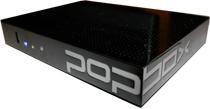 PopBox is the First Over-The-Top Solution to Handle 3D[teaser]No firmware update required, PopBox will be 3D capable at launch. [/teaser] Over-the-top solutions – you know, things like the Boxee Box, PopBox and Roku player – are relatively new, but they're already playing a bit of catch up. Sure, you can download and stream your favorite content without the need for a cable TV subscription, but can you do it in 3D? With PopBox you can, or you'll be able to when it launches. The company announced today that they've licensed RealD 3D technology for their PopBox and PopBox Wireless. That means you'll be ready for 3D web video streaming right to your home. It is, potentially, a pretty big move for PopBox. "Content created in 3D should be enjoyed in 3D," says PopBox CEO Alex Limberis. "Leveraging the RealD Format gives our community a new dimension of HDTV entertainment right out of the gate." The PopBox will be ready for 3D on day one, but whether there will be 3D content worth downloading is another story altogether. Source EONPosted Mon May 24, 2010 at 10:45 AM PDT by:
 -
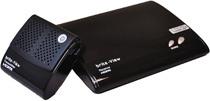 Brite-View HDelight Offers Wireless 1080p PC Streaming[teaser]It's the first of its kind, and it's under $200. [/teaser] Home Theater PCs are incredibly cool. You can stream, download, and playback just about anything there is. You don't have to worry about compatibility with Flash or HTML5, and you don't need to hope for firmware updates to add Netflix and Hulu. But they aren't always practical to have sitting right there in your entertainment center. Even small HTPCs take up space, and there's not always room. But thanks to the latest device from Brite-View, you can move the PC away from your TV and stream wirelessly. "The HDelight lets users enjoy online entertainment on the big screen," says CEO Robert Lo. And it couldn't have come at a better time. As low puts it, "This will be a whole new experience for PC users, especially since Netflix will soon begin streaming 720p HD content." You'll get uncompressed video, unnoticeable latency and a simple set-up. The Brite-View HDelight will be fairly inexpensive, coming in at at under $200 when it launches in July. Source eCousticsPosted Mon May 24, 2010 at 08:00 AM PDT by:
 -
 Sony's 3D Filmmaking Competition Gives You a Shot at Fame and Prizes[teaser]It's also a great way for Sony to generate some 3D content.[/teaser] This one goes out to all the aspiring filmmakers out there. Or to the folks who aren't, but still want a shot at winning some cool stuff from Sony. The company needs 3D content to give out with their new TVs, and to generate that content, they're holding a contest that gives you a shot at some sweet Sony prize packages. They're looking for ten short videos (5-10 minutes) that demonstrate 3D in the best way possible. If you win, your short will be included on a disc given away with every 3D television Sony sells, which, if nothing else, is some great exposure. But don't worry, you can get stuff too. If you're in the top three, you'll get a 3D home theater system including a BRAVIA television. The next seven winners just get the BRAVIA. Even if you're not in the top 10, you still stand a chance at walking away with something. The top 50 runners-up will snag a free copy of the 'Cloudy with a Chance of Meatballs' 3D Blu-ray when it is released. Not a bad prize for coming in 60th place! You've got until July 9th to enter, so take your time and make sure you check out the rules before getting started. Source SonyPosted Mon May 24, 2010 at 06:00 AM PDT by:
 -
 The 59th Street HD Advisor Song (Feelin' Groovy)Editor's Note: Each Friday, High-Def Digest's own HD Advisor will answer a new round of questions from our readers. If you have home theater questions you need answered, send an email to [email protected]. If you've already sent a question and don't see it answered yet, please be patient as we work our way through them. To browse through previously answered questions, visit the main HD Advisor page. Answers by Joshua Zyber Large vs. Small Speakers Q: It's not unusual to see the automatic calibration feature of receivers end up considering a large speaker as "small," and then apply the crossover frequency to the signals of the corresponding channel. Actually, as far as I know, there is a line of thought that states that every speaker should be considered "small" because, whichever the speaker is, the subwoofer can reproduce better bass. And I'm not sure about that, but I think I read that the THX standard agrees with this statement. That led me to think the following: If the speakers should always be considered small, why then, in the audio track, do the studios record bass sounds directed to the speakers? Don't the movie industry people think that some bass sounds could indeed be reproduced by the speakers? It seems the movie industry has one idea on the subject, and the home theater industry another. A: As I'm sure you're aware, the "Large" and "Small" settings in the receiver don't just refer to the physical size of the speakers. They're actually meant to gauge whether the speakers can reproduce the full frequency range of an audio track, down to the lowest bass registers. To accomplish that, you generally need large woofers and a lot of power to drive them. Hence this usually only happens in physically large loudspeakers. However, it's perfectly possible to have big speakers that cannot reproduce the full bass range either, and thus should not be considered "Large." The vast majority of home theater speakers are not full-range, and should be defined as "Small." So, why then do movie sound mixers still place so much bass activity in the main speakers rather than moving it all to the .1 channel? Well, most movie soundtracks are mixed primarily with the theatrical release in mind. To give you a more detailed answer straight from the horse's mouth, I solicited advice from Marc Fishman, a Hollywood sound mixer with an extensive and impressive resumé of films he's worked on. Here is what he had to say: MF: This isn't one idea vs. the other... because they are two different venues. Since the goal is translation, these differing 'ideas' on the subject achieve the desired results. Theatrical sound systems are always at least 2-way (and some 3-way) designs, meaning they are all bi-amped and have plenty of power to drive the cabinets. On my stage, each main channel consists of high-end driver on a horn enclosure for the high end on top of a cabinet of 4 x 15" drivers. They are both separately fed by their own 1,000 Watt amps… plenty of power. Even though we are talking about smaller spaces, most home theater setups (and speakers for that matter) don't have that kind of power in them. And even if they do, it rarely comes in the form of bi-amplification. It's a matter of translating what we have the ability to do (large SPL and frequency reproduction across our main channels) into a home environment (accurate SPL and frequency reproduction using what is available) by using the amplification more wisely. Pillarbox Bars – Black vs. Gray Q: I have a Sharp Aquos television, a Pioneer Elite DVD player, a Panasonic Blu-ray player, and an Onkyo receiver. I have contacted each of these manufacturers with this question and they have all said they have no idea what the problem is (if it is a problem). When I play a full screen film on my Pioneer DVD player, the side bars are black. On the Panasonic Blu-ray player, the side bars are a kind of cream color. Is there some way to make sure the side bars are only black? A: First, let's be clear and define "full screen" movies as those with a 4:3 aspect ratio, which should be displayed in the center of your 16:9 screen with pillarbox bars. The term "full screen" is a bit of a misnomer that goes back to the days before HDTV. The term continues to be used, even though a 4:3 picture will obviously not fill a 16:9 screen without stretching or distortion. Are these movies you're watching all on DVD, or are you comparing the same movie on DVD and Blu-ray? I'm going to assume that you're watching the same DVD on two different machines. "Full screen" DVDs are natively encoded in a 4:3 shape. Any pillarbox bars you see are created by either the DVD player or your TV. If either of your players has a Pillarbox (or "Squeeze") mode, the player itself generates those bars. My best guess here is that your Pioneer DVD player has a Pillarbox mode. When you watch DVDs on that machine, your TV should be set for 16:9 aspect ratio, and the player does the pillarboxing. Those pillarbox bars it creates are black in color. Meanwhile, your Panasonic Blu-ray player probably doesn't have its own Pillarbox mode. (I'm not sure about current models, but the older Panasonic BD players I've owned did not). In this case, when you play a 4:3 DVD in the machine, your TV will have to be set for its own 4:3 mode. And, when that happens, the TV generates gray bars. Unfortunately, many HDTVs are designed to generate gray pillarbox bars rather than black. The reasoning behind this is that gray is supposedly less likely to cause image burn-in. Some TVs will allow you to adjust the color of the pillarbox bars, but many others will not. Most viewers find the gray very distracting. If your DVD picture quality is otherwise the same other than this issue, I'd recommend just watching 4:3 DVDs in the Pioneer player. But if you're unhappy with the quality of that machine, you may want to invest in a new Blu-ray player that has the pillarbox feature. Blu-ray Quality Control Q: In light of the recent audio issues with the 'Saving Private Ryan' Blu-ray, I was curious if you had any insight into how something so major could make it to retail. Is no one reviewing the master before replication? A: Somebody at either the studio or the production facility screwed up. I honestly think it's as simple as that. Mistakes sometimes happen, even major ones. At least, in this case, the studio has acknowledged the problem and issued a recall. Compare Paramount's response to this issue to the way that Magnolia has treated 'Let the Right One In' on Blu-ray. Initial copies of that disc were authored with a simplified English subtitle translation that many fans objected to. When complaints came in, the studio agreed to include the original theatrical subtitle translation on future pressings. That sounds like a good thing. The problem is that they never recalled the old disc, and the new copies use the same UPC. The only way to tell the difference is to look at the fine print on the back of the case. Consumers ordering from online retailers have no way of knowing which version they'll get. And the updated copies still seem to be in short supply even in brick & mortar stores. Homework Assignment: You Be the Advisor The HD Advisor knows many things, but he doesn't know everything. Some questions are best answered with a consensus of opinions from our readers. If you can help to answer the following question, please post your response in our forum thread linked at the end of this article. Your advice and opinions matter too! Blu-ray Players with Wi-Fi Q: I need to buy a Blu-ray player for a friend and he is interested in streaming Netflix. However, his TV is a million miles away from his router. Have you know of any specific players that handle wi-fi streaming better than others? My PS3 handles it superbly, but I don't think a PS3 is in his cards. Check back soon for another round of answers. Keep those questions coming. Joshua Zyber's opinions are his own and do not necessarily reflect those of this site, its owners or employees.Posted Fri May 21, 2010 at 10:55 AM PDT by:
 -
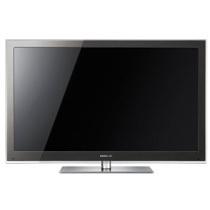 Samsung's 3D Plasmas Available Now[teaser]LCDs not your style? Not a fan of Panasonic? Not to worry! [/teaser] Samsung's 3D plasma sets have finally made it to store shelves. That's welcome news, especially if you like a little choice when it comes to your plasma purchases. Both the 7000 and 8000 series plasmas offer 3D capability and extras like Internet@TV that let you access social media and video streaming services. They've got 1080p resolutions, an ultra-thin design and an increase in energy efficiency over last year's models. If you pick up one of Samsung's plasmas in conjuction with a Samsung Blu-ray Player, you'll be able to pick up the 3D Starter kit – which contains a 3D Blu-ray version of 'Monsters vs. Aliens' and two pairs of 3D glasses – for free. The 7000 series starts with a 50 inch set and an MSRP of $1,999. You can snag it on Amazon for a mere $1,648. The 50 inch 8000, which adds motion judder canceling and Samsungs' Real Black Filter can be had at a list price of $2,299 and a current Amazon sale price of $2067. Source: AmazonPosted Fri May 21, 2010 at 09:00 AM PDT by:
 -
 Bang & Olufsen Launches the BeoVision 8[teaser]B&O's new TV isn't cheap, but at least it looks nice. [/teaser] Bang & Olufsen is a strange case. While other manufacturers focus on making their televisions cheaper and slimmer, B&O seems to take the opposite approach. The BeoVision 8 is much smaller than the BeoVision 10, which had a set of speakers attached that made it just as tall as it was wide. Instead, it's got full range speakers -- specially tuned for voice reproduction -- flanking the screen. Underneath the set are down-facing bass speakers. "What we did," says David Lewis, a designer for B&O, "was move the sound forward and up, designing the TV like a proper stage with an orchestra pit." The BeoVision 8 is what B&O calls "an advanced yet entry-level TV." You'll be able to pick the 40 inch set up this summer at a price of $5,400. Source: Bang & OlufsenPosted Fri May 21, 2010 at 07:00 AM PDT by:
 -
 Google TV is Real – Sony Internet TV Coming This Fall[teaser]So now that it's finally official, let's talk about what it does. [/teaser] The rumors were right, and Google TV is finally on the way. As far as the platform goes, there aren't a lot of surprises. It'll come in the form of fully featured televisions and set-top boxes. It will require the use of an Intel CE4100 processor, and of course, Sony is the first TV manufacturer to jump on the Google TV bandwagon. The concept isn't anything that'll blow your mind. Google TV allows you to search for content on your TV, and then watch that content. The idea is that you'll be able to find what you want when you want to watch it. One surprise partner of Google TV is Dish Network. When Google TV devices start rolling out this fall, Dish Network will be the first fully compatible with the new tech and ready to roll out set-top boxes. In fact, they've already been testing Google TV with some of their customers. And as Google does so well, they've created a video to explain the concept in the simplest way possible. Check out the link below for more. Source Google (via YouTube)Posted Thu May 20, 2010 at 01:00 PM PDT by:
 -
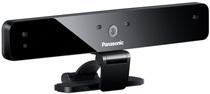 Panasonic Enables Skype, Announces Camera Availability[teaser]And yes, you'll need to shell out $169 for Panasonic's camera. [/teaser] When Panasonic announced the addition of Skype video calling functionality to their new line of televisions there was a bit of a mixed reaction. All in all though, it's added functionality, even if you'll never use it. And it's activated now on Panasonic TVs, which means you can get out there and start chatting it up, as long as you pick up Panasonic's camera. According to Panasonic, their own TY-CC10W camera is "the only camera that enables access to Skype on your VIERA video calling features." It seems like a nice enough camera. It's got four unidirectional mics, echo canceling, and audio processing to help separate voices from background noise. It supports video of up to 1280 x 720 and a maximum of 22fps. Source eCousticsPosted Thu May 20, 2010 at 11:00 AM PDT by: