-
 Vizio Introducing Consumer Grade 3D TVs That Use Passive Technology[teaser]That means no more $150 glasses, but the price of the TV itself is up in the air. [/teaser] You asked for it and Vizio's bringing it. Passive 3D technology means you won't have to shell out $150 for a pair of battery operated glasses, and that's something that people seem to like. At the ESA Line expo, Vizio is going to be demonstrating a 65 inch television that uses passive 3D tech. There's no word on availability or pricing, but since it's aimed at traditional consumers – and it's from Vizio – it should be fairly reasonable. Of course, passive 3D displays are available now if you want them, but they're not anywhere in the realms of useful or cheap. The only way you can get one is by going through the professionals and buying a far too expensive 3D monitor. Hopefully we'll find out more about the 65 inch passive 3D TV during Vizio's press conference at the expo. Source: VizioPosted Mon Jun 21, 2010 at 08:00 AM PDT by:
 -
 Oh, What a Night. HD Advisor Back in '63Editor's Note: Each Friday, High-Def Digest's own HD Advisor will answer a new round of questions from our readers. If you have home theater questions you need answered, send an email to [email protected]. If you've already sent a question and don't see it answered yet, please be patient as we work our way through them. To browse through previously answered questions, visit the main HD Advisor page. Answers by Joshua Zyber 3-D Pass-Through in Receivers Q: I had been under the impression that a receiver labeled as "pass-through" was a bad thing. That it meant a receiver could not process HD audio bitstreams from its HDMI port, so that you also had to connect an optical or coaxial digital audio cable to complete your surround setup (and also miss out on hearing lossless surround audio). Now when looking for 3-D capable receivers, the term "3-D pass-through" for video appears to be a desired feature. One retailer list the Onkyo TX-SR608 receiver as having "3-D Pass Through." Another retailer lists it as "3-D ready," which makes more sense to me. Am I the only one being confused by the new use of the term "pass-through"? A: I think this will just come down to a matter of the same term having different implications in different contexts. In all cases, the phrase "pass-through" means that an A/V receiver can receive a video signal over HDMI on one end, pass that signal through to the other end, and transmit it to the display. You are correct that, in the early days of HDMI receivers, "pass-through" implied that the receiver's HDMI connection was only used to pass video between the disc player and the display. These receivers could not process any audio signals carried by the HDMI cable. For audio, you would need separate connections. This was not a desirable outcome. It's preferred if the receiver can both pass the video through and process audio over HDMI. For the lossless audio formats, that's required. These days, when it comes to 3-D, the term "pass-through" has a different implication. Because the 3-D signal has a different specification than traditional standard-def or high-def video signals, most A/V receivers can't pass the 3-D video. The video will go in on one end but never come out the other. For that reason, 3-D pass-through is very desirable. Of course, you're going to want a receiver to process audio over HDMI in addition to that 3-D pass-through. Fortunately, as far as I'm aware, all 3-D compatible receivers should be able to do that by now. 3-D Glasses and Broadcast TV Q: ESPN has been promoting that they are broadcasting some of the World Cup games in 3-D. The companies that are making 3-D monitors don't have the shutter glasses aspect together yet. I'm referring to non-compatibility between brands, and so forth. How will broadcast media, such as these soccer games, deliver the sync signal, and with compatibility to what kind of glasses? Also, is an upgrade in cable boxes going to be needed to pull this off? A: To answer the first part of your question, the sync signal for 3-D is something specific to each television model and its corresponding 3-D glasses. This signal is not carried in the TV broadcast or encoded on a Blu-ray disc. The specifications for broadcast 3-D and for Blu-ray 3-D are standardized across all equipment on the output side (the cable box or Blu-ray player). The output signal from a Panasonic 3-D Blu-ray player will be identical to the output signal from a Samsung 3-D Blu-ray player. Likewise, the output signal from one 3-D cable box will be the same as any other 3-D cable box. (Note that the standards for broadcast 3-D and Blu-ray 3-D are different than one another, however. Broadcasters will use an inferior form of 3-D that will deliver only about half the resolution to each eye as compared to Blu-ray 3-D. The Blu-ray version is called "Full HD 3D TV" or "FHD3D." Regardless, the hardware for processing both of these two standards should be built into every new 3-D TV.) That's how it works on the output side. On the input side, each television brand may have its own way of processing those 3-D signals and syncing them with the necessary glasses. The sync signal will be added by the TV itself. That's why you'll need a pair of 3-D glasses specifically compatible with the brand of television you own. So, in other words, if you have a Panasonic 3-D TV, you can hook a Samsung 3-D Blu-ray player to it, and it will work fine. You don't need a Panasonic Blu-ray player. But you will need a pair of 3-D glasses compatible with the Panasonic TV, and Samsung glasses may not be. As for your question about cable boxes, this may vary by hardware model and cable provider. Some existing cable boxes may be upgradeable to 3-D with a firmware update, if the cable provider offers one. Unfortunately, I suspect that most cable carriers will force you to swap out the box for a newer 3-D model. Depending on the specifics of the hardware, there may or may not be legitimate technical reasons for that. In any case, I'm sure that they'll use this as an excuse to charge you extra each month for the 3-D box. 3-D Frame Rates Q: Do you have any information about the refresh rates for 3-D material stored on Blu-ray, or the refresh rates of 3-D material displayed using 3-D players or TVs? I was curious if the 24fps rate of film was going to be matched or multiplied for home viewing, or if 3-D technology requires higher rates (to prevent flickering) that would involve 3:2 Pulldown processing at some point in the presentation. For example, the Panasonic Viera TC-P50VT25 appears to refresh each eye at 60Hz. But if a 3-D Blu-ray is going to be backward compatible with 2-D players that want to play at 24Hz, I would think that both the left and right views of the film would still be encoded at the standard 24Hz. A: My understanding is that 3-D Blu-ray discs will be encoded with 1080p video at 24 frames per second, the same frame rate as traditional 2-D Blu-ray discs. The difference is that the 3-D version will be encoded with each frame at a resolution of 1920x2205 pixels. This equates to both the left eye and right eye views for each frame, stacked on top of one another, with some extra blanking pixels in between. (See the HD Guru web site for a graphic representation.) These "packed" frames will be transmitted to the TV at 24 fps. At that point, the TV will decide how it wants to process them and display them on screen. Most models will unpack the frames into separate left and right frames at the traditional 1920x1080 resolution each, and then display them in sequence, much like interlacing. Those original 24 frames now become 48 frames per second. The TV will then multiply those 48 frames to its native display rate of either 120 Hz or 240 Hz. Now, this is where things get tricky. If the TV is a 120 Hz model, that means that the left eye and right eye views must be displayed on screen at 60 frames per second respectively. Because 60 is not an even multiple of 24, the TV will apply 3:2 Pulldown to each of the original frames. Thus, you will lose the 24 fps cadence and may notice image judder. At first, I assumed that a 240 Hz model TV would display the left and right views at 120 frames per second each, thus allowing the set to apply 5:5 Pulldown and maintain the original cadence through simple multiplication of frames. However, reader Lee pointed out that these sets actually insert black frames in between the video content frames. Therefore, the screen still only shows 60 video content frames per eye per second. Essentially, this means that there's no way to avoid 3:2 Pulldown with 3-D at the present time. Whether that might change in the future, I can't say. [Note: Portions of this answer have been updated since original publication.] 3-D Compatibility of Older 120 Hz TVs Q: I realize there are soon to be many different 3-D TVs on the market, but right now they all seem to be quite expensive. I realize 3-D technology is achieved by a 120 Hz signal that alternates each frame and the shutter glasses are synchronized to match these alternations. I was wondering, if I had a regular 120 Hz TV that supported a 120 Hz input signal, would it be possible to buy some kind of device that I could place between my 3-D enabled device and my TV that would interpret the 3-D signal, send the signal that the glasses use to synchronize, and then pass that signal to the TV? This way anybody with a 120 Hz TV that could read a 120 Hz signal would be able to be converted into a 3-D TV. This is a similar idea to back when HDTVs required a digital tuner set top box in order to actually receive an HDTV signal. Are there any such devices currently planned? A: From a theoretical standpoint, what you describe might be possible if the TV could accept a 120 Hz input signal. Unfortunately, I don't know of any HDTVs that actually will accept a 120 Hz signal. All that I'm aware of are limited to 24 or 60 HZ input, and then multiply those signals internally to the 120 Hz or 240 Hz display. So, that pretty much makes this a moot point, I'm sorry to say. Homework Assignment: You Be the Advisor The HD Advisor knows many things, but he doesn't know everything. Some questions are best answered with a consensus of opinions from our readers. If you can help to answer the following question, please post your response in our forum thread linked at the end of this article. Your advice and opinions matter too! Connecting Laptop to HDTV Q: I have some playback problems when connecting my Dell laptop to my Samsung LN46B640 46" HDTV. The computer image accurately translates to the television except when I watch certain videos. Sometimes video streaming through Windows Media Player and other media players will not display on the television. The image works perfectly on the computer screen, but only a black image displays on the television. Check back soon for another round of answers. Keep those questions coming. Joshua Zyber's opinions are his own and do not necessarily reflect those of this site, its owners or employees.Posted Fri Jun 18, 2010 at 11:45 AM PDT by:
 -
 AT&T May Cut U-Verse Spending[teaser]If the FCC tightens regulation of internet companies, AT&T's CEO says the company may stop expanding the U-Verse service. [/teaser] So, the whole net neutrality thing is happening. The FCC is going to be rolling out new regulations on internet providers that would prevent unfair practices in regards to charges, services, and practices. It's a pretty contentious issue, especially if you're the CEO of an internet provider. "If this Title 2 regulation looks imminent, we have to re-evaluate whether we put shovels in the ground," says AT&T's Randall Stephenson. That's a bit of a threat from AT&T, saying that they'll stop expanding if the regulations hit. That would mean that U-Verse internet would stop where it is now, and there would be no additional coverage. But it would mean that U-Verse TV and phone services stop expanding too, which could be detrimental for anyone living in a town with a single television provider. Source: The Wall Street JournalPosted Fri Jun 18, 2010 at 10:00 AM PDT by:
 -
 Logitech's Google TV Box Gets a Name[teaser]After a long naming process, it's now called the Logitech Revue with Google TV. [/teaser] Logitech spent some time getting the name just right for its new Google TV box. "At Logitech, we’re known for certain kinds of products," writes Ashish Arora on the official Logitech blog. But, he says, the Google TV box does everything they're known for and more. "So it couldn’t just be the Harmony Box or Squeezebox TV or, even worse, the Logitech TV Hub (although believe me, we’ve discussed them all)," adds Arora. So now it's the Logitech Revue with Google TV. The inspiration for the name came from the variety show style revues that were popular during the early 20th century. That's the only big update for now though. We'll find out a lot more this fall when Google TV products start to hit the shelves. Source: LogitechPosted Fri Jun 18, 2010 at 07:00 AM PDT by:
 -
 Father's Day: HDD's Last Minute Blu-ray Shopping Guide![teaser]Don't forget, Father's Day is this Sunday. If you're looking for some last minute ideas, HDD reviewer Aaron Peck is here to help![/teaser] See that guy over there flipping through the used DVDs. That's my Dad. Yes, he just bought a Blu-ray player, but he's already forgotten that buying Blu-rays is requisite. Oh crap, he's already got a few titles in hand, time to intervene. "Dad, what are you doing?" "Picking up some movies." "But, you just bought a Blu-ray player, why are you searching through the DVDs?" "Those Blu-rays are too much money," this exclamation is followed by a wave of the hand towards an overpriced Blu-ray shelf. "Yes, these Blu-rays are too much. Did you realize we're at Hastings?" "I like it here; they've got a great used DVD selection." I can see that this is going to be tough, "Why did you buy a giant high-def TV and a Blu-ray player in the first place then?" After a moment of contemplation, my Dad puts down the used copy of 'Catwoman' he's holding and replies, "The guy at Best Buy was a really good salesman, plus he gave me a dynamite deal." "So, why aren't you getting any Blu-rays?" "Because the salesman said Blu-ray players also play DVDs." I don't know. Maybe it's a generational thing and there's a technological gap that holds them back, or may you have a more technologically savvy father. Whichever Dad you might have, shopping for them on Father's Day can be challenging. Whether he's the kind who doesn't realize the importance of upgrading his DVD collection ("But, I bought all these DVDs, I'm not just going to get rid of them"), or the kind of Dad who buys up every new release that hits the shelves ("Please tell me again, Dad, why you're holding 'Twilight: New Moon.' Are you on Team Edward or Team Jacob?") you still have to get him something for Father's Day. So how do we shop for our different types of fathers? The following is a list of Dads that we all might have and suggestions on what to get them. Remember, he's the one that didn't tell your mom when he caught you making out with your high school crush in the basement, when you said you were only going down to watch 'Gremlins.' New Releases Only Dad Doesn't matter what the movie is really, as long as it's on the new release rack he'll pick it up. 'Inglourious Basterds,' check. '2012,' check. 'Couples Retreat,' ugh, check. To this Dad, Blu-rays are only available for movies after the format was invented. One mention of the word "catalog" causes a furrowed brow and confused look. "Older movies Dad, catalog means older movies." "They put older movies on Blu-ray? How does that even work?" "None of that matters right now, let's just find you some movies that you didn't know existed in high-definition." As you walk him past the giant cardboard cutout displays for 'Avatar' and 'Sherlock Holmes,' his look slowly changes from confusion to glee. "Holy cow, they have 'The Natural,' and 'Field of Dreams'! Do they have 'Man from Snowy River?" After suppressing your giggle, "No Dad, but I'm sure they'll get to that one soon." Showing this Dad that other movies exist outside of the new release realm will be the gift that keeps on giving, and if your gift-giving conscience allows you, it could suffice as your Father's Day present. If not, picking up any John Wayne movie ('Rio Bravo,' 'The Searchers,' or 'The Cowboys' ) on Blu-ray would go a long, long way in showing him the vastly expanding catalog Blu-ray library. Questionable Taste Dad This Dad is a curious creature. It's amazing how he can come home with bags of films that run the gamut of the Quality Spectrum, everything from 'Anaconda,' to 'Braveheart.' After looking at his haul it's easy to be proud and mortified simultaneously. The best cure for the Dad with Questionable Taste is to get him a collection of films that represent quality films across the board. Box sets are a perfect solution to the problem. Picking up the 'Rocky' collection on Blu-ray would be a nice start. Five out of the six films are great, giving you a wonderful ratio of good films compared to iffy ones. Other solid box sets include 'The Mel Brooks Collection,' and 'The Bourne Trilogy.' Another option for this type of Dad is purchasing a quality TV show that spans hours and hours of excellent storytelling. Blu-rays of 'Dexter,' 'Planet Earth,' and even '24,' can give him a new found love for watching TV on Blu-ray. Snobby Dad Look, all Dads don't swig beer, tell dirty jokes, and play golf every other weekend. Some fathers out there are heads of university English departments, sip lattes, and read poetry for fun. You may have a Dad like this, and find him very hard to please. This is where the classics come in. Showing your snobby Dad that they have classic movies like 'Casablanca,' on Blu-ray should be the way to go. Introducing him to the foreign Blu-ray scene should go over well. He may be one of those haughty types that thinks if it doesn't have subtitles, I'm not watching it. The German film, 'The White Ribbon' is due out in a couple weeks, and promises to satisfy the snobby and casual film watcher alike. Get him a few Criterions to start out with, and he just may be collecting for the rest of his life. 'Vivre sa Vie,' 'M,' 'Everlasting Moments,' and 'Pierrot le fou' would be perfect starting points to show him exactly what can be had when investing in Criterion Blu-rays. DVD Hound Dad His DVD collection is legendary. His Excel spreadsheet catalogs all his titles alphabetically, and he's even engineered an efficient system for lending them out. He was a very early DVD adopter, and now the money he has spent amassing his collection could've easily put you through college. In short, it's his baby. He isn't going to give it up without a fight. First thing's first, get him to find out what HD actually looks like. Remember he went from VHS to DVD, a world of difference. In his mind it's darn near impossible anything could look better. He's most likely been using standard definition cable for years. A small present might be getting him hooked up, for a little extra money with HD cable (assuming he has an HD-ready TV. If not, well you know what to do). Make sure to show him what sporting events look like on regular cable and then what they look like in HD. This is a good segue into mentioning Blu-rays. Don't be frightened if your father recoils in fear. He's most likely heard from his DVD-loving buddies that Blu-rays are "Too expensive," "Don't look any different," "Are just another way for the movie studios to bilk more money out of you because you're forced to re-buy your entire collection." After you've talked him out of the corner he's cowering in, take him over to your local Best Buy and show him a side-by-side comparison. Once he sees the error of his ways, it may be hard to curtail him when he's spending his retirement money on the latest and greatest equipment. This is when you have to step in and say, "Dad, I know you're excited, but that three thousand dollar 3-D TV probably isn't going to be the best purchase right now." To get his Blu-ray collection started, you may want to go with some great demo material like 'Avatar,' or any of the Pixar titles ('Up,' 'Monsters, Inc. and 'Toy Story') to give him a good idea of what he can expect with his new purchase. Weaning him off of DVDs, will be the challenge, but give it time. Future Father's Days you can continue to purchase Blu-rays for his favorite films on DVD, slowly replacing his collection. It will be a slow process, but be proud of yourself it definitely wasn't an easy road. Sports Junkie Dad His gigantic high-def TV is used for nothing more than watching every sporting event ever broadcast. There's a simple solution here. Getting this Dad any few sports movies should suffice nicely. If he's a football fan give him 'Remember the Titans,' or 'Any Given Sunday,'. Baseball fan? No problem we've got comedic baseball with 'Major League,' dramatic baseball with 'The Rookie,' or Kevin Costner baseball with 'Bull Durham.' Is your Dad a basketball guy? Well, Blu-ray has him covered there too. Take your pick from feel good teamwork types like 'Coach Carter,' or 'Glory Road.' Want to go more in the way of sporting classics? Try the storied 'Hoosiers.' After buying all these sports films, you may find yourself lamenting that the 'Mighty Ducks' hasn't found its way to Blu-ray yet. I know I have. Action Jackson Dad Balls-to-the-wall, one hundred and ten percent action all the time. Explosions, gunfire, and balled fists connecting with faces continuously emanate from his sound system. This Dad is pretty easy to buy for actually. Any action film will do, but let's try and stick to the ones that are actually good films as opposed to getting him 'Transformers 2' and then having to suffer through it every time he sits down to watch it. 'The Dark Knight,' and 'Batman Begins,' should start things off well. Follow those up with 'Iron Man,' 'Casino Royale,' and 'Enemy at the Gates,' and you've got yourself a pack of action that also contains some quality cinema. So, whichever Dad you may have (or whatever combination of the above) you have a general roadmap of what to do if you're planning an HD-centric Father's Day surprise. Your Dad is special, he raised you, and made you the person you are today, the least you can do for him is show him what he's doing wrong and correct it. Happy Father's Day!Posted Thu Jun 17, 2010 at 01:45 PM PDT by:
 -
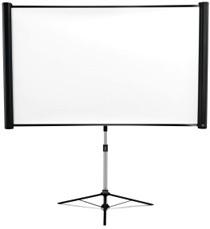 Epson Launches a New Portable Projection Screen[teaser]The ES3000 is 80 inches of easy-to-move screen ready for you to watch. [/teaser] Projectors are a great way to get a big screen experience without breaking the bank, but when it comes to picking a screen, the choices can get downright expensive. The ES3000 isn't going to cost you an arm and a leg. It's only $249 for an impressive 80 inches of screen. It's nice and easy to set up, take down, move and store. It's even got a wheeled case so you don't have to carry it. Of course, the ES3000 isn't going to live up to the standards of a nice permanent screen. It's made as an all-in-one projector for movies and presentations alike. But it can adjust to 4:3, 16:9 or 16:10 aspect ratios without and hassle. Epson's ES3000 might not be the right projector screen for your living room, but for your backyard, garage or other unconventional viewing space, it might be just the thing. Source: eCousticsPosted Thu Jun 17, 2010 at 01:10 PM PDT by:
 -
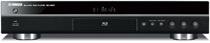 Yamaha Announces the BD-S667 Blu-ray Player[teaser]$329 gets you Deep Color, PCM output, and Netflix streaming. [/teaser] Yamaha's got a new Blu-ray player and it looks pretty slick. The BD-S667 does just about everything you could expect a middle of the road Blu-ray player to do. It plays movies in 1080p/24Hz, but that's to be expected at this point. It supports x.v. Color and Deep Color, and upscales DVDs to 1080p. It's can handle all current HD audio formats, which, again, is to be expected. It can bitstream and send Linear PCM out through HDMI, or it can downmix audio for 2-channel analog output. The 192kHz/24-bit audio DAC is a nice touch. You can stream movies from Netflix with the 667, and watch WMV videos thanks to DLNA certification. It can display JPEGs while simultaneously playing MP3s, which could be a pretty slick background display at parties. It's also got a Setup Wizard that, well, makes it easier to set up. Source: eCousticsPosted Thu Jun 17, 2010 at 11:00 AM PDT by:
 -
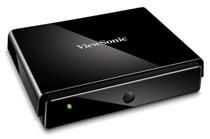 ViewSonics' NexTV VMP75 is a Media Player and Web Browser in One[teaser]But before you get too excited, it doesn't handle Flash. [/teaser] Network media players must be cheap and easy to build; they're coming out at an impressive rate. Viewsonic's NexTV VMP75 doesn't exactly offer anything new, but it can do just about everything you need it to. For starters, you can play just about any movie file you've got with it. It handles H.264, AVI, MKV and DivX, and a range of audio files as well. And you can get that content from any networked device in the house, or through an attached storage device. The VMP75 plays back files in 1080p, and offers an HDMI port to hook right in to your television. But of course, you can send audio out through the S/PDIF optical port as well. There's no WiFi capability built in to the NexTV, so you'll have to plug it in via Ethernet, unless you pick up the optional adapter. It streams from the net too. Netflix is at the top of the list, but you can also get content from YouTube, Live365.com, SHOUTcast Radio and more. You can even browse the net, but sadly there's no flash capability. The NexTV VMP75 is up for pre-order on Amazon now at a price of $129. Source: AmazonPosted Thu Jun 17, 2010 at 07:00 AM PDT by:
 -
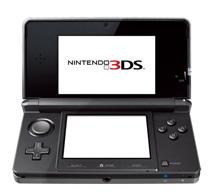 3D Movies Are Coming to the 3DS[teaser]Nintendo's new handheld will give you glasses-free 3D movies. [/teaser] Do you like the idea of glasses-free 3D? How about a portable 3D device? How about both? That's what Nintendo's bringing to the table. We don't know when or how much it will cost, but the 3DS is on the way. It's a 3D capable handheld system in the style of the Nintendo DS and it's incredibly cool. You can switch the 3D on and off, or adjust the depth, and of course, you won't need to wear glasses. But what makes the 3DS announcement even more exciting is that Nintendo also mentioned that 3D movies would be on the way. Again, there's no word on a price point for the movies, release dates or even potential titles. The practicality of the 3DS as a movie watching device really could go either way depending on all of that. But if you're looking to get into 3D, the 3DS will definitely be the cheapest way to go. Source: NintendoPosted Wed Jun 16, 2010 at 11:35 AM PDT by:
 -
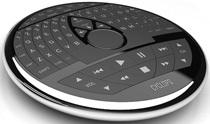 The Cyclops Remote is… Unique[teaser]This futuristic looking, potentially unwieldy remote was created out of Play-Doh. [/teaser] Why they mention it in the press release is a mystery, but the Cyclops remote was first crafted out of Play-Doh. Then again, they spell it "Play Dough" so it could easily have been from a non Hasbro branded doughy play substance. But that's hardly the point. The Cyclops is neat looking, but it's really hard to get a feel for the practicality of the device. It's round and it looks big. The size isn't specified, but it's either too large to use practically, or it's comfortably small with buttons that are way too small to use. The goal is for the Cyclops to be the only controller you'll ever need. It's got a full QWERTY keyboard and plenty of controls, all laid out to be used by – apparently – your thumbs. Genos, the company behind the Cyclops, says that it's ready to go to full scale manufacturing. The company is currently looking for distribution, and hopes to have these out for Christmas. Source: eCousticsPosted Wed Jun 16, 2010 at 11:00 AM PDT by: