-
 Jordan Peele Set to Host New TWILIGHT ZONE Series for CBS All Access[teaser]Jordan Peele's next stop ahead will be The Twilight Zone.[/teaser] Jordan Peele (Get Out) has been announced as the host and narrator for CBS All Access' new The Twilight Zone streaming series. The upcoming show will be a modern reimagining of the original 1959 anthology series which was hosted by creator Rod Serling. "Rod Serling was an uncompromising visionary who not only shed light on social issues of his time, but prophesied issues of ours," said Jordan Peele. "I'm honored to carry on his legacy to a new generation of audiences as the gatekeeper of 'The Twilight Zone.'" Check out the announcement teaser below! The original Twilight Zone series ran for five seasons from 1959 until 1964. The show told standalone sci-fi stories in every episode, frequently using metaphor and socially conscious writing to examine timely cultural themes. All 156 episodes of the show are now available to stream through CBC All Access. Likewise, all five seasons of the series are available on Blu-ray in a Complete Series Box Set. Though an exact release date for the reboot has not been announced yet, new episodes of The Twilight Zone are set to begin production this fall for a 2019 debut through CBS All Access. CBS Television Studios will produce the series in association with Jordan Peele's Monkeypaw Productions and Simon Kinberg's Genre Films. In addition, Peele and Kinberg will serve as executive producers, along with Win Rosenfeld, Audrey Chon, Carol Serling, Rick Berg, and Greg Yaitanes. Host and producer Jordan Peele is best known as the director and Academy Award-winning writer behind Universal's Get Out, and as one half of the sketch comedy duo Key and Peele with Keegan-Michael Key. A current CBS All Access subscription costs $5.99 per month with reduced commercials or $9.99 per month for a commercial-free plan. Other recently announced CBS All Access original series include a new Star Trek show starring Patrick Stewart. Source: CBS All AccessPosted Thu Sep 20, 2018 at 11:30 AM PDT by:
 -
 Sony Launches Pre-Orders for PlayStation Classic Mini Console[teaser]The new mini console will include 20 pre-loaded games.[/teaser] Sony has announced a new PlayStation Classic retro game console. The system is designed to look like a miniature version of the company's original PlayStation and will include two controllers and 20 pre-loaded games. Pre-orders are now live for $100 through Amazon and Best Buy. The PlayStation Classic mimics the look and feel of the original system but is about 45% smaller. Likewise, the device doesn't actually feature a disc drive. Instead, the Open button is used to switch games and the Reset button is used to suspend games. The package includes the console, two wired controllers, a virtual memory card, an HDMI cable, and a USB cable -- though users will need their own separate USB AC adaptor to power the unit. 20 games will be pre-loaded on the system and playable in their original formats. While a full list of titles has not been announced yet, the collection will include games like Final Fantasy VII, Jumping Flash, Ridge Racer Type 4, Tekken 3, and Wild Arms. More games will be revealed at a later date. The original PlayStation console was first released on December 3, 1994 in Japan and September 9, 1995 in the US. Over 100 million units of the console have been sold. The device was succeeded by the PlayStation 2 in 2000, the PlayStation 3 in 2006, and the PlayStation 4 in 2013. Sony's PlayStation Classic ($100) is now available for pre-order for a December 3 release. The retro console will join similar previously released mini systems from Nintendo, including the NES Classic Edition ($60) and SNES Classic Edition ($80). Source: PlayStation BlogPosted Wed Sep 19, 2018 at 03:25 PM PDT by:
 -
 Marvel Reportedly Developing LOKI & SCARLET WITCH Shows for Disney Streaming Service[teaser]Big screen Marvel heroes and villains are set to hit the studio's new streaming platform.[/teaser] According to a report by Variety, Marvel is developing new shows focused on its Marvel Cinematic Universe characters for Disney's upcoming streaming service. The MCU series will join the previously announced Star Wars show from Jon Favreau. Though the studio has not confirmed the news, Variety's report indicates that Marvel's plan centers on several limited series starring MCU heroes and villains who have not already had their own standalone films. This includes shows about Loki and Scarlet Witch with Tom Hiddleston and Elizabeth Olson expected to reprise their roles. With that said, major characters like Iron Man and Captain America who have already starred in their own movies will not be featured on the streaming platform. The potential series are expected to feature six to eight episodes each and will likely carry big budgets similar to major studio productions. Marvel Studios and Kevin Feige are also expected to be directly involved in the shows' development. Full details on Disney's streaming service have not been revealed yet, but the platform is set to launch in the fall of 2019. Beyond the Marvel and Star Wars shows, other series reportedly planned for the service include a Monsters Inc show and a High School Musical project. Likewise, movies expected to premiere on the platform include Don Quixote, Stargirl, Togo, Lady and the Tramp, The Paper Magician, 3 Men and a Baby, Sword and the Stone, Timmy Failure, Magic Camp, and Noelle. Outside of streaming news, Marvel recently released the first trailer for its upcoming Captain Marvel film. The movie is set to hit theaters on March 8, 2019. Source: VarietyPosted Wed Sep 19, 2018 at 08:10 AM PDT by:
 -
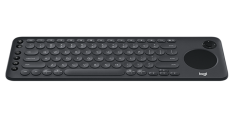 Logitech Unveils New K600 Wireless Keyboard for Smart TVs[teaser]The new keyboard is designed to make Smart TV navigation easier.[/teaser] Logitech has announced the latest addition to its keyboard lineup. The K600 TV Keyboard features a touchpad and D-pad to go along with standard keys, offering support for text entry and precise menu and cursor control for select smart TV models. "Finding web content and navigating menus on your Smart TV can be a chore," said Art O'Gnimh, global head of keyboards at Logitech. "The Logitech K600 TV Keyboard provides familiar text typing and cursor control, making it easier than ever to interact with and unlock the full potential of your Smart TV." The K600 TV Keyboard is geared toward living room use with a smart TV. The unit's curved shape, slim size, and light weight make it easy to rest on a user's lap, store face down on any table, or hold for simple two-hand navigation. Thanks to its standard keys, touchpad, and d-pad, the device offers easy navigation and control for web browsers and media apps on supported smart TVs, making it much simpler to enter in text for searches or select content in streaming services. In addition, the keyboard also features dedicated media and navigation keys for remote control functions like volume. The device supports a wireless range of 15-meters and is rated for 12-months of battery life. Full smart TV controls are supported for select models from Samsung, LG, Sony BRAVIA, and Philips, as well as select Toshiba and Insignia Fire TVs. To check whether your TV model is supported, click here. Likewise, the keyboard is compatible with Windows and Mac computers, as well as iOS or Android mobile devices. The K600 TV Keyboard is set to launch in October for a suggested retail price of $79.99. Source: LogitechPosted Tue Sep 18, 2018 at 09:35 AM PDT by:
 -
 VIZIO Details New Dolby Atmos Sound Bar Systems[teaser]Three Dolby Atmos sound bar models have been detailed.[/teaser] VIZIO has announced pricing and availability for its 2018 Dolby Atmos Sound Bar lineup. The collection includes a 36" 5.1.2 System ($499.99), a 46" 5.1.4 System ($999.99), and a 46" 3.1.2 System ($799.99). "VIZIO's latest Dolby Atmos home theater sound bar integration continues to prove our dedication to delivering high-performing, intuitive products at the incredible value for which we're known," said Bill Baxter, Chief Technology Officer, VIZIO. "This next iteration of audio solutions to hit retailers offers consumers an immersive cinema-quality home audio experience thanks to hardware advancements such as upward-firing speakers that allow sound to reflect off the ceiling and truly encapsulate listeners." The 36" 5.1.2 System features a 36-inch sound bar unit with two upward firing drivers, two rear satellite speakers, and a wireless 6-inch subwoofer. Meanwhile, the 46" 5.1.4 System features a larger 46-inch sound bar unit with two upward firing drivers, two rear satellite speakers with their own upward firing drivers, and a larger 10-inch wireless subwoofer. Likewise, a 46" 3.1.2 System will also be available with that same configuration minus the satellite speakers. All three models feature support for Dolby Atmos decoding in lossless TrueHD over HDMI from a connected Blu-ray player or in Dolby Digital Plus via a connected set-top box or smart TV. Likewise, the systems include DTS Virtual:X tech for simulated immersive audio if a user does not want to engage the upward firing drivers. With that said, the units do not support DTS:X decoding. Connectivity options include an HDMI input with 4K HDR passthrough, an HDMI ARC port, optical, Ethernet, Wi-Fi, and Bluetooth. In addition, the sound bars feature Google Chromecast built-in, allowing users to stream music from Chromecast-enabled audio apps like Google Play Music, iHeartRadio, Pandora, and Spotify. A dedicated remote is included as well, though customers can opt to use their mobile devices for control instead via the free VIZIO SmartCast app. Finally, the new sound bar lineup also supports voice-control through Google Assistant. The 36" 5.1.2 System (full review coming soon) is now available for an MSRP of $499.99. Meanwhile, the 46" 5.1.4 System ($999.99) and 46" 3.1.2 System ($799.99) are set to start shipping later this year. Source: VIZIOPosted Tue Sep 18, 2018 at 05:00 AM PDT by:
 -
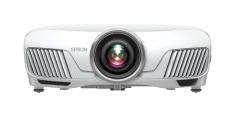 Epson Reveals Home Cinema 4010 4K PRO-UHD Projector with HDR[teaser]The company's newest home theater 4K HDR projector has been unveiled.[/teaser] Following the reveal of the Pro Cinema 4050 earlier this month, Epson has now announced another projector with the company's new proprietary 4K PRO-UHD technology. The Home Cinema 4010 is now available for $2,000 from Best Buy and other retailers. "Epson's new Home Cinema 4010 4K PRO-UHD projector represents a new type of 4K experience for home theater projection," said Rodrigo Catalan, senior product manager, Projectors, Epson America. "Utilizing proprietary resolution-enhancement technology, along with advanced forms of HDR and image processing, the Home Cinema 4010 produces incredible brightness, color accuracy, and image detail for the ultimate 4K experience." Like the Pro Cinema 4050 model, the Home Cinema 4010 4K Projector features 4K PRO-UHD tech with a high performance optical engine, Epson's 15-element glass projection lens, and advanced pixel-shifting to produce 4K images (each pixel is shifted diagonally to double Full HD resolution). Unlike the 4050, however, the 4010 does not include the Pro Cinema Kit. Meanwhile, the device offers 2,400 lumens of color and white brightness, a contrast ratio up to 200,000:1, 12-bit digital processing, and HDR10 playback support at 24fps. Likewise, the unit is capable of covering the entire DCI-P3 wide color space. Finally, Full HD 3D projection support is included as well. Here's a full rundown of key specs and features per Epson: Epson 4K PRO-UHD technology – Utilizes dedicated hardware processing to precisely control three-individual 1920 x 1080 LCD panels that accepts a maximum input resolution of 4096 x 2160. This advanced form of pixel-shifting technology produces an exceptional 4K experience, including color, brightness and resolution, that is similar to, competing home theater models claiming native 4K performance HDR10 High Dynamic Range and Rich Black Contrast — full 10-bit color output and a contrast ratio up to 200,000:1 deliver an extraordinary range of color and detail in both bright and dark scenes Advanced 3-Chip, 3LCD Technology — sophisticated parallel pixel processing and a state-of-the-art 3-chip architecture deliver amazing color accuracy, color brightness and color gamut Epson's Advanced Projection Lens — state-of-the-art 15-element glass projection lens displays a bright, uniform image with virtually no hot spots or chromatic aberration L*a*b* Ultra Wide Color Gamut — delivers 100% of the 3-dimensional DCI-P3 color gamut, the digital cinema standard, with 50% wider color gamut than Rec. 709 3-Axis Precision Motor — for powered focus, 2.1x zoom, up to ± 96% horizontal and up to ± 47% vertical lens shift, and 10 preset positions Professional Level Color Accuracy — low Delta E, for extremely accurate color reproduction 100% Balanced Color and White Brightness — 2,400 lumens of color and 2,400 lumens of white brightness4 for vibrant, rich color Smooth, Crisp Images and Transitions — 12-bit digital color processing chip with Frame Interpolation and proprietary Advanced Motion Control No Color Wheel — images are free from any distracting rainbow effect; balanced color and white brightness means no white segments Source: Epson via PR NewswirePosted Tue Sep 18, 2018 at 12:01 AM PDT by:
 -
 Sinemia Announces Movie-Per-Day Subscription Plan for $30 a Month[teaser]A new Sinemia plan has been launched to fill the void left by MoviePass' recent changes.[/teaser] Following the recent termination of MoviePass' $10 unlimited plan, rival service Sinemia has launched a new Movie-Per-Day option of its own for $30 a month. The plan now joins the company's other existing options which start at just $5 per month. "While most of our plans are focused on the modern moviegoer who sees one, two, or three movies each month, we want to serve every type of movie lover and that includes frequent moviegoers looking for an unlimited tickets option," said Rifat Oguz, CEO and founder of Sinemia in the release. "We've spent four years testing and fine-tuning our unlimited tickets model and are confident this is the right price to sustainably offer such a plan." With the Sinemia Unlimited Plan, subscribers can get one 2D movie ticket a day for $30 per month. The service works with all theaters and there are no blackout dates. Likewise, the plan also supports advance ticket options. Once a user signs up, they simply need to download the Sinemia app and then select their desired movie and time. Customers can then receive their tickets online and the system does not require a physical card for use. The subscription is billed annually and there is no activation fee. Beyond the new Unlimited Plan, Sinemia also offers a variety of additional movie ticket options, including a three ticket per month plan for $18 that includes 3D, IMAX, and other premium formats. For a full list of Sinemia plans, click here. Meanwhile, rival service MoviePass continues to offer a three 2D movie ticket per month option for $10, and AMC A-List offers a three movie ticket per week option for $20 per month. Source: Sinemia via Business InsiderPosted Mon Sep 17, 2018 at 12:35 PM PDT by:
 -
 Christopher Nolan & DGA Launch Campaign Against TV Motion Smoothing[teaser]Turns out the Dark Knight director hates motion smoothing just as much as we do.[/teaser] As reported by Slashfilm, Hollywood is going to war against Motion Smoothing and other inaccurate TV settings. Spearheaded by directors Christopher Nolan, Paul Thomas Anderson, and Johnathan Mostow, the DGA (Directors Guild of America) has reached out to its members and consumer display manufacturers in order to help establish a new "reference mode" for TVs. Motion Smoothing, otherwise known as motion interpolation or "the first thing I turn off when I unpack a new TV," is a common feature found on many modern displays designed to produce a more fluid and sharp image during motion. To do this, the setting artificially increases the natural 24fps cadence of film content to match the 120 Hz or higher refresh rate of many consumer displays by generating extra frames in between existing ones. Unfortunately, though indeed smoother, this technique typically results in a "soap opera effect" with an unnatural and overly processed appearance that can make movies look like cheap video recordings. And while this setting can be manually disabled on most TVs, Motion Smoothing is usually turned on by default -- along with several other artificial picture options that result in inaccurately sharpened images and unnatural colors. Unhappy with how their movies are being presented in the home, Hollywood directors are now hoping to help eliminate these settings via a "reference mode" that better represents a filmmaker's artistic intent. To do this, Christopher Nolan and Paul Thomas Anderson have reached out to TV manufacturers through the UHD Alliance. As a result, the DGA has now sent out a survey to its members in order to help determine what this proposed TV "reference mode" should feature and how it should operate. The answers will then be used to create a set of guidelines for the UHD Alliance to consider. Here's a rundown of some key questions form the survey obtained by Slashfilm: How important is it to you to have a simple way to get consumers’ home TV setup similar to monitors in the color-grading suites for viewing film and television content that YOU created? For the following aspects of film and television playback, what elements of creative intent should be maintained in current home displays? Motion/frame rate should match the original frame rate (no motion interpolation) Home displays should maintain what was seen in the grading suite – in terms of color, brightness, black levels, white point, etc. Dynamic range should be preserved – HDR should look like HDR, standard dynamic range should look like standard dynamic range, dynamic range should not be stretched. Would you expect this “reference mode” to work for both SDR (standard dynamic range) and HDR (high dynamic range) content or just SDR or just HDR? Please choose one. Would you expect this “reference mode” to be called the same thing on different manufacturers of TVs? Though the concept of a "reference mode" is nothing new -- select displays essentially already offer such a feature via THX, Technicolor Expert, or Netflix Calibrated modes -- the idea of a universal pre-calibrated option across all brands approved by the DGA sounds like a home theater dream come true. Of course, this is only the first step toward making such a feature a reality, but it looks like Nolan and company are helping to steer the industry in the right direction. Source: SlashfilmPosted Mon Sep 17, 2018 at 10:45 AM PDT by:
 -
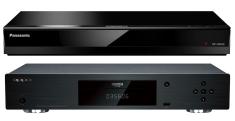 Do You Still Need Your Oppo? Oppo UDP-203 vs Panasonic DP-UB820 4K ShowdownOh, how we all adore our Oppo Blu-ray & 4K Blu-ray players! The superior build quality, the plethora of features that cater to serious videophiles and audiophiles, the terrific upscaling and downconverting, and gorgeous picture quality. When the company ceased production of its beloved disc players earlier this year, movie fans mourned and bemoaned the loss, but as other companies like Panasonic and Pioneer step up to fill the void, many of us are quickly realizing there is indeed life after Oppo, and the future isn't as bleak as we thought it would be. With new players both on the market and on the horizon, the question must be asked... Do we still need our Oppo players? Technology continues to evolve, so should we cling to the past or embrace the future? Do the Oppo players still reside on a rarefied plane, or should we pack them away on a closet shelf? I still own two Oppo Blu-ray players - the BDP-103D and the UDP-203 - and, with apologies to the late, great Charlton Heston, no one will pry these excellent players from my cold, dead hands anytime soon. Yet I also love my brand new Panasonic DP-UB820 Blu-ray player, which now occupies the flagship position in my primary home theater setup. If I was in the market for a new player right now, would I pay a king's ransom for a new Oppo player on eBay or "settle" for the Panasonic? That's a no-brainer. Panny all the way! For $499, the Panasonic UB820 gives me everything I want right now from a UHD player, including built-in support for the fledgling HDR10+ format. The Oppo, though, has some bells and whistles the Panny doesn't (especially when it comes to audio), so there are some strong arguments for sitting tight with your Oppo for the time being, especially if you own a projector with an anamorphic lens. [Teaser]To help you decide whether to remain on the sidelines or wade into new waters, let's take an in-depth look at the Oppo UDP-203 and Panasonic DP-UB820, so you can determine what might work best for your setup and viewing/listening preferences.[/Teaser] Build & Connectivity Oppo has always prided itself on producing a sturdy, stylish machine that looks and feels like its built for performance. Unpacking one of those brand new babies from its carton was always a supreme delight, and it's an experience I will sorely miss. Yet once the Oppo is safely ensconced in your equipment rack, it doesn't exude the same cachet. While the Panasonic build definitely feels "cheaper," and its lighter-by-two-pounds weight lacks the signature Oppo heft, some sleek accents, and a shiny finish make it an attractive enough component that's definitely a cut above previous Panny Blu-ray models. While the rear panels of both players feature dual HDMI out jacks (so the video signal doesn't need to pass through your A/V receiver), an optical audio output, 7.1 analog capability, an Ethernet port, and a USB 3.0 port, Oppo ups the ante with an HDMI input, a coaxial audio out jack, an additional USB 3.0 port, an RS-232C serial control port, a trigger output, and a trigger input. I'm a simple HDMI guy, so the Panasonic suits me just fine, but if you have a complex setup and flexibility is important to you, then Oppo has the edge. Advantage: OPPO Video Settings While both players allow you to select your preferred resolution, color depth mode (YCbCr or RGB), deep color output level, 3D, 24p, HDR, and Dolby Vision settings (yes, the promised firmware update now equips all UB820s with Dolby Vision support), and both enable you to change the position of subtitles, that's where the similarities end. The Oppo menu does let you save three custom picture modes (composed of adjustable brightness, contrast, hue, saturation, sharpness, and noise reduction levels), but I've never taken the time to fool with that, preferring instead to adjust the picture, if necessary, through my TV. It also has nine zoom settings, on-board 3D conversion (so you can lend your 4K discs a more dimensional feel...if you have a 3D TV), the ability to change the color, outline, size, and sync of subtitles, and features three pre-set modes for HDR to SDR downconversion. The Panasonic UB820 doesn't have any zoom, 3D conversion, or adjustable downconversion settings, but is cutting edge when it comes to UHD settings, offering HDR10+ support, 4K60p and HDR/Color Gamut settings, HLG/PQ Conversion, 25p/50p output, and SDR to HDR conversion on SDR network content. Its biggest leap forward, though, is the HDR Optimizer, which can be launched during playback of an HDR disc. This handy tool has four preset brightness options that enable you to tailor HDR output on the fly to suit the light levels in your viewing environment. The Optimizer also opens up a more intensive set of tools that allow you to tinker with dynamic range and brightness levels, as well as black and white tone curves, which ever so slightly enhance detail levels in those areas. In addition, the UB820 features two customizable UHD picture modes that include the aforementioned HDR settings along with color adjustments (saturation and hue), sharpness adjustments (luma [high- and mid-frequency], chroma, and edge correction), and noise reduction adjustments (separate settings for block, random, and mosquito). (Once again, I don't think I'll ever use this feature, but I'm sure plenty of people out there will.) Standard Blu-ray discs also have two customizable picture modes, though the video menus are slightly different. The same luminance, color, sharpness, and noise reduction settings are there, as well as six preset viewing options (normal, cinema, fine cinema, retro cinema, animation, and live) and normal and projector display options. While the Panny doesn't offer as many subtitle settings as the Oppo, it does allow you to change the luminance of the subtitles along with their positioning, something the Oppo does not. Both the Oppo and Panny are well equipped to provide a fantastic viewing experience, but the Panasonic's new HDR Optimizer and ability to manipulate black and white tone curves, as well as its support for HDR10+, give the UB820 the edge here. Advantage: PANASONIC Video Performance I'm not going to spend much time or space extolling the virtues of both of these top-of-the-line Blu-ray players. (For detailed reviews of both players, click here for the Oppo UDP-203 and here for the Panasonic DP-UB820.) Suffice it to say both the Oppo and Panasonic provide breathtaking viewing experiences, bringing your 4K UHD, Blu-ray, 3D Blu-ray discs - hell, even your standard-def DVDs - to brilliant life. Colors pop, details are razor sharp, depth is palpable, and playback is virtually seamless. I feel the Panasonic handles fast motion slightly better than the Oppo, supplying a smoother, more stable image with only the slightest hint of jitter. 3D also looks a hair crisper and a tad more vivid on the Panasonic, and I think the Panny does a slightly better job with upscaling (which is really saying something, because the Oppo has always been known for its superior scaling). I was not able to test either player's downconversion capabilities for this review, although some online forum threads seem to indicate the Panasonic UB820 handle that tricky task a bit better than the Oppo line. One feature the Panasonic has that the Oppo doesn't is the ability to watch Blu-ray and DVD content slightly speeded up by moving to the first fast forward position. This trick is most handy for listening to audio commentaries, cutting down their time by about a third, but it also works nicely for watching special features. While I would never watch a movie in this mode, it enables me to get through supplemental material - which I very much enjoy, but don't always have time for - much quicker. Why Oppo never adopted this feature, which has been a Panasonic staple for years, has always bewildered me. In the end, all the margins between the two players from the playback perspective are razor thin, so you really can't go wrong with either machine. But after putting both through their paces, if I had to choose between the two, I'd pick Panasonic by a nose. Advantage: PANASONIC Audio Settings If you want SACD or DVD-A, then this one's a no-brainer. Oppo scores big because Panasonic doesn't support those formats. Oppo's lead in this category widens with its breadth of customizable settings. Oppo has long been regarded as the premier Blu-ray player of choice for audiophiles, and the Panasonic UB820 doesn't compete. (The upcoming Panasonic DB-UB9000, due out this fall in the U.S., promises more Oppo-like audio features, along with a much heftier price tag than the UB820.) The Oppo UDP-203 allows you to configure your surround sound speakers, set crossover levels, select filter characteristics, manage volume levels and dynamic range control, and adjust A/V sync on the fly while watching recorded content. It also lets you customize your DVD-A and SACD listening experiences. The Panasonic UB820 does have 7.1 Channel Audio Reformatting, which can expand signals of 6.1 or less to 7.1, dynamic range compression, 10 sound effects options, a dialogue enhancer, and settings for high-quality sound. It also has an A/V sync tool, but it's only accessible through the setup menu, which means you have to leave the movie you're watching, adjust the sync, then go back to the film to see if the setting is acceptable. If it isn't, you have to repeat the cumbersome process until the result is satisfactory. Very annoying. Hopefully, a future firmware update will put the A/V Sync tool in the options menu so it can be adjusted more easily. Advantage: OPPO Network/Streaming Panasonic is the clear winner here, namely because Oppo decided not to include any onboard streaming services on the UDP-203. Both the Oppo and Panasonic feature both wireless and Ethernet connectivity, and network for both is a snap. Though the Panasonic UB820 originally shipped with only Netflix pre-loaded, recent firmware updates have added Amazon Prime Video and, most recently, YouTube. (The UB820 network hub also features a link to an app store where the pickings - as of this writing - remain frustratingly slim, but more options should be added in the coming months.) Playback on all streaming formats has been smooth and seamless so far, with quick response and loading times. Advantage: PANASONIC Remote With universal remotes so prevalent, many of us might not use individual remotes for each component, which might be why the Panasonic remote is fairly stripped down. Both have basic functions, but the Oppo remote is easier to manage, thanks to motion-sensitive backlighting, which the Panasonic remote doesn't have, a bigger footprint (longer by two inches and slightly wider), and buttons that are more spread out. You can do just about anything with the Oppo remote, from changing resolution, audio, video, and subtitle settings to adjusting the brightness of the front panel screen and setting up personalized segments to repeat. The Setup menu can be accessed while watching content, as well as a comprehensive Options menu. Plenty of options can be accessed through the Panasonic remote on the fly, but you must leave your movie and return to the home screen to access the Setup menu. The HDR Optimizer can be easily accessed through the remote, there's a dedicated Netflix button, and you can turn your TV on and off, change inputs, and adjust the TV volume if you so choose. The buttons are tiny, though, so it's hard to manipulate quickly. Advantage: OPPO Projector Support This one is clear and simple. If you have a projector with a fixed anamorphic lens, you'll want to cling to your Oppo as if it was the holy grail...at least for now. The Panasonic UB820 does not come equipped with a 21:9 setting, which is essential for those using a scope screen. If, however, your projector has a non-anamorphic or zoom lens, you're good to go with the UB820. Still, the Oppo UDP-203 has movable, fixed, and cropped 21:9 settings to provide maximum flexibility, which means... Advantage: OPPO Future-Proof When a company more or less goes out of business, despite promises that it will continue to support its product, it's risky to invest in it. Oppo claims it will continue to offer firmware updates for its various players as situations warrant them, but really, how long will that last? When I emailed Oppo a few months ago asking about an HDR10+ firmware update, I was told the company "hoped" such an update would be forthcoming. Today, in fact, Oppo's twitter account replied to a question about the topic thusly: We are currently exploring the feasibility of bringing hdr10+ within the next few firmware updates. — OPPO Digital (@OPPODIGITAL) September 12, 2018 So future HDR10+ capability is looking more and more certain. But a year from now, two years from now, will Oppo really still try to keep up with the latest technology? I'm sure their Blu-ray players will still be happily humming along, but support and responsiveness might be lacking. Panasonic seems to be all in with their new line of players, hoping to fill the void left by Oppo and attract their dedicated customer base. They have supplied three firmware updates since I received my player in the beginning of August, adding Dolby Vision support (much earlier than originally announced) and apps for Amazon Prime Video and YouTube, and I expect more will be forthcoming in the months ahead. Advantage: PANASONIC Value At $499, the Panasonic DP-UB820 may seem a bit pricey when compared to other UHD Blu-ray players on the market, but it offers tremendous value for the money, especially when you consider all of its attractive features and fantastic performance. It's also cheaper than Oppo's UDP-203 ever was and certainly is today. A quick check of eBay showed brand new UDP-203s selling for between $1,300 and $1,500, and used ones going for between $500 and $1,250! That's a huge chunk of change for an out-of-print player that might not be all that viable a few years from now. Yes, the Oppo is an equally great UHD 3D Blu-ray player, but if you're in the market for a new player, by all means go with the Panasonic UB820. Your wallet will thank you, and so will your eyes. Advantage: PANASONIC Bottom Line Is the Oppo obsolete? No way! And it won't be for quite some time. So I say, if you're a current (and happy) Oppo owner, hang on to your Oppo UDP-203 Blu-ray player and get as much enjoyment out of it as you can over the next couple of years...unless, of course, you want to make some cool, quick cash on the auction market. Taking the leap over to the Panasonic DP-UB820 right now isn't necessary, unless you're actively pining for that nifty HDR Optimizer, black and white tone curve controls, and out-of-the-box HDR10+ capability. Hopefully, Oppo will make good on its promise to continue to support and update its players for the foreseeable future, but have no fear about making the switch to Panasonic. The UB820 is a high-quality, beautifully designed machine that fluidly and crisply displays HDR and Dolby Vision, and makes your standard Blu-rays and DVDs look better than you can imagine. Am I happy I bought one? No. I'm THRILLED I bought one! And honestly, if someone took away my other two Oppos and replaced them with two Panasonic UB820s, I wouldn't miss the Oppos one bit. But since that's not going to happen, I am more than content to keep and use my Oppo players for as long as they support the latest technology and can keep pace with my viewing habits. You only "need" your Oppo if you have an anamorphic projector and care passionately about SACD and DVD-A, but even if those things don't apply or matter to you, there's still no good reason to get rid of your Oppo player. And there's also no reason to fret about the demise of Oppo. The Panasonic UB820 is more than a viable alternative. So when you’re ready, take the plunge and don’t look back. Yes, Oppo is an old friend, but the Panasonic UB820 is my new best friend. Click HERE to purchase thePanasonic DP-UB820 4K Ultra HD Blu-ray Playervia BestBuy.com!Posted Fri Sep 14, 2018 at 04:05 PM PDT by:
 -
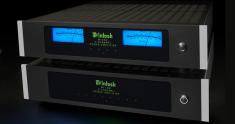 This Week in Gear: McIntosh Details New Products, Sony TVs Add VUDU 4K Support, and More[teaser]We've compiled the latest gear news, including details on McIntosh's newest products, the arrival of VUDU 4K HDR streaming on Sony TVs, and more.[/teaser] From product announcements and streaming app updates to general industry news and recent gear trends, keeping up with the latest tech news can be a daunting task. With that in mind, we're here to offer you a roundup of some of the latest gear and consumer electronics news that you may have missed. For this edition, we're covering McIntosh's new amps and speakers, the addition of 4K HDR VUDU support to Sony TVs, and the arrival of the Xfinity Stream app on Samsung TVs. So, without further ado, here's a rundown of some of the latest gear and tech news: McIntosh Details New Amps & Speakers McIntosh has revealed several new additions to its lineup of custom installation products. The collection includes the MI254 and MI128 Power Amplifiers, and a new line of In-Wall and In-Ceiling Speakers. "We are excited to return to the custom install category with these new amplifiers and speakers," said Charlie Randall, McIntosh President and CEO, referencing the company's previous multi-room offerings. "Many of our traditional home audio products have been used for distributed audio applications by talented CI installers. We are happy to once again offer products specifically designed for custom installation." The MI254 is a 4-channel amplifier rated for 250 Watts per channel. Meanwhile, the MI128 is an 8-channel outputs amplifier rated for 120 Watts per channel. Both amps feature closed loop digital switching designs and are 2U rack mountable. Likewise, the Class D amplifiers do not require cooling fans to regulate temperature, cutting down on extra noise. Multi-color LED indicators are integrated on the front panel of each unit, and the MI254 also includes two blue McIntosh Watt Meters. When it comes to connectivity, the MI254 uses standard 5-way speaker binding posts while the MI128 uses 2-pole Phoenix style push-in speaker terminals. In addition, the MI128 offers back panel volume controls, 2 digital audio inputs (coax or optical), and channel summing circuits. Beyond amps, the company also announced a new line of In-Wall & In-Ceiling Speakers rated for up to 250 Watts of power. The in-wall versions feature a fully enclosed design, and all of the models include new shallow woofers that can fit in a standard 2x4 wall construction. Likewise, all of the units use the same 2" midranges and ¾" tweeters found in McIntosh's XR50 and XR100 home audio speakers. "The performance of McIntosh home audio products is legendary and goes back nearly 70 years. We're thrilled to bring that level of performance back to the CI channel,” said Dan Wakefield, McIntosh Vice-President of North American Sales. Exact pricing has not been announced for McIntosh's new MI254 and MI128 Power Amplifiers, and In-Wall and In-Ceiling Speakers, but the lineup is set to launch this fall. Source: McIntosh VUDU 4K HDR Streaming Arrives on Sony Smart TVs VUDU has announced the release of an updated app for the Android TV platform. With version 4.2.52, compatible 2016 and 2017 Sony 4K Smart TVs can now stream supported VUDU titles in 4K HDR10 and Dolby Vision. "4K and HDR represent the best possible cinematic experience at home – and we want to be able to deliver that exceptional experience to as many people as possible, across as many devices as possible. So, we’re continuously working to bring Vudu 4K UHD capability to more devices – no matter the platform," said Kristine Lopes, Sr Manager, Product Marketing. The updated VUDU app will automatically install for users who have auto-update enabled on their Android TV. Otherwise, customers can simply download the update manually through the Google Play Store. VUDU offers a growing collection of 4K UHD titles available in Dolby Vision and HDR10, including select movies from studios like Warner Bros., Lionsgate, Universal, Sony, Paramount, and Disney. High dynamic range content and displays use expanded brightness to improve contrast between dark and light aspects of an image, bringing out deeper black levels and more realistic details in specular highlights -- like the sun reflecting off of an ocean -- in specially graded material. Likewise, HDR titles feature a Wide Color Gamut (WCG), providing a greater range of colors than those found in the previous Rec. 709 color standard. Here's a full rundown of Sony Smart TV models with support for the new VUDU 4K HDR update: 2016 X830/800/750/700D, S850D, and Z9D series 2017 X850/820/800/750E, X950/940/930E, and A1E series Source: VUDU Comcast Xfinity Stream App Arrives on Samsung TVs Comcast has announced the expansion of its Xfinity Stream beta app to select Samsung TVs. Xfinity Stream gives Xfinity subscribers access to the platform's entire TV line-up, including live channels, on-demand programming, and DVR recordings directly through the app on Samsung TVs. Here's a full rundown of supported Samsung models per Comcast: 2018 TVs with minimum software version T-KTM2AKUC 1131.9 and Model Codes NU8500, NU850, NU8000, NU800, Q9F, Q8F, Q7C, Q7F and Q6 [F = Flat, C= Curved] 2018 TVs with minimum software version T-KTM2LAKUC 1131.9 and Model Codes NU7300, NU730, NU7200, NU7100 and NU710 2018 TVs with minimum software version T-KTSUAKUC and Model Code UNXXNU7090 2018 TVs with minimum software version T-KTSNAKUC 1131.9 and Model Codes N5510, N5500, N5350, N5300, N4500, N4350 and N4310 2017 TVs with minimum software version T-KTMAKUC-1210.8 and Model Codes Q9F, Q8C, Q7F (Flat), Q7C (Curved), MU9000, MU8500, MU8000, MU7600, MU7500, MU750, MU7100, MU700, MU7000, MU6500, MU6490, MU6300, MU630 and MU6290 2017 TVs with minimum software version T-KTSAKUC-1210.8 and Model Codes M5300, M530, M4500 and M450 For detailed instructions on how to download and activate the Xfinity Stream app for Samsung TVs, click here. Source: Comcast, EngadgetPosted Fri Sep 14, 2018 at 03:15 PM PDT by: