-
 The UK’s ITV Isn’t Happy About Apple’s iTV[teaser]ITV says they’ve defended their IP in the past, and are likely to do so in the future. [/teaser] When most folks heard that Apple was changing the name of the Apple TV to the iTV, the reaction was something along the lines of “well of course it is, why wouldn’t they?” If you happen to live in the UK though, you probably saw the issue quite quickly. ITV is the oldest and longest running commercial television channel in Britain. It’s a well established channel and holds a pretty big piece of the British television market. Think of it as an ABC or CBS, but with accents and tea. If Apple is planning on naming its new product the iTV, there’s going to be a bit of a fight. “ITV has a very strong brand, and a highly valued IP,” says ITV’s Mike Large. He also confirmed that the station has “vigorously defended” its name in the past. There are options of course. Apple could rename the product for UK production, or ITV could license the name. Either way, it will be interesting to see how this all shakes out. Source: Pocket LintPosted Tue Aug 17, 2010 at 09:00 AM PDT by:
 -
 Onkyo Releases a Pair of New A/V Receivers[teaser]The HT-RC260 and HT-RC270 are set at the mid level and high end respectively. [/teaser] The latest receivers from Onkyo have plenty in common. Both the HT-RC260 and the HT-RC270 are 7.2 channel systems boasting HDMI 1.4 inputs and compatibility with 3D formats. Both decode Dolby TrueHD and DTS-Master Audio as well. The HT-RC260 features Audyssey DSX and Dolby ProLogic IIz, but only the HT-RC270 has Audyssey's MulitEQ feature that makes simplifies room setup. It's also the only one with DLNA and Windows 7 compatibility, along with the ability to play internet radio from sources like Slacker, Pandora and Rhapsody. When it comes to the hardware itself, both receivers offer Onkyo's WRAT amps. In fact, they've got seven of them, equipped with three-stage Darlington circuitry. Each also includes Burr-Brown 192kHz/24-bit DACs. You can pick up the RC260 now at a price of $499 while the RC270 will cost you $849. Source: eCousticsPosted Tue Aug 17, 2010 at 07:00 AM PDT by:
 -
 Zenverge Showcases Whole Home Wireless Television[teaser]The new tech is able to transcode and stream four HD streams to four HD TVs at once. [/teaser] Going wireless is the dream, isn't it? To slip the surly bonds of cable and send media through the sky on laughter-silvered wings. Alright, maybe that's overdoing it a little, but it'd still be great not to have to deal with wires running all over the place, wouldn't it? That's what Zenverge is promising to do using ProVision's AXAR2010 platform. Zenverge is using its own ZN200 – a 4xHD codec and transcoder system. The system pulls in MPEG2 streams, converts them to H.264 and then sends them on out wirelessly. "Operators worldwide are looking for ubiquitous, reliable, and cost effective solutions for distributing content around the home," says Zenverge CEO Amir Mobini. "Zenverge's ZEN architecture, with its industry leading performance and density, was designed from the ground-up to do just that. It's an OEM solution, which means it's not going to be made or sold on its own, but you'll see it eventually from other manufacturers under another name. Source: PR NewswirePosted Mon Aug 16, 2010 at 11:00 AM PDT by:
 -
 Blockbuster Bankruptcy is Imminent Say Analysts[teaser]It may be getting close to the end for the once giant rental chain. [/teaser] Blockbuster has been making some big moves in an attempt to stay in the game. Blockbuster kiosks are popping up all over and unprofitable retail stores are closing. The company even launched a fantastic new game rental service that blows competitors out of the water price wise, even if availability is lacking. Michael Pachter, an analyst with Wedbush Morgan Securities, suggests that bankruptcy may well be in the works for the company. The current Blockbuster strategy of touting their earlier access to movies just isn't working, according to Pachter. "Most consumers are motivated by price, are generally unaware of a DVD’s street date, and are likely to discover availability when visiting their local Redbox kiosk, rendering the 28-day head start inconsequential over the long run," he writes. His colleague Edward Wood agrees. "If they would have been able to avoid bankruptcy, it’s likely they would have been able to come to a recapitalization already." Home Media MagazinePosted Mon Aug 16, 2010 at 09:00 AM PDT by:
 -
 3D Viewing Won't Hurt Your Eyes. Unless You're Three.[teaser]Looks like 3D is as safe as it gets. Just don't pop 3D glasses on your baby. [/teaser] Alright, let's nip it in the bud now. 3D is safe. You're not going to get some kind of weird permanent eye damage because you wore 3D glasses. "There are people who get uncomfortable with it," says Dr. Mark Borchert, "but there's no evidence it can cause permanent harm to your vision." Now, when it comes to your three year old, things are different. You see, the whole binocularity thing – seeing one image with both of your eyes – is something that has to be learned. According to Borchert, that happens within the first three years of your life. It's possible that 3D viewing could affect that process. On the flip side, a three year old that hasn't yet fully developed his or her stereoscopic vision won't benefit from 3D anyway. In other words, they won't be watching movies or playing games in 3D anyway. "I can't imagine how this is going to cause any kind of permanent harm to someone who is over four years of age." Source: GamasutraPosted Mon Aug 16, 2010 at 07:00 AM PDT by:
 -
 That '70s HD AdvisorEditor's Note: Each Friday, High-Def Digest's own HD Advisor will answer a new round of questions from our readers. If you have home theater questions you need answered, send an email to [email protected]. If you've already sent a question and don't see it answered yet, please be patient as we work our way through them. To browse through previously answered questions, visit the main HD Advisor page. Answers by Joshua Zyber Passive vs. Powered Subwoofers Q: I finally broke down and bought a new receiver, a Yamaha RX-V565. I can use my old speakers from my previous Home-Theater-in-a-Box for now until I save up enough money to upgrade those as well. My question is about the subwoofer. On the subwoofer output on the receiver, it says "Subwoofer (Pre-Out)." I am assuming this means that the sub is amplified in the receiver, rather than me needing a pre-amp. Also, it has what looks like a standard RCA plug for the sub, but my current subwoofer has the old bare wire plug. Can I use my current subwoofer, and can I simply go out and buy a connector? A: There are two basic types of subwoofer in a home theater system: passive and powered. As with any speaker, the audio signal sent to a subwoofer needs amplification before you'll hear any sound. A passive subwoofer relies on that amplification to be performed in the A/V receiver or in some form of intermediary amplifier placed between the receiver and the sub in your signal chain. A powered subwoofer has the amplification built right into it, and requires nothing more than the raw audio signal. If your old subwoofer only has binding posts for speaker wire, but has no RCA input and doesn't plug into your electricity directly, it's a passive model. You'll note that the rest of your speakers are also passive. (You connect them straight from the receiver by speaker wire.) While your receiver is probably built with plenty of amplification to run your main five (or seven) speakers, the subwoofer traditionally needs more power to drive the low frequency audio at loud volumes. Even if your receiver offered standard speaker wire outputs for a subwoofer (the RX-V565 does not), you'd really be better served with external amplification anyway. The "Pre-Out" connection on your receiver is a pre-amplified output. Meaning, it outputs the audio signal before amplification. The receiver expects you to do that amplification elsewhere. You have two options at this point. The easiest is to buy a new powered subwoofer. Connect the Subwoofer Pre-Out from the receiver directly to the sub and turn it on. Your other option is a little more complicated. You can buy a dedicated subwoofer amp that will accept the signal from the Pre-Out on the receiver, amplify it, and then connect to your subwoofer by speaker wire on the other end. If your passive subwoofer came from a Home-Theater-in-a-Box system, odds are that you'd be best off replacing it altogether with a new powered sub that's designed to dig deeper and play louder anyway. Ugly Blu-ray Cover Art Q: Although this is more of an aesthetic question, I was wondering if you could explain to me why many Blu-ray releases use alternate box-artwork for the covers as opposed to using the original poster-artwork. The recent release of 'National Lampoon's Vacation' is a perfect example where the original classic movie poster artwork is replaced by some cheesy cover-art that looks as if it should be at the back of the box! Maybe it's just me, but I find this a bit disappointing. A: I happen to be annoyed by this as well, and that 'Vacation' cover is a real eye sore. The simple answer here is that the studios' home video divisions rarely care about the aesthetic values of movie poster art. They just want to move product. The easiest way to catch a potential buyer's eye as he or she browses the racks at Best Buy or Walmart is to design a cover with a big photo of the main star's face on it. The hope is to inspire a reaction of, "Oh hey, that's [insert famous actor's name here]. I like him [or her]. Let me see what that movie is." Meanwhile, the more attractive artwork designed to be displayed on large posters in movie theater lobbies typically isn't as immediately eye catching when shrunken down to DVD or Blu-ray size. Some studios care more about the look of the cover art than others. Discs from the Criterion Collection almost always feature very tasteful artwork. On the other hand, major studios frequently give us abominations like that 'Vacation' cover, which was probably thrown together in half an hour by a college intern marginally proficient with Photoshop. Dropped Frames Q: So I just bought a new TV, a Sharp Quattron LC-40LE810UN, and I love it. However, on some movies it will flicker black very quickly for about a second. It seems to only happen when I am watching Blu-rays at 24 fps. I assume this is because it is dropping frames, but I am not an expert on this stuff. If it helps, I am using a PS3 as my Blu-ray player, and I generally have the motion interpolation (called "Motion Enhancement" and "Film Mode") set to on, often high. It is an awesome TV, so I will not get rid of it for this, but any advice would be appreciated A: My first immediate suggestion is to turn all frame interpolation off. These so-called "motion enhancement" settings may make motion look superficially smoother, but they do so by generating artificial frames that were not originally contained in the source signal (i.e. the movie you're watching). The TV creates these new frames by averaging the data from frames in the source and essentially guessing what something in between those frames might look like. Movies are photographed at 24 frames per second. 1080p Blu-ray discs are encoded at that original rate. The Sharp LC-40LE810UN is a 120 Hz model, meaning that it refreshes its frames 120 times per second. The easiest and best way to convert a 24 Hz source to display on a 120 Hz screen is simply to multiply the original frames so that each repeats four additional times. This is called 5:5 Pulldown, and the result should be seamless to your eye. When you turn frame interpolation on to the maximum setting, the TV generates four fake frames for every one original frame in the source. Only a fraction of what you're watching on screen was actually photographed by the movie's director or cinematographer. Give that some thought. When the TV has to generate more fake frames than real frames, it should not seem at all surprising to find that it will occasionally glitch and cause the flicker you're seeing. I have a feeling that simply turning all this artificial processing off will solve the problem. Homework Assignment: You Be the Advisor The HD Advisor knows many things, but he doesn't know everything. Some questions are best answered with a consensus of opinions from our readers. If you can help to answer the following question, please post your response in our forum thread linked at the end of this article. Your advice and opinions matter too! HD Advisor Column Title Suggestions JZ: It's time once again to put the call out for assistance coming up with HD Advisor column titles that fit the numerical theme. Basically, I've got next to nothing after this week. Help me out! Check back soon for another round of answers. Keep those questions coming. Joshua Zyber's opinions are his own and do not necessarily reflect those of this site, its owners or employees.Posted Fri Aug 13, 2010 at 12:00 PM PDT by:
 -
 High-Def Digest and Dolby Are Giving Away the LAST of Five Copies of 'Dexter: The Complete Fourth Season' on Blu-ray!![teaser]Today is your last chance to win this great season on Blu-ray![/teaser] High-Def Digest and Dolby are giving away one more copy of the highly-anticipated, Emmy-nominated 'Dexter: the Complete Fourth Season' on Blu-ray featuring Dolby® TrueHD 5.1 surround (24-bit/96 kHz)! Five lucky High-Def Digest readers will be chosen at random to win this prize from Dolby. To enter, go to the High-Def Digest Facebook page and comment on the daily post to enter the giveaway. Complete rules can be found here. Check out the HDD Facebook page and enter to win now! In all, we're giving away five copies of this fantastic season, so check back and enter each day this week!Posted Fri Aug 13, 2010 at 11:00 AM PDT by:
 -
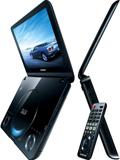 Samsung Releases the First 3D Capable Portable Blu-ray Player[teaser]The player is 3D capable, but the screen isn't. You'll need to plug it in if you want to enter the third dimension. [/teaser] While portable DVD players once came in all shapes and sizes, portable Blu-ray players just haven't taken off in the same way. There are only a few models out, and none of them really satisfy. Samsung's BD-C8000 might just change that. The new portable player features a 10.3 inch screen, which is quite large for a portable player. It handles Samsung Apps, gives you access to videos from Blockbuster and YouTube and even streams from your PC. Before you go getting to excited about the whole 3D thing, let's clarify. The Samsung BD-C8000 can play back 3D movies on a 3D capable screen. The screen on the BD-C8000 isn't 3D capable. That means you'll have to plug the player into a 3D television to go 3D. Still, for what it is, the BD-C8000 is impressive, slick looking and packed with features – though Samsung has not disclosed the screen resolution. It's also just $449. Source: AmazonPosted Fri Aug 13, 2010 at 10:30 AM PDT by:
 -
 The New Apple TV Goes 720p and Gets Renamed iTV[teaser]1080p video is dropped from the list of features, but it's getting apps. [/teaser] Mark this down as a pretty big disappointment. The new Apple TV, which is now named iTV, is losing 1080p. Apple's iTV will instead play only 720p content, which brings down the appeal quite a bit. This is all according to Engadget, who claim to have a reliable source on the matter. You won't be surprised to learn that the iTV will be getting apps. It's not shocking, since the iTunes App Store is prevalent in everything Apple makes these days. If the iTV is a success though, it could mean good things for other, less successful app stores. Again, this is all unconfirmed by apple, but what we're looking at so far is an iPhone 4 without a screen that costs around $100. It'll let you stream 720p content from the iTunes cloud and give you access to plenty of apps. Source: EngadgetPosted Fri Aug 13, 2010 at 09:00 AM PDT by:
 -
 Samsung Intros a 65 Inch LED Backlit 3D Television[teaser]It's the largest set of its kind on the market, and it's priced to match.[/teaser] The UN65C8000 from Samsung is huge. At 65 inches, it's the largest LED backlit 3D television on the market today. Samsung's massive 3D television features everything you've come to expect from the 8000 series. It's got a ridiculous 8,000,000:1 contrast ratio, and Real 240Hz tech built right in. It does precision backlight dimming, and sports Samsung's Ultra Clear panel. There's plenty in the way of internet content, since the UN65C8000 can connect to the 2010 suite of Internet@TV content providers. It's WiFi ready – which means you'll need to attach a dongle – which means you can Skype with your friends without having to worry about cords. And of course, it does 3D. The emitter is built into the set, so there's nothing extra to pick up there, but glasses are sold separately. It's an impressive set to be sure, and it's currently selling on Amazon for a price of $5,999. eCousticsPosted Fri Aug 13, 2010 at 07:00 AM PDT by: