-
 Vizio and OnLive Starting Video Streaming Services[teaser]The cloud gaming company will soon make a foray into movies, but so could the number one selling TV brand in America. [/teaser] Netflix is huge. That's not a problem for Netflix, but it is a problem for everyone else, who sees the popular video streaming company as a target. They feel the service is too big for its own good. OnLive, the cloud gaming service, is considering throwing its lot into the streaming game. It makes perfect sense that they should, since the company already has some of the needed architecture in place. What's likely to make a bigger impact though, is Vizio's plan for a subscription streaming service. Even if it doesn't offer as much as other options, it will be highlighted on Vizio TVs and Blu-ray players across the country. Since Vizio sells the most TVs in the US, that's very good marketing. There are a lot of rumors going around and plenty of plans in place, and we expect to hear something a bit more official in the coming months. Source: ElectronistaPosted Tue Dec 7, 2010 at 11:00 AM PST by:
 -
 Bug Fixes and UI Improvements Heading to the Boxee Box[teaser]A few helpful options are on the way to the Box in the form of a new firmware update. [/teaser] A product or service designed to bring internet content to your TV can live and die by its user interface. Simplicity and customizability are equally important, and that's what Boxee is adding to the next patch. When you initially set up the Boxee Box it will now ask you whether it should focus on local content – files you've ripped or downloaded – or web based content. That should make things quite a bit easier for those that prefer viewing their own files first. In addition, some helpful tools like the ability to mark watched programs, navigate alphabetically, and a few other new sort options are coming to make browsing for your content simpler. Source: Boxee BoxPosted Tue Dec 7, 2010 at 09:00 AM PST by:
 -
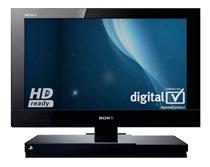 Sony Packs a PS2 Into a Bravia[teaser]It's a nice option for folks with a tight budget, but it's still pretty ugly. [/teaser] The PlayStation 2 is a great gaming system and still one of the best for kids and adults alike, assuming that you don't mind a 4:3 picture and a standard definition screen resolution. It's been swept by the wayside by the new HD consoles, but that's not stopping Sony. The new KDL-22PX300 is a 22 inch set that's packing a PS2. Now before you go getting excited about a sleek TV with a side loading slot for PS2 games and DVDs, take a look at the picture. It looks like someone went and glued a TV to the top of a PS2 slim. The 22PX300 offers a 720p resolution, though the system will still only play in SD. It also includes four HDMI inputs, an Ethernet port as well as the ability to go online via a WiFi dongle. It's not available in the States, but our British friends can pick it up for around $313. Source: JoystiqPosted Tue Dec 7, 2010 at 07:00 AM PST by:
 -
 CALM Act Approved – Commercials Are Getting Quieter[teaser]It's decades late, but we're finally getting some regulation on ridiculous commercial volumes. [/teaser] You've probably been complaining about this as long as you've been watching television. Commercials are freakishly loud. They're louder than the show most of the time, and can be a pain to deal with, especially when watching at low volumes. Congress has finally decided to do something about it by approving the CALM act, which would require that television commercials meet certain loudness requirements. "Consumers have been asking for a solution to this problem for decades, and today they finally have it," says Califronia representative Anna Eshoo. Of course, with advances like Dolby Volume which was created to deal with this and the move of consumers from traditional TV to streaming and download services, this bill seems to be too little too late. The bill is now on the way to President Obama for final approval. Source: The Wall Street JournalPosted Mon Dec 6, 2010 at 11:00 AM PST by:
 -
 Samsung Apps: Over One Million Served[teaser]Samsung's connected TVs seem to be doing just fine, despite the lack of Google TV. [/teaser] When a television company starts talking about apps, our eyes roll. Generally, it's a half-assed attempt to cash in on something that Apple has hit on. Samsung, though, appears to be doing pretty well with it. Samsung owners have now hit a million downloads for Samsung apps. The majority of those, it seems, would be things like Netflix, Pandora, Blockbuster on Demand and Twitter, but premium apps are almost certainly doing a bit of business as well. While it doesn't compare to the kind of business that Apple does, it's a great sign, especially considering that Samsung Apps debuted this year. The rumor, of course, is that Samsung will be launching a Google TV. Official word from Samsung changes "will" to "might," and with the success of Samsung Apps it's clear to see why. Source: TechCrunchPosted Mon Dec 6, 2010 at 09:00 AM PST by:
 -
 Netflix Willing to Pay $100,000 for New Episodes[teaser]With other services on the way, the folks at Netflix are looking to stay competitive. [/teaser] Netflix is at the top of the heap when it comes to streaming services, but there are plenty of others waiting to take its place. The one with the most exposure currently is Hulu Plus, which is aiming to take the crown with its selection of current television shows. Netflix wants to stay at the top, and is attempting to add brand new shows to the lineup. According to the New York Post, Netflix is willing to shell out between $70,000 and $100,000 for new shows. That's not per show – that's per episode. That's an eye opener for two reasons. First, it shows just how much Netflix is willing to spend to keep their subscriber base high. Second, it shows just how much money there is to be made streaming content. If Netflix is able to secure more shows, they could make Hulu a thing of the past. Source: New York PostPosted Mon Dec 6, 2010 at 07:00 AM PST by:
 -
 HD Advisor 1985: The Legend is RebornEditor's Note: Each Friday, High-Def Digest's own HD Advisor will answer a new round of questions from our readers. If you have home theater questions you need answered, send an email to [email protected]. If you've already sent a question and don't see it answered yet, please be patient as we work our way through them. To browse through previously answered questions, visit the main HD Advisor page. Answers by Joshua Zyber Video Calibration Standards Q: Proper calibration of your home theater equipment is quickly becoming more mainstream, almost a must. Especially for videophiles. It's generally recommended to use one of the many different home calibration discs that are available. Most of these discs will guide you through a wealth of adjustments and then provide you with an image or scene from a selected film as the final test, stating that, "If your television is now properly set, the following scene should look like this and you should be able to make out this and this.". Does this truly calibrate your set to properly display all films and content? Or does it only calibrate it to properly display the scene (or type of film) it refers you to? Because all films are shot differently, with different lighting, different film stocks, film and digital, real and animated, and essentially most films all have a very different and unique look. So for example, if you calibrate your set to properly display an intentionally dark and grainy film like 'Fight Club', would that calibration not be off for a slick looking movie like 'Zodiac'? Or an animated movie like Toy Story 3'? And if so, is there really any point to these discs, as in reality in order to properly display every movie you would have to calibrate your set every time you watch something different? A: In theory, the video transfers for all movies should be mastered to the same reference standards for proper monitor calibration, regardless of any particular movie's photographic style. For example, the reference standards define what black is supposed to look like, what white is supposed to look like – red, green, blue and so forth. When you calibrate your TV, you're trying to bring it as close to those professional reference standards as possible. These standards don't tell you anything about what the movie should look like, just how the monitor should be set. Only by sticking to these standards can the transfer technicians determine exactly how far off the movie should stray to hit its desired look. If we didn't set these standards, then 'Toy Story 3' might look bright and shiny on the studio monitor but dark and grainy on your TV at home. Or, conversely, a movie like 'Fight Club' that's supposed to be very dark could wind up looking far too bright and washed out on your set. Calibration is about finding the same reference point so that what you see is the same thing that the people who performed the video transfer saw. You want your TV's definition of "red" to be the same as the studio's definition of "red," or else something that's supposed to be red will look green on your set. And that's just chaos! PS3 Setup with Soundbar Q: I recently picked up the Panasonic SC-HTB500 home theater system. It is a simple soundbar and subwoofer, which is really all my living room can handle. I have a PS3 hooked up to it, but don't know what formats to tell my PS3 that my speakers can handle. The product page is located here. I am mostly confused by the fact that the soundbar says it supports 7.1 LPCM even though this is a simple 2.1 setup. Any help would be greatly appreciated. A: When your soundbar system claims that it can accept up to a PCM 7.1 input signal, it will internally downmix that 7.1 signal to its native 2.1 format. In this case, you have two options for how to set your PS3. You can set the console to output the maximum signal that the soundbar will support, and let the soundbar do the downmixing. Or you can let the PS3 do the downmixing itself. My first inclination is to say that the PS3 will probably do a better job with this. However, I don't believe the PS3 offers a 2.1 PCM output format for audio. The options are either simple 2-channel (no LFE) or multi-channel (5.1 to 7.1). You may wind up losing the LFE channel and not taking advantage of your subwoofer. On the other hand, the subwoofer that comes with this soundbar is probably not equipped to handle very deep bass anyway. I think I'm still inclined to say that you should set the PS3 for 2-channel PCM output. However, you should probably try it both ways and see if you notice any difference. If any of our readers have more direct experience with soundbars, please add your feedback to the forum thread linked at the end of this article. 4k Digital Cinema Revisited Q: My local AMC theater had posted on its marquee that all screens now have 4K projectors. My first thought was, "Sweet!" But my second thought was remembering that most movies are shot and / or post-produced at 2k. The theater web site doesn't seem to specify if the movie is being show in 2k or 4k. Is there a way to know which movies are at 4k? A: Even though many digital cinemas have recently begun a transition to 4k projectors, at the present time most of the content distributed to these theaters is still only 2k resolution. When a 2k source is displayed on a 4k projector, the picture is upconverted, similar to how standard definition content is displayed on an HDTV. I'm not aware of any sources that state whether a particular movie will be projected from a 2k or 4k source at a particular theater, unless the theater itself advertises this. (Someone please chime in if you know of a resource for this.) Frankly, I don't think the movie studios or theaters want you to know this information. They'd rather lure you to the theater with the promise of "digital" or "4k" and leave you in blissful ignorance as to what you're actually watching. Homework Assignment: You Be the Advisor The HD Advisor knows many things, but he doesn't know everything. Some questions are best answered with a consensus of opinions from our readers. If you can help to answer the following question, please post your response in our forum thread linked at the end of this article. Your advice and opinions matter too! DLP Picture Problem Q: Earlier this year, I replaced my 61-inch 720p Samsung DLP display with a 65-inch 1080p Mitsubishi DLP display. After calibrating my new set, I am reaping the benefits of 1080p content. When the display is off, there is a gray-like blotch in the middle of the screen. The Samsung display had similar issues, so I was wondering if this is a problem with DLPs (in terms of how they are manufactured), or is there something wrong with the way I calibrated the sets? I used the 'Spears and Munsil Blu-ray and can't imagine that calibration would result in such an effect! I should mention that when the sets are powered on, there is no issue with picture quality. JZ: Have any other DLP owners experienced this? It doesn't sound like a calibration issue to me, more like a manufacturing defect. Check back soon for another round of answers. Keep those questions coming. Joshua Zyber's opinions are his own and do not necessarily reflect those of this site, its owners or employees.Posted Fri Dec 3, 2010 at 11:00 AM PST by:
 -
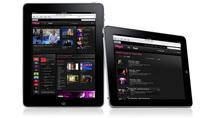 BBC iPlayer Goes International on iPad[teaser]The subscription service is the first to offer the BBC outside of the UK. [/teaser] It's a small world we live in, and content from other countries is becoming more and more accessible. If you're a fan of 'Doctor Who,' Top Gear,' or the new 'Sherlock Holmes' show that's been making waves, you know that the BBC is still unavailable outside of the UK. Sure, you've got BBC America but it's not the same. Thankfully, the folks at the BBC are branching out, and have announced the first release of the BBC iPlayer for us Yankees. It's a subscription based service, and it's coming only to the iPad. At this time, there's been no mention from the BBC of just how much the subscription is going to run. There also isn't any word on what other devices the global iPlayer launch will appear on. Source: Ars TechnicaPosted Fri Dec 3, 2010 at 09:00 AM PST by:
 -
 DISH Network Adds Starz MoviePlex[teaser]The HD Platinum package just got a little bit better. [/teaser] Getting something for free is a great feeling. Getting something good for free, like an extra movie channel on your cable package, is even sweeter. If you subscribe to the DISH Network HD Platinum package, you're getting a brand new channel – Starz MoviePlex. If you're not familiar, MoviePlex is a little different than the usual movie channel. Rather than a hodgepodge of movies, the channel focuses on one genre a day. The new channel will soon be available through DISHOnline so you'll be able to watch the movie selection on MoviPlex whenever your heart desires. It's also one more channel that you can get to with DISH Network's Remote Access, assuming you subscribe to the HD Platinum package. "Starz is excited to broaden the distribution of our channels through not only DISH Network's TV service, but also via its on demand and online platforms," says Starz VP Ed Huguez. Source: PR NewswirePosted Fri Dec 3, 2010 at 07:00 AM PST by:
 -
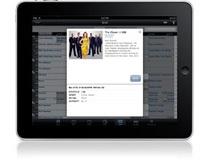 DISH Lets You Watch Live TV on Your iPad[teaser]Thanks to an update to Apple's device, Remote Access is now available. [/teaser] The folks over at DISH Network launched their new Sling adapter a few weeks ago and while it easily satisfied the desire to watch television no matter where you are, there was something missing – the iPad. Today DISH has announced that the iPad is now up and running with DISH Remote Access, allowing iPad owners to watch TV anywhere they've got an internet connection. You can watch live TV, check out your recordings, manage your DVR and everything else the rest of the enabled devices can do. You'll need the appropriate DISH Network ViP 722 or 722k HD DVR and the $99 Sling Adapter to go with it, but the app itself can be downloaded free directly from the iTunes Store. Source: SlashGearPosted Thu Dec 2, 2010 at 09:00 AM PST by: