-
 Pantel Shows Off Water-Resistant Mirror HDTVs at CEDIA[teaser]Though probably not for the average consumer, Pantel’s new M line of TVs will be turning heads this fall. [/teaser] From the M20 up to the M42, these ultra bright flatscreens are geared towards outdoor use and commercial application. The specifications for the displays are fairly standard, but the secret to success is in the specialization. Needless to say, these water resistant LCDs are fairly unique. When turned off, they look to all the world like a mirror, but when turned on they produce a picture up to 1080p quality. Intended as options for bathroom and Jacuzzi TVs, as well as for hotel rooms, and outdoor displays, these Pantel LCDs start at $1,999 for the 20” M20 up to $4,499 for the 42” M42. More information as well as the complete specs are available at PantelTV.com.Posted Wed Aug 19, 2009 at 01:00 PM PDT by:
 -
 Western Digital’s WD TV-2 Player Photo and Info Leak[teaser]A pretty strong upgrade over their previous offering, the WD TV-2 Media Player offers a great umber of options for viewing computer files in full high def on your HDTV[/teaser]. Simply attach a USB storage device to the unit or hook it into a home network and you’re good to go. There are many devices that have this capability, from game consoles to receivers, but the WD TV-2 does offer one thing that those don’t, and that’s compatibility with an impressive array of file formats. In video files alone, the list ranges from the standards like WMV and Xvid to MKV, TS/TP,M2T and more. Credit goes to AVS Forum for the pics. There’s no word yet on pricing information for the device.Posted Wed Aug 19, 2009 at 11:00 AM PDT by:
 -
 LG Picks Up Four EISA Awards[teaser]The company's products were declared Best Value in HDTV and Blu-ray Player categories.[/teaser] The European Imaging and Sound Association saw fit to shower LG with a handful of awards for their HDTVs and Blu-ray players. The Korea IT Times reports that in an addition to an award for greenest mobile phone, LG took home three home theater awards. The as yet unreleased LG SL8000 took home the Best Value HDTV and has been praised for combining the best in design and technology into one device. The unique face of the LCD makes it appear to be one uninterrupted sheet of smoky glass, and according to the EISA provides “a great Full HD viewing experience at an affordable price.” The critically lauded BD390 took home the Best Value award for the Blu-ray Player category. With built in Wi-Fi, Netflix and CinemaNow streaming, not to mention high visual quality and analog 7.1 ouputs at an affordable price, it’s no surprise. Already a winner of a 2009 CES Innovations Award, the LG HB954PB is a fantastic looking Blu-ray home theater system which includes streaming capabilities. The EISA commented that owners of the home theater system were able to “experience Blu-ray in full High Definition and surround sound, for a high quality music and movie experience” with a “simple and easy installation” and “balanced, detailed sound.”Posted Wed Aug 19, 2009 at 09:00 AM PDT by:
 -
 Pioneer Outlines Future Strategies “Post Plasma”[teaser]Surviving without Plasma will mean stressing A/V expertise.[/teaser] Pioneer has a long road ahead of it, and as a part of the recently announced restructuring plans, that’s a road devoid of plasma televisions. In a conversation with Twice, Russ Johnston said that the company’s core philosophy won’t change. Pioneer will still be “focused on engineering excellence and a maniacal commitment to create the best possible home-theater experiences.” After spending time researching the competition’s brand messages, marketing, and of course benchmarking their products, Pioneer has come forward with a three pronged process to ensure their place in the future of home entertainment. To start, Pioneer will be reminding customers of the quality of their offerings. After significant benchmarking, the company found, in the words of Russ Johnston, “our products stood on their own and stood out as leadership products.” In the past, he and others felt that the company lost sight of that on many of their products due to their focus on displays. Pioneer will be stressing its relationship with professionals, including musicians, movie producers, and production houses. They’ll also be focusing on their work with London’s Air Studios and THX, to explain and stress the importance of certification from both. Lastly, Pioneer will focus on the balance of their product line. While some companies may make excellent displays, they might also make terrible speakers. Pioneer wants consumers to know that they do it all and they do it all well. Pioneer isn’t dropping quality, nor are they making themselves more commonplace. “The current economy put a lot of pressure on companies” said Johnston, “They put custom-installation lines online, and others are in or will be in retailers they've never been in before.” Pioneer on the other hand, won’t be expanding distribution, and the Pioneer Elite line will remain a non-internet brand.Posted Wed Aug 19, 2009 at 07:00 AM PDT by:
 -
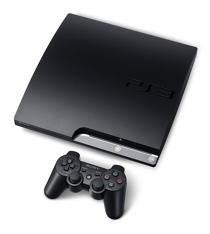 $299 PlayStation 3 Slim Officially Announced and Detailed[teaser]Smaller, lighter , and less power hungry, the new PS3 has finally been announced.[/teaser] Available in the US in the first week of September, Sony has officially announced the PS3 Slim. It’s smaller, it’s lighter, and it’s cheaper, at an MSRP of only $299. Kaz Harai, who announced the price cut, says the PS3 Slim won't have capabilities that the normal PS3 doesn’t have. The price cut, which will affect standard PS3s starting tomorrow, may be a big announcement, but perhaps more important for home theater buffs is the power consumption, which has been cut by 34%. Less power consumption means less heat, and less heat means a quieter fan, which makes the PS3 slim preferable to it’s bigger brother for Blu-ray watching. The PS3 slim does not have the ability to install an OS like Linux, something expected by many. There also does not appear to be a simple way to remove the hard drive, meaning that an upgrade from the on board 120GB drive will be difficult at best. More images and full specs are available at video game site Destructiod.Posted Tue Aug 18, 2009 at 01:45 PM PDT by:
 -
 Cinram’s DVD Revenue Down, Blu-ray Up[teaser]Replicators lose significant revenue, despite Blu-ray increase.[/teaser] Cinram, DVD and Blu-ray disc replicators, announced an 18% decrease in revenue this year, blaming the loss primarily on lower DVD replication volumes, though Blu-ray production did increase. A fairly telling indicator of the industry as a whole, if the replicators are making less of something, it means companies are expecting to sell less. After all, supply needs to adjust to fit demand. According to their Q2 2009 financial statement, the company dropped from $386 million in revenue in Q2 last year to just over $300 million this year. All in all, Cinram posted a loss of $787 thousand for the quarter, a vast improvement over the previous year’s near $7.1 million. While Blu-ray production increased according to Cinram, the modest boost of Blu-ray didn’t have much of an effect on profits. While Blu-ray proceeds increased from $5.1 million to $5.5 million, the company produced 22 million less standard DVDs.Posted Tue Aug 18, 2009 at 11:00 AM PDT by:
 -
 Check out Dell’s Zino HD HTPC[teaser]Leaked shots offer glimpses of system inputs, outputs, and more[/teaser] There’s not a lot known about Dell’s new Zino Home Theater PC, but we can surmise a lot from the pictures leaked earlier this week. Dubbed the Mac Mini killer my some, the Zino HD has clearly gotten a few things right. The machine is small and sleek and shiny, and that’s important for a piece of hardware that’s going to be sitting in your living room. Taking a closer look at the front of the Zino, we see a pair of USB ports, an audio jack and a card reader. There’s nothing new here, but the essentials are present. The back is a bit more interesting though, with with USB and eSATA slots meaning plenty of room for expansion. As expected, there is an HDMI output and Ethernet port. Sound hookups seem fairly lacking, but perhaps Dell knows something we don’t. The specs are still a mystery, including what kind of optical drive the Zino HD uses. It is fairly safe to assume that if Dell’s goal is to compete with the mini by ducking under the price, a standard DVD drive is stock. Whether there are any plans for Blu-ray on the Zino, we have yet to find out.Posted Tue Aug 18, 2009 at 09:00 AM PDT by:
 -
 Official Zune Specs Outlined by Microsoft[teaser]Recent leaks involving the Zune HD have provoked a huge amount of misinformation about the device, spurring Microsoft to correct it by delivering the full Zune specs.[/teaser] For a mobile device, it’s pretty impressive. The 32GB Zune HD will hold up to ten hours of high definition video, or 48 hours of Zune optimized video, and sport a battery life that offers 8.5 hours of video playback on one charge. While the 480x272 display isn’t going to send any videophile into frenzy, the Zune’s ability to output HD video at a respectable quality makes this a good piece of hardware to have around. With the addition of a docking station, the Zune HD will be capable of outputting HD 720p video at 30fps with a peak bit rate of 14Mbps. The docking station will also output optical digital audio. It’s not Blu-ray quality by any means, but it will enable a fairly robust playback of high definition content from an incredibly portable device. Taking a Blu-ray player traveling, even a portable one, may be a bit prohibitive, but the Zune HD will provide HD playback capabilities anywhere it can plug in. Of course, the Zune HD does audio too, boasting a 33 hour battery life for audio and a ridiculous amount of space to hold music as well as an FM and HD Radio tuner. Official specs are available in PDF form here.Posted Tue Aug 18, 2009 at 07:00 AM PDT by:
 -
 Man Tries to Sell Oven Door as HDTV[teaser]A con artist was cooking up something pretty crazy last week. [/teaser] High-Def Digest readers know that no one is going to sell you a 37” Sony HDTV for $100, but Anthony Miles, 52, was looking for some very foolish or very trusting people when he tried to pull a variation on the old “rocks in a box” scam. With a bit of wrapping, a manual, some wires and a whole lot of stickers, police say Miles disguised an oven door as a Sony HDTV and attempted to sell it in the parking lot of a Wal-Mart in San Lorenzo, California. The Oakland Tribune reports that the witness who called in the attempted sale said that the man claimed he had gotten the TV for $60 at a flea market and was trying to resell it for $100. As unbelievable as this all seems, the door actually looks fairly convincing when covered top to bottom with Best Buy and Sony stickers. A closer look would almost certainly reveal the TV to be a fraud, but it might have been enough to fool an unwitting customer.Posted Mon Aug 17, 2009 at 03:30 PM PDT by:
 -
 24 Hour HD Advisor PeopleEditor's Note: Each Friday, High-Def Digest's own HD Advisor will answer a new round of questions from our readers. If you have home theater questions you need answered, send an email to [email protected]. If you've already sent a question and don't see it answered yet, please be patient as we work our way through them. To browse through previously answered questions, visit the main HD Advisor page. Answers by Joshua Zyber HD Audio Through Analog Outputs Q: In your Connecting a Blu-ray Player to a Standard-Def TV article, you mentioned that the gentleman could play HD audio via his 5.1 analog outputs from his player. Really? I thought I had read from several places that it isn't HD when played this way. That in order to get the true HD audio, you must use HDMI. So my 5 year-old AVR will play HD audio then as long as my player converts it to LPCM? A: A movie soundtrack has to go through several stages from the compression codec authored on the disc until sound hits your ears. First, the Dolby TrueHD or DTS-HD Master Audio codec must be decoded to uncompressed PCM form. That PCM must then be converted to analog. Finally, the analog must be amplified out to your speakers. Those first two stages (the decoding and D-to-A conversion) can be performed either in the disc player or your A/V receiver. The amplification step almost always takes place at the receiver or other external amp (except in certain Home-Theater-in-a-Box systems that combine the disc player and amp into one unit). So long as the Blu-ray player has internal decoders on board for the full TrueHD or Master Audio codecs, and offers multi-channel analog outputs, you will be able to get lossless quality from the analog connections. With that being said, is "lossless" audio output as analog from your player the same as lossless audio output as digital? Not necessarily. The process of decoding to PCM is pretty straightforward. In my experience, it shouldn't matter whether that happens in the disc player or in the receiver. However, digital-to-analog conversion is more complicated. The quality of the DAC components will play a significant role in determining your final sound quality. So, even if you already own a Blu-ray player with the full decoding suite and multi-channel analog outputs, you may still find it advantageous to upgrade to a new HDMI-capable receiver with superior DACs. The "lossless" nature of the digital compression codec only guarantees that there will be no degradation of sound quality from the original master for as long as the signal is compressed or decoded. As soon as it's converted to analog, your sound quality will vary depending on the hardware being used. Lossless audio converted to analog in your receiver may (or may not) be superior to lossless audio converted to analog in your disc player, by the same logic that a high-end A/V receiver may do a better job of this than an entry-level model, even though they both support "lossless" audio. HDMI Handshaking Issues Q: I have a Playstation 3 hooked up via HDMI to my receiver (Sony STR-DG910). My receiver outputs to a Sony KDL-40V2500 Bravia. Each time when I turn on my Playstation 3, after a couple minutes the screen goes black for about a second and then the screen and sound come back. Also on the screen is the TV information like the display setting (1080p), the video input label, and time, etc. It's as if I had just turned the TV on. This only happens once but it happens every time I turn on my PS3 without fail. This has happened ever since I hooked the PS3 up to the TV. A: It sounds to me like you're having an HDMI handshaking problem. When you connect two devices by HDMI, each must "handshake" with the other at startup to confirm compatibility and encryption protocols. This process is compounded if you route the signal through an intermediary device like an A/V receiver. In that scenario, your Blu-ray player must handshake with the receiver, and then the receiver must handshake with the HDTV. If the handshake breaks down at any point, you lose the picture and sound. What's likely happening here is that one of your devices initially confirms the handshake, and then loses it for a second and must re-establish a new handshake. During that time, your TV loses sync with the signal and must start over as if you'd just turned it on. Unfortunately, this sort of thing is pretty common in the world of HDMI. As an experiment, you should try connecting your PS3 directly to the TV. Does the same thing happen? If not, then the problem is with your receiver. There are a couple of potential solutions to this, but none are ideal. You can buy an HDMI splitter that will direct one cable from your PS3 straight to the TV for video and another to the receiver for audio. But those are expensive and often even more glitchy than what you're dealing with now. Alternately, you can buy the Component Video adaptor for the PS3 and send that to your TV for video while using HDMI for audio. In either case, the solution is probably more of an inconvenience than the problem. You may just have to deal with it. But at least you'll know what causes this. Why Do Some Blu-rays Not Get Reviewed on This Site? Q: Before I purchase any Blu-ray disc, I check to see if your site has reviewed the disc. I have actually been swayed to reconsider based on the ratings you have given some BDs. That being said, I have noticed you have not reviewed (or at least posted) many Criterion Collection Blu-rays or newer catalog works like 'Raging Bull' or 'Dumb and Dumber'. I was wondering what priority is given for reviews. For instance, is it really more important that you publish a 'Dragon Ball Z' review before reviewing 'The Third Man' (for which I am still waiting patiently)? I know the time and the effort it must take to review discs, but (and I can only speak for myself) I would much rather see a review and be swayed on an analysis of 'Bottle Rocket' than the Canadian import of 'Good Will Hunting'. A: We at High-Def Digest make a best-efforts attempt to review every Blu-ray disc we can. However, we receive the majority of discs that we review as screener copies sent by the home video studios. Some studios have been better about sending screeners than others. Criterion, for example, did not send us many screeners of their early Blu-ray releases, though they have gotten better with more recent releases. Some studios are more likely to send us day-and-date releases than catalog titles. And some studios hardly send us anything at all. If we don't receive a screener for a particular title, there are occasions when a reviewer may opt to purchase that disc on his own if he feels a compelling desire to review it. Unfortunately, that reviewer must pay for the expense out of his own pocket. High-Def Digest is a small operation and we simply don't have the budget (much less the time) to purchase every title that isn't sent to us. By necessity, our priority will always be to review titles for which we receive screeners first. In any given week, there will always be plenty of those to keep us busy. It simply wouldn't be fair to the studios that do make the effort to send us screeners if we pushed those titles aside in favor of other studios that don't. (There may occasionally be exceptions if a title is considered of high interest to both the readers and the staff.) Of those discs that we do receive, we try our best to prioritize titles that we think will hold the most interest to our readers. However, the interests of the staff who actually have to watch the movie and spend hours reviewing it will also play a role. The amount of content on a title is also a factor. As a result, a multi-film box set with 80 hours of bonus features may have to be set aside while the reviewer completes a few simpler titles first. Finally, I would just ask all readers to consider that their own specific interests may or may not reflect those of the greater readership as a whole. Although you may not care for 'Dragon Ball Z', you'd probably be surprised at how many people do. The long and short of it is that we at High-Def Digest will continue to do our best to review as many Blu-ray titles as we can. Unfortunately, some discs may slip through the cracks. We can try to rectify that as best as we're able, as soon as we're able, but the pressure of keeping up with incoming waves of newer releases usually takes up most of our time. (A note to readers: This question was sent in before our official review of 'The Third Man' was published.) Homework Assignment: You Be the Advisor Some questions that the HD Advisor receives are best answered with a consensus of opinions from our readers. If you can help to answer the following question, please post your response in our forum thread linked at the end of this article. Your advice and opinions matter too! Smaller HDTV Recommendations Q: I need to replace the TV in my living room. I currently have a 25" 4:3 standard-def set. By my calculation, a 32" 16:9 HDTV should give me approximately the same 4:3 image size, with additional width. I don't want to go much smaller than 32", because I don't want to give up the current 4:3 image size. My wife still watches a lot of SD programming in the living room, and will be upset if she has to watch 'Next Top Model' any smaller than she does now! The problem is that this TV must fit into a cabinet that's exactly 31" wide. Because most HDTVs have their speakers on the sides of the screen, all of the 32" diagonal models I've looked at have been more than 31" wide. One in particular I looked at was 31.2" wide. Unfortunately, I have no leeway here. It just won't fit. Can anyone suggest a model with an (approximately) 32" screen that is 31" or less wide? 1080p would be preferred, even though I realize that there probably isn't a whole lot of visible difference between 720p and 1080p at these sizes. Check back soon for another round of answers. Keep those questions coming. Joshua Zyber's opinions are his own and do not necessarily reflect those of this site, its owners or employees.Posted Fri Aug 14, 2009 at 12:00 PM PDT by: