-
 Sony Unveils BDP-S770, S570, and S370 Blu-ray Players[teaser]Sony opened the floodgates this year, debuting their new monolithic designed home theater line, including a trio of Blu-ray players. [/teaser] This coming spring brings us a pair of new Sony Blu-ray players; the BDP-S570 and the BDP-S370. Both of the new BD Players feature Sony’s BRAVIA Monolithic design – which is much more evident a difference in their televisions – and full 1080p playback of Blu-ray discs. They decode Dolby TrueHD and DTS-HD Master Audio, and can play a variety of audio and video files from networked sources thanks to DLNA compatibility. They differ mainly when it comes to internet content. They both have access to an increasingly impressive assortment of content providers that includes Netflix, Amazon, NPR and Pandora. Only the S570 can get there wirelessly right out of the box. The S370 simply sports an Ethernet port, but a wireless adapter can be added. The BDP-S570 also offers a feature that was extremely popular at CES 2010. It’s got a different name from each company, but everyone seems to be offering noise reduction for online content. Blowing up a YouTube video or even HD content from Netflix to a size it wasn’t originally meant to be viewed at can be detrimental to picture quality. The S570 should clean that up a bit. Sony’s BDP-S770 Blu-ray player will be coming out in the summer and offer all of the features of the S570 but with the addition of Blu-ray 3D playback. Like the S370 and S570, it’s got quick start and fast loading options and can be controlled by both the iPhone and iPod Touch with the addition of a free app. Pricing is not yet available for Sony’s new Blu-ray players. Source: SonyPosted Wed Jan 13, 2010 at 01:40 PM PST by:
 -
 CES 2010: Touring Samsung’s Booth[teaser]I had an opportunity to go through Samsung’s booth and check out their new LCDs and Plasmas, the amazing touch screen remote, and exactly what 2D to 3D conversion looks like. [/teaser] Samsung shows off their advances in technology in a way that other companies don’t, but in a way that makes it impossible to ignore. Simply, they take their new 2010 television and place it next to a comparable Samsung set from 2009 and let you judge for yourself. The difference was small in some cases, and staggering in others. Demos were set up to show off Samsung’s new 240Hz motion smoothing technology, advanced color depth and the increased sharpness of their new televisions. Of course, we only have Samsung’s word that the televisions are set up in the same way, but the final demo was absolutely convincing. To demonstrate the difference in black levels between the older and newer sets, Samsung had set up two displays side by side showing the same video, a fireworks display. While the 2009 Samsung television looked good, the 2010 model – a 9000 series LED backlit LCD – put it to shame. 3D sets were on display at every turn, which makes sense with a good chunk of Samsung’s new TVs being 3D ready. Samsung built booths around the sets to avoid the screen glare that is so detrimental to a 3D picture. The images were at least as good as on any other set at the show, but they still seemed a bit flickery. Samsung’s booth is the first I visited to show off real time 2D to 3D video conversion, a technology that can be used to watch older content in 3D. It’s not the same 3D effect that you’ll see on content made for 3D though, it’s a different experience. While films like Avatar and Monsters vs Aliens have images popping out of the screen at the viewer, anything converted from 2D to 3D only pops in. It gives a sense of depth, as if you're looking in through a window. The example they showed was of a soccer game, and since sports would make for one of the more interesting 3D viewing experiences, it made a fine sample. The score and the banner graphics detailing the game stats, player names and the like stayed at the same level as the television. That is to say that they were the closest thing to me as I watched. The field stretched deep into the background, creating the experience of sitting in the stands and watching the game live, but with a few floating pieces of information. To be honest, I much preferred the pop-in 2D to 3D upconversion to the pop out 3D content. It felt much more natural. Samsung had a few surprises up their sleeves this year, but the most intriguing was that of their new touch screen remote. It comes with the 9000 series of LED LCD televisions, and can be purchased separately for use with the 7000 and 80000. As we found out at the beginning of the show, you’ll be able to stream content from your TV to your remote, making it a secondary display perfect for trips to the kitchen and bathroom. You can even watch another channel on the remote, so you don’t have to interrupt viewing to check the weather or sports scores. Today we found out just what else it can do. The remote connects to your television via a WiFi connection, which means it can move with you throughout the house. It’s also DLNA compatible, meaning that it can stream video from your networked PC or storage device. The 9000 series remote is less like a traditional remote and more like a handheld tablet with remote capability. I also had a chance to take a look at some of the other products Samsung will be launching. Touch screen laptops were abundant and interesting, but representatives said that they won’t be hitting the US this year. There was also an impressive range of netbooks built for a variety of uses, including one that locks the hard drive as soon as it detects fast motion to ensure that no data is lost when it hits the ground. What I didn’t expect to like though, was their new transparent OLED MP3 player. It’s a touch screen player that you can see right through and control from either side of the screen. The screen is transparent, but not clear, so text is still simple to read. It’s incredibly slick.Posted Sun Jan 10, 2010 at 04:00 PM PST by:
 -
 One for HD Advisor, and HD Advisor 4-1Editor's Note: Each Friday, High-Def Digest's own HD Advisor will answer a new round of questions from our readers. If you have home theater questions you need answered, send an email to [email protected]. If you've already sent a question and don't see it answered yet, please be patient as we work our way through them. To browse through previously answered questions, visit the main HD Advisor page. Answers by Joshua Zyber 50 Hz Frame Rate Problems Q: I have my Panasonic DMP-BD60 Blu-ray player hooked up to my Panasonic TX-47P500H (Australia) rear-projection TV using the Component connections. When I select 1080i output from the Blu-ray player, the TV screen just goes blank once the disc is finished loading. You can hear the audio for the movie as my receiver has no problem, but there is no video coming through to the TV. If I select 576p or 576i, I get the video signal through to the TV and it plays fine at the lower resolution. I have pretty much tried every different adjustable setting to see if it helps and I get the same result. I also tried the other component input on the TV and got the same result. The TV states that it can play 1080i/576p, but I am unable to get it to play Blu-rays at 1080i. A: As I've written in other recent columns, all Blu-ray players are capable of transmitting Blu-ray video at 1080i resolution through the Component Video connections. However, that doesn't necessarily mean that your other hardware will be compatible with that signal. I've done a little research into your older rear-projection TV model, and found that it will only accept a 1080i input signal at the 50 Hz frame rate commonly used in Australian and European TV broadcast. On the other hand, your Blu-ray player will output its 1080i signal at a 60 Hz rate that your TV doesn't accept. This is a tremendous oversight in the design of the television. I'm not familiar with the Australian release of the DMP-BD60 Blu-ray player (assuming that yours actually came from Australia). I know that the American model doesn't have the ability to frame rate convert video content from 60 Hz to 50 Hz, but I don't know whether the Australian version does. If so, you should try that. If not, you may be out of luck. You can try to find another Blu-ray player that will convert 1080i60 to 1080i50. This is likely a rare feature. I know that the OPPO BDP-83 will do this, but I don't know of any other models that will. Perhaps this may be a more common feature on Australian or European units? External video processors can perform this type of frame rate conversion as well, but those are often quite expensive. Keep in mind that even if you find a way to convert the 1080i60 to 1080i50, the conversion may cause your video to stutter frequently. Realistically, the only certain fix for this problem is to upgrade to a newer HDTV. Why One Lossless Audio Format over Another? Q: If the new lossless audio codecs more or less provide the same thing, why would a studio pick one over the other? Are some easier to work with? Is one cheaper to license? A: Although Dolby TrueHD and DTS-HD Master Audio are both lossless formats that provide the same end result as one another (a bit-for-bit identical copy of the original studio master), they each go about this process in different ways. DTS-HD Master Audio is constructed in a "core + extension" configuration. If a user's hardware isn't compatible with the full lossless track, the Blu-ray player will extract the DTS core that provides the soundtrack at a 1.5 Mb/s bit rate equivalent to the best available on standard DVD. If the hardware is fully compatible with the lossless format, the player simply adds on the lossless extension. Dolby TrueHD, however, is not built in this core + extension design. A TrueHD track is one single entity. In order to ensure backwards compatibility, the studio must also include a backup Dolby Digital 5.1 track to tag along with it. Some studios prefer one model, and some the other. From what I've read, the amount of disc space that each takes up on any particular title isn't really that significantly different, once you account for the backup DD 5.1 track. However, that may play a role. Other possible factors include licensing arrangements between the companies and marketing concerns. (Whether it's necessarily always true or not, the DTS brand has an audiophile cachet associated with it that can drive additional sales in some cases.) There may also be technical reasons on specific titles that require one format over the other. In general, Warner Home Video prefers Dolby TrueHD on their Blu-rays. But they found that TrueHD didn't work so well with the "Maximum Movie Mode" interactive feature on 'Watchmen' and 'Terminator Salvation', and so used DTS-HD Master Audio on those discs instead. Video Calibration Q: I plan to upgrade from a 61" 720p DLP to either a 63" 1080p plasma or 1080p DLP set. Should the plasma or DLP set be calibrated to ISF standards or would a good Blu-ray calibration disc do the job? A: You should at the very least start with a video calibration disc such as 'Digital Video Essentials' or the 'Spears & Munsil High Definition Benchmark'. Those will certainly help to get you in the ballpark of accurate video settings. However, there is a limit to how much control you have over your video using only the TV's consumer-accessible settings. A professional calibrator will be able to access your TV's hidden service menu for more fine-tuned calibration. He or she will also bring measuring equipment like color analyzers and wave-form monitors that will help dial in your TV's picture much more accurately than you can do by eye with just some color bars and a plastic blue filter. Is Blu-ray Dying? Q: Is Blu-ray dying? A: No. Hate Mail Since this is the beginning of a new year and I still have a little bit of holiday spirit left, I'll let our readers off without a homework assignment this week. In its place, allow me to post a fun new feature: Hate Mail! The Black Bar Hater Returns Complaint: I really appreciate how you took the time to fast-track my query over all the hundreds of questions you are "working your way through." I especially liked the nearly unprecedented dismissive one-liner "STFU NOOB" answer that did nothing but link to a "FAQ" that led me to this conclusion: Millions of consumers shouldn't even have the option to crop wide scope films because when Sergio Leone filmed 'Once Upon a Time in the West' he chose to put two characters on the very edge of the frame that were so important to the history of cinema that they must never EVER be cropped off! Your argument doesn't benefit from the overuse of cliche "evidence" for "black bars". Yeah, I'm just confounded by those black bars that won't go away! Something must be wrong with my TV set! Just one loyal High-Def Digest reader here, exercising my right to uppity sarcasm. Truth be told I'm just proud to have my question posted so quickly (backlogged... really?) and will gladly lap up all future High-Def Digest content. As Bogey always reminds me, when I'm slapped I'll take it and like it! JZ: For the record, the HD Advisor email box usually has a backlog of about 100 questions at any given time. When choosing which to answer for each new column, I do not address them chronologically. I pick and choose those that I feel will make for the best column. Sometimes that means newer questions, sometimes older questions, and often a mix. If I tried to answer them in order, I would never catch up, and the column would suffer from too many "stale" older topics. Also, many of the emails in the backlog are repetitive of questions that other people have already asked, and do not need to be addressed twice. As for the bulk of your complaint... In my experience, hatred of letterbox bars almost always stems from a root ignorance of their purpose. Even people who claim to understand that not all movies are photographed in the same aspect ratio as their TV, often still don't understand the basic principles of photographic composition. Hence questions such as yours about why the studios don't just crop all movies to fit your TV screen. Perhaps if you understood why many movies are photographed in a "scope" widescreen ratio in the first place, you wouldn't be so eager to mangle the director's artistic intentions for his film. But, at the end of the day, some people just don't want to understand. Some people don't care about such highfalutin concepts as artistic intention, or bluntly refuse to acknowledge that filmmaking should ever be considered an art form at all. Some people just want their damn TV screen filled no matter what. If that's you, so be it. If you want to zoom movies to fill your screen, I can't stop you. Do what makes you happy. Turn on the zoom control in your TV. But I absolutely will never support your demand that the studios intentionally alter their movies just to placate this screen-filling mentality. I also have no sympathy for the notion that your 34" TV is just too microscopic to possibly watch letterboxed movies on. Back in the days before DVD, I was more than happy to watch letterboxed VHS tapes on a 20" standard-def TV, because I knew that it was the best, most accurate presentation I could get at the time. When I was in college, a 34" TV seemed like a decadent extravagance. As home video formats have evolved from tape to Laserdisc to DVD and now to Blu-ray, the higher resolution images and introduction of 16:9 HDTV screens have only made the issue of letterboxing less and less of a valid concern. More than a decade of prevalence on DVD has proven that letterboxing and Original Aspect Ratio presentations are here to stay. In other words: Suck it up and deal with it. Eventually, once some of your animosity has worn off and you learn more about filmmaking, you may come to appreciate the importance of an OAR presentation. Check back soon for another round of answers. Keep those questions coming. Joshua Zyber's opinions are his own and do not necessarily reflect those of this site, its owners or employees.Posted Fri Jan 8, 2010 at 12:10 PM PST by:
 -
 CES 2010: Hands on with ActiveVideo’s CloudTV[teaser]ActiveVideo isn’t a content provider, and they’re not selling a set-top box. You can think of them more as a distribution network like Boxee. The difference is that with ActiveVideo, you don’t need an external box or HTPC. You just need to access the cloud. [/teaser] Cloud computing has been around for a while, and has been predicted since long before the internet saw its rise. The concept is simple. Rather than buying a hefty computer to crunch data, you use your computer as a terminal to access a much more powerful machine elsewhere. Many people have used cloud storage to back up files and share data. It’s an exciting concept, but admittedly not the most entertaining application. It’s only recently that our connection speeds have advanced to the point that the cloud concept can be used for entertainment. Games like Quake Live utilize a bit of the concept, but aren’t entirely cloud based. Netflix is great example of a cloud like video service, but it’s not quite there. I sat down with ActiveVideo’s Edgar Villalpando for a demonstration of the CloudTV service that’s already active in over five million homes worldwide. The setup they used consisted of the flat screen LCD that comes standard in the suites where we were meeting and a small box to allow the device to connect to the service. While CloudTV was created to work with ‘dumb’ TVs, it does need an internet connection and a small amount of storage space to function, which is what the box provided. We started by taking a look at some of the content offered by Blockbuster, the newest partner of CloudTV. I was able to browse through menus quickly, with a minimum of latency, and video previews loaded instantly. Even the Blockbuster service itself started in a second or two. Of course, video streaming isn’t the only possibility. Thanks to a partnership with TAG, gaming is a possibility as well. We rocked out a few rounds of Bejeweled with the slightest of latency, and even attempted Bookworm Adventures, but without a QWERTY remote it proved to be a bit of a challenge. CloudTV achieves this by using a flat screen display as just that – a display. The Blockbuster program isn’t actually on the television, just the video stream. The only data being sent out is the buttons pressed on the remote, and the only data received is the MPEG video stream. We did run into a few minor issues with button presses during the games which weren’t noticeable when browsing the video menus. For example, a directional button would every once in a great while move twice for each time it was pressed, or not detect the command. While this does bring up some questions, it’s important to keep in mind that the demo wasn’t given under optimal conditions. We were using a standard television remote to play games, which is never optimal, and going through the hotel’s internet connection. We finished up the demo with a bit of YouTube browsing. It was quick to search and load video when we knew what we were looking for, and even trying to find the right version of Apache to load up and laugh at only took a moment. Remember, there’s a nice server somewhere taking care of the search and processing the video, we’re just seeing what it sees. With all the available providers – Netflix, Vudu, Blockbuster, and Amazon just to name a few – and the massive amount of streaming devices that have hit the market in the last year, you might think that CloudTV was simply another one of those. Another video service, another streaming device, another set top that doesn’t quite do everything. ActiveVideo doesn’t see devices like the Boxee Box as competition, but as opportunities. “If Boxee wants to offload the processing on their end to us, that’s great,” explained Edgar. “We’re not trying to compete with them.” The advantage to the consumer is obvious. CloudTV’s interface takes up around 200k worth of space on your device’s hard drive, and only needs a standard broadband connection. Offloading the processing to a server means that you don’t need to buy a hugely powerful television to get streaming content, just a TV that’s net capable. Content providers have an easier time in the cloud as well. Netflix, for example, has to create a new application each time their service is added to a device. With CloudTV, they can simply create one service that anyone can use. The possibilities of CloudTV are astounding, but it’s got to get to the public to mean anything at all. ActiveVideo is currently in talks with consumer electronics manufacturers and cable companies alike. They plan to be in ten million homes by the end of the year.Posted Fri Jan 8, 2010 at 10:34 AM PST by:
 -
 CES 2010: Touring LG’s Booth at CES 2010[teaser]Read on as we take a tour of all the home theater products that LG’s announced for 2010. [/teaser] Booths hosted by television makers all share a common theme. The areas are enormous, but never big enough to hold the throngs of people that swarm around them. The walls, and sometimes even the ceilings, are covered with televisions. LG’s in particular makes the lights of the casinos look dull by comparison. In form, LG is similar to the others, but in content they stand separate. Unlike the majority of other manufacturers who feature giant 3D displays and 3D theaters, LG’s 3D section is fairly laid back. They have a few 3D televisions, and a small viewing area for their new 3D projector. It’s clear that LG is aware of the trend, but – this year at least – they’re firmly rooted in two dimensions. LG’s biggest move forward it televisions is their new line of Infinia LCDs and plasmas. They all offer the same functionality, including allowing users to access LG’s NetCast family of television applications. While there are a few differences between each Infinia model, the largest separator between each is the technology used in the screens. On the LCD side, The Infinia series consists of the LE7500, LE8500, and LE9500 models. The LE7500 is the only edge lit model, though it does feature a basic 16 segment local dimming function. The 8500 and 9500 are Full LED backlit televisions that feature up to 240 segments. The LE9500 is the top of the line of the Infinia LCD series. Not only does it feature a 480p refresh rate and 3D capabilities, but it and the 8500 are the first LCD TVs in the US market to receive THX certification. LG has also seen fit to include the THX “Bright Room” function, which adjusts brightness contrast and gamma settings for optimal performance in rooms with a great deal of ambient light. The 8500 and 9500 both include a new feature for LG televisions that they hope will make it a bit easier for users to do what they want with their TVs. Based on the controls for the Nintendo Wii, LG calls their new remote the Magic Wand. By using gestures and selecting buttons with a pointer, LG hopes that users will have an easier time utilizing the wide range of different applications available to them with NetCast. The LCD sets looked incredibly nice of course, but they paled in comparison to the plasmas added to the Infinia line. The PK950 and PK750 series are the completely redesigned plasmas that complete the Infinia series. They’re slim – just two inches deep – and they’re over 40% lighter than previous models. The sixty inch model, for example, weighs in at just ninety-five pounds. Like the 9500 LCDs, LG’s plasmas carry THX certification. They’ve created new technologies to slim the television and reduce the gap between the glass and the filter which helps to eliminate double imaging, and screen glare. The PK950 also incorporates the magic wand remote system. All of LG’s Infinia televisions offer NetCast functionality, which has been expanded significantly for 2010. LG’s connected media suite now includes Netflix 2.0 (allowing consumers to bypass the PC entirely), Vudu, Youtube, Napster and a range of Yahoo! Widgets. Skype is another new addition to NetCast. By attaching a webcam to their TV, you’ll be able to use Skype to call, and video chat with your friends and family. They’ll need a webcam as well, and a compatible TV or PC in order for you to see them. LG has announced that the webcam will be sold separately. The representative I spoke with was not able to confirm whether a third party webcam would be able to be hooked up. LG will be selling a bundles media hub and wireless receiver separately from the television. Using this hub and receiver will allow users to connect to sources like Blu-ray players, networked media devices and PCs. LG also showed off a 60” ultra high resolution display prototype, a prototype 3D plasma display, and a series of portable televisions that pull HD signals right out of the air. While 3D wasn’t a main feature of the booth, LG did debut the first consumer level full HD 3D projector. Most of the 3D technology on display – including the projector – made use of active shutter glasses. Check out LG's press page for a peek at some of these new products. Make sure to keep checking back to High Def Digest for more up to the minute news straight from the show floor of CES 2010.Posted Thu Jan 7, 2010 at 02:45 PM PST by:
 -
 CES 2010: Press Day Run Down[teaser]CES is upon us, and things are off to an impressive start. Toshiba detailed the Cell TV and Samsung showed off some impressive LED backlit sets as well as some plasmas. Oh, and every single company talked about 3D.[/teaser] Though LG’s press conference started the day, it was Toshiba’s that brought the first bit of really exciting news. The much lauded Cell TV will be making its way to the US. It’s not priced or dated yet, but we know a lot about what may be a real game changer of a television. Toshiba’s Cell does more than any other television on the market today. It handles 3D content like a champ. The 480Hz refresh rate may seem a bit excessive at first, but it’s there for reason. 3D video requires two simultaneous pictures to be shown, which cuts television refresh rates in half. By using 480Hz technology, the Cell TV is able to show 3D at a still impressive 240Hz. It’s all part of Toshiba’s new plan to avoid the rush to the bottom. During the press conference they said that people who know quality will pay for quality, and they’ll pay for the Cell TV. The Cell has a few more features not found on other sets. Your Blu-ray player or receiver is the traditional sources for upscaling your standard definition signals, but the Cell can do it too. It’s a nice feature for television signals, or for the built in DVD (not Blu-ray) player. It even goes a step further than that with net content upscaling and eliminating compression and noise; handy since it streams Netflix, Vudu, CinemaNow and more. It’s also got a 1TB hard drive, wireless HDMI, WiFi, and a video phone option that will upscale to 1080p. In addition to the Cell TV, Toshiba announced ten new series of televisions – seven of which will be LED backlit – and a 3D Blu-ray player. Samsung’s press conference was packed to the brim with people waiting to see the latest and greatest. In addition to the impressive LED LCD television lines, Samsung showed off an MP3 player called the Samsung Ice Touch. It’s got a 2” transparent OLED display, which Samsung says is ideal for touch screen users. Since you can see right through the screen, it can be controlled from behind, so your fingers don’t cover the screen that you’re trying to navigate. They also mentioned the Samsung Mobile TV, a mobile device that you can watch television shows on. Details were sparse, but it’s based on the Samsung Moment, and a trial run will start in Washington D.C this spring. Of course, 3D is the focus of Samsung’s new efforts, and they brought on Jeffery Katzenberg of Dreamworks to announce a new partnership with the content company. 3D is the future, says Samsung, and their new mission statement is to “Inspire the world, create the future.” In addition to 3D televisions that convert 2D to 3D in real time like Toshiba’s Cell, Samsung announced that they’ll be releasing 3D Blu-ray players, active shutter glasses, and even 3D HTiB’s. Samsung was quick to assure us that these products all meet the Blu-ray and Broadcast 3D standards. Panasonic, like its competition, was quick to announce their plan to dominate the 3D market. Panasonic does have one distinct advantage in that they provide an end to end solution. They have 3D TVs and Blu-ray players, but also the first prosumer level 3D video camera. It costs $21,000, and it looks like an overblown viewmaster, but it’s the cheapest way to film 3D yet. Panasonic announced a partnership with DirecTV, which will debut a trio of 3D channels this summer, just after the spring launch of Panasonic’s 3D Viera televisions. Partners providing content for the 3D channel will include CBS, NBC, MTV, and Fox Sports. 'Avatar' producer Jon Landau took the stage to talk about all the Panasonic gear used in the filming and production of 'Avatar,' and said that he sees 3D video as the new stereo sound. “At first,” he said “stereo was a novelty, and now we’ve come to expect it.” The new Viera Plasma V series is 3D capable and will have WiFi built right in. The most interesting addition to Panasonic’s television line may be Skype, which will allow video calling right from the television. They’ll also be bringing a 3D Blu-ray player with HDMI 1.4 specification support. On the non-3D front, Panasonic announced their new BD-85. It’s a Blu-ray player with built in WiFi and an impressive load time. It’s one of those “I’ll believe it when I see it” statements, but Panasonic claims a half second load time for Blu-ray discs. They’ll also be bringing out the B15 Portable Blu-ray player that features the Viera Cast network and built in WiFi, and an HTiB with subs built right in to the left and right channel speakers. Don’t forget to keep checking back to High-Def Digest for more updates direct from the show floor at CES.Posted Thu Jan 7, 2010 at 01:50 PM PST by:
 -
 Dolby and Motorola Partner to Defeat Loud Commercials[teaser]Dolby and Motorola are working to protect your delicate little ears![/teaser] by Michael S. Palmer Upfront side-tangent: Dolby wishes to extend an invitation to all High-Def Digest readers planning to attend CES this week in Las Vegas. Because the reference quality Blu-ray featured Dolby TrueHD, this year’s Dolby booth is ‘Star Trek’ themed, featuring elements from the film’s set. Stop by to hear some sweet sound, “bring your captain’s costume, AND get your picture taken on the set.” Nerds. Just kidding, I wish I could go too. And now… The news: While the bureaucrats on Capital Hill fight to dispatch loud commercials legally, sound gurus Dolby Laboratories and cable set-top box manufacturer Motorola have united to bring Dolby Volume technology to current and future High-Def cable boxes (both HD DVRs and HD stand-alone units). Dolby Volume not only allows listeners to enjoy reference-level quality sound at decibels that won’t make you deaf (what!?!!), but it also acts as a “source leveler.” Meaning, in addition to, “so long, loud commercials” (though I still do want a Snuggie), Dolby Volume also equalizes variances between the channels themselves, like those always disastrously loud or unimaginably quiet cable-access feeds. If, by chance, you also happen to be in the market for a new Audio/Video receiver, be on the lookout for the Dolby Volume logo there as well. Per Dolby’s own Craig Eggers, the best use of Dolby Volume will be to utilize the technology “as far downstream as possible” (a.k.a. closest to your speakers). Pick up a Dolby Volume enhanced receiver, and not only will changing channels be easy on the ears, but so will transitioning from any potential mixture of high fidelity (Blu-ray) and low quality (looking at you, Internet) audio sources. Check your Motorola-brand cable set-top box model number to see if it’s one that can be updated (“DCX3400 HD-DVR” and “DCX3200 HD” set-top box) by your service provider. Or, if you need to swap an older model out (an option that is usually free of charge, and easy to do, if you live close enough to one of your service provider’s branch offices) make sure to take home a “DCX700”, a “DCX3300,” or a model listed above. Then simply head into the settings menu, enable Dolby Volume, and enjoy. Happy listening, and here’s the official press release.Posted Wed Jan 6, 2010 at 01:50 PM PST by:
 -
 Vizio XVT Pro Line Fully Detailed[teaser]SiBEAM leaked a bit of information about wireless HDMI in the XVT Pro series from Vizio, including a trio of 3D ready LCDs and a 21:9 Cinema Display. [/teaser] Vizio’s new line of televisions completely does away with the budget set branding and goes straight for performance. Three new 3D ready LED backlit LCDs will be hitting the shelves this summer. They all offer 480Hz smooth motion technology and smart dimming, though the amount of zones changes based on size. The smallest of the series is a 47” model with 160 zones for smart LED dimming, coming at a price of $1,999. Going a step up from thatis the 55” model, which features 120 zones and a price tag of $2,499. The largest of the series is a 72” monster that boasts 480 zones for smart dimming. It’s also the most expensive, at $3,499. Sensio 3D provides the 3D tech for the new Vizio line, rather than the RealD technology used by Samsung and Sony. In addition to the already mentioned wireless HDMI, the Vizio XVT series will offer 802.11n wireless networking built right in, and a full QWERTY bluetooth remote. Vizio also announced a 58” Cinema Wide Display, which offers a 2560 x 1080p resolution, allowing the common 2.35:1 theater aspect ratio to be viewed without black bars or distortion. The Cinema Wide display does offer the same bluetooth remote and HDMI and networking, but only sports a 120Hz refresh rate. It’s also lacking a price and a firm release date, with Vizio only stating that we can expect it later this year. Source: VizioPosted Wed Jan 6, 2010 at 12:00 PM PST by:
 -
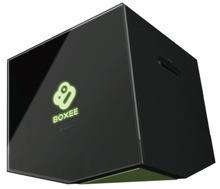 Boxee Box Officially Detailed[teaser]D-Link has spilled all the information you could possibly want on the Boxee Box, as long as you don’t want to know when it comes out or an exact price. [/teaser] We don’t know when it’s coming out, and all D-Link is saying price wise is “below $200.” We do know that it’s coming with a very simple remote that hides a full QWERTY keyboard behind it. And while there are still a few pieces of information missing, we expect those details to be revealed in the next few days. First and foremost, the Boxee Box plays back just about any media file you can think of. The list of compatible audio files – MP3, WMA, WAV, AIFF,FLAC,AAC, DTS, Dolby Digital, Ogg Vorbis – is robust, but not entirely unexpected. It’s in the video files that we find some excitement. The Boxee Box will play back the usuals, like WMV, AVI and MPEGs 1,2 and 4. It’ll also tackle some of the less common files, like VOB, PCM, Divx, Xvid, MKV, MOV, and Flash 10.1. This is a device obviously catering to the web savvy. It’s got built in access to Pandora, last.fm, flickr, Picasa and Facebook. It’s got Hulu, albeit through a web emulation, rather than a direct stream. There’s no word yet on Netflix support, but you can be sure Boxee wants it in there. Source: BoxeePosted Wed Jan 6, 2010 at 11:15 AM PST by:
 -
 Sony Picks up a Piece of Sharp’s New LCD Plant[teaser]In a not entirely surprising move, Sony has acquired a stake of Sharp’s new LCD plant in Sakai. [/teaser] Manufacturing plants aren’t cheap, and it’s not too uncommon for companies to buy shares in their competitor’s plants when the products being made are similar enough. In this case, the products are LCD panels, and the companies involved are Sharp and Sony. According to the Asashi newspaper of Japan, Sony has invested just over a hundred million dollars in the plant. The return they’ll be seeing is seven percent of the panels made in the plant. According to reports, Sony plans to increase their share gradually. In the end, according to the Asashi newspaper, Sony is planning to raise their investment – thereby raising their return – to 34 percent by April of 2011. Other investors are expected to be involved in the near future. The new Sharp facility is a 10g facility, which means that it is capable of utilizing enormous glass substrates. Each substrate can be made into six 60 inch LCD panels. The current production estimates for the plant range at about 72,000 panels a month. Of those 72,000 panels, Sony will currently get around 5,400. Source: BloombergPosted Tue Jan 5, 2010 at 08:00 AM PST by: